Tayda UV Printing

Does anyone have any tips / notes for Tayda's custom enclosure drilling for non standard pedalpcb templates? The drill design tool looks intuitive enough but wanna make sure it comes out right. I've been sitting on finished hyped fuzz and carcass fuzz boards procrastinating on figuring this out

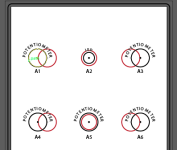
You could use these coordinates but change the hole sizes, it looks right to me but not 100% sure.
 
Is there a good resource for Exporting Layers correctly in Affinity Designer? The first design I did and exported to .PDF keep the layer heirachy, my second design however no matter which export profile I try keeps throwing the other two layer (Colour & Gloss-V) into the White Layer...Headscratching
I think I've figured out what the issue is when exporting layers....

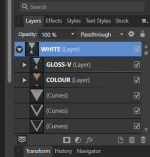
I found I slightly had some shapes going outside of the canvas area. When exporting it was causing 2 of the layers to move into the 3rd layer.
Layers incorrect.png

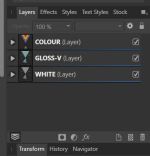
Once I tidied up to ensure nothing was going outside the frame, it exported correctly! Been bugging me all day. I can sleep now.
Layers correct.png

Hope this helps anyone else having issues with exporting layers in Affinity Design.
 
If you could share this that would rule. I want to get some drilled for the Ionizer which would I think be the top left, top right, and bottom middle of your template there. Just a two knob w an LED.
SIDESIZEX posY pos
B9.7-15.25.75
B8.10-4.4
B9.715.25.75
A7.2-16.538.1
A7.216.538.1
A7.2-16.512.7
A7.216.512.7
A6.55012.7
A*LED
adjust to taste
038.1
A12.20-45
There you go. Hole sizes already have the 0.2 mm added for powder coat
You'll want to adjust the LED hole, and the DC jack (B - 8.1mm) depending on what you're using, 8,1 are for the slim/thinline DC jack
 
I think I've figured out what the issue is when exporting layers....

I found I slightly had some shapes going outside of the canvas area. When exporting it was causing 2 of the layers to move into the 3rd layer.
View attachment 10736

Once I tidied up to ensure nothing was going outside the frame, it exported correctly! Been bugging me all day. I can sleep now.
View attachment 10737

Hope this helps anyone else having issues with exporting layers in Affinity Design.
The issue is when that file is imported into Adobe Illustrator, it collapses all the layers to a single layer. Exporting and importing back into Affinity seemingly works fine. It’s just when it’s exported from Affinity and opened in Illustrator that it has that layer issue. And by all accounts, Illustrator is what Tayda is using to open and interpret the file for printing.
 
The issue is when that file is imported into Adobe Illustrator, it collapses all the layers to a single layer. Exporting and importing back into Affinity seemingly works fine. It’s just when it’s exported from Affinity and opened in Illustrator that it has that layer issue. And by all accounts, Illustrator is what Tayda is using to open and interpret the file for printing.

Hhmmm . . . . so does Tayda want to see an AI file or a PDF?
 
Hhmmm . . . . so does Tayda want to see an AI file or a PDF?
PDF is fine, but how Affinity encodes a PDF and how Illustrator encodes a PDF ends up with different results. Illustrator encodes the PDF with layers that can be recognized and opened in both Illustrator and Affinity. Affinity encodes a PDF with layers that are only recognized in Affinity. If you open it in Illustrator all of the layers are combined into a single layer.
 
PDF is fine, but how Affinity encodes a PDF and how Illustrator encodes a PDF ends up with different results. Illustrator encodes the PDF with layers that can be recognized and opened in both Illustrator and Affinity. Affinity encodes a PDF with layers that are only recognized in Affinity. If you open it in Illustrator all of the layers are combined into a single layer.

VERY interesting.

I live in Illustrator - new tools are cool, but I think I'll stick to what I know.

Thx!
 
And by all accounts, Illustrator is what Tayda is using to open and interpret the file for printing.

I could be wrong, but I believe they're opening the file with Roland VersaWorks.

Unfortunately without a hardware dongle (which is a $30000 UV printer) we can't run the software to see how it behaves. :cautious:
 
VERY interesting.

I live in Illustrator - new tools are cool, but I think I'll stick to what I know.

Thx!
I also live in illustrator, but I did pick up Affinity with plans to eventually transistion to it, I love illustrator, but headed towards retirement their subscription model isn't going to work for me
 
I could be wrong, but I believe they're opening the file with Roland VersaWorks.

Unfortunately without a hardware dongle (which is a $30000 UV printer) we can't run the software to see how it behaves. :cautious:
Yeah that’s the worst part (not knowing how it behaves). But Hugo did tell me that if they see an issue with a file they open it in Illustrator to check it out. Looks like if we create the layers in Affinity we are hosed on both fronts.
 
Does anyone have the drill measurements for the vhs, the vcr clone? I usually measure the pcb but i was hoping to get the tayda order before it arrives.

Cheers.
 
Does anyone have the drill measurements for the vhs, the vcr clone? I usually measure the pcb but i was hoping to get the tayda order before it arrives.

Cheers.
You could either open the drill guide in Illustrator and the like, and measure from there, or print it out and measure on the sheet.
 
You could either open the drill guide in Illustrator and the like, and measure from there, or print it out and measure on the sheet.

Piggy backing off of this, which took me forever to figure out, is if you layout a drill layout like this in Illustrator, you won't need math to get the tayda from-center measurements although some positive and negatives will be reversed, which is easy enough to fix in the upload tool. The math isn't hard but it's definitely something I know I'd get wrong without triple checking.

edit:

see @jcrhee and @SYLV9ST9R's methods instead
 
Last edited:
Piggy backing off of this, which took me forever to figure out, is if you layout a drill layout like this in Illustrator, you won't need math to get the tayda from-center measurements although some positive and negatives will be reversed, which is easy enough to fix in the upload tool. The math isn't hard but it's definitely something I know I'd get wrong without triple checking.

View attachment 10786
Or you could just line the ruler to zero out at the center instead of the default upper left corner. This can be done in Illustrator and Affinity designer by clicking and dragging from the ruler's intersection onto the center.

 
Back
Top