Tayda UV Printing

Or you could just line the ruler to zero out at the center instead of the default upper left corner. This can be done in Illustrator and Affinity designer by clicking and dragging from the ruler's intersection onto the center.

Yep, that's the way to do it. Make artboard center mark visible and drag the zero point to it.
 
Or you could just line the ruler to zero out at the center instead of the default upper left corner. This can be done in Illustrator and Affinity designer by clicking and dragging from the ruler's intersection onto the center.


Yup - brilliant.

To make it a little easier you can create a box the same size as the artboard in Tayda's template and use the center of that new box to 'snap to' the center point, provided you have that function, ummm . . . functioning.

Alternately, you can create an anchor point with the pen tool and locate the anchor point at the center of the artboard - the snap-to often works better with actual anchor points vs object centers.
 
Last edited:
Thanks for all the suggestions. I tried both last week and I found there was about a 5mm difference between the measurements from my printout and in illustrator. The printout lines up perfectly with a spare case I have so I assumed I did something wrong somewhere.

I'll give illustrator another go. Cheers.
 
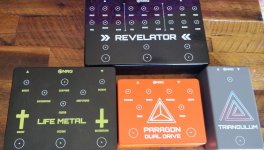
Black on black sand came in the mail today. Hard to get a good picture so I took a quick video. Came out exactly like I was both hoping and imagining. If you've ever seen gloss black printed on matte black paper it is just like that.


The file was setup so that the complete design was on: the white layer, the color layer (in a rich black, I used cmyk 60,40,40,100 - there are plenty of other rich blacks though) and the gloss layer. The gloss pass was varnish, and I paid for two passes of the white layer.
 
Last edited:
Has anyone had success getting a print with a PDF export from Affinity Designer? Taught myself Designer over the last few weeks and just completed a fairly complicated design and am now very hesitant to pull the trigger on the order.
 
Has anyone had success getting a print with a PDF export from Affinity Designer? Taught myself Designer over the last few weeks and just completed a fairly complicated design and am now very hesitant to pull the trigger on the order.
I have but I think I made an error on the white layer with the because I did not make sure the spot color was correct. I have not had a change to try again yet. The pedals I posted here were affinity exports.
 
I have but I think I made an error on the white layer with the because I did not make sure the spot color was correct. I have not had a change to try again yet. The pedals I posted here were affinity exports.
That gives me some hope. I might just have to bite the bullet and experiment. I have a very busy background with like 900+ curves once the image converted to vector. I then had to cut out all of the parts over the top for the white to come through in places etc. It will be a miracle if it comes out correctly.
 
so . . . is Tayda particularly poor at responding to emails?

I am gonna buy 7 boxes from them - 5 will need drilling and printing. I want to pay for combined shipping rather than each set of boxes individually and figured the best way to keep art and drilling specs specific to intention is to put in separate orders. But they won't respond as to whether or not combined shipping is even an option.

Is there a specific point of contact that is better than using their GUI email form?
 
so . . . is Tayda particularly poor at responding to emails?

I am gonna buy 7 boxes from them - 5 will need drilling and printing. I want to pay for combined shipping rather than each set of boxes individually and figured the best way to keep art and drilling specs specific to intention is to put in separate orders. But they won't respond as to whether or not combined shipping is even an option.

Is there a specific point of contact that is better than using their GUI email form?
They're on a week-long holiday break. Also, you can combine all your boxes into a single order. Just specify the SKU to the design. Each color and size have a unique SKU to help differentiate. If they're all the same size and color, they go by quantity. As long as you have the correct quantity for UV and drilling, you'll be fine. On a side note, if the drilling is the same as the PPCB pre-drilled enclosure, save yourself the drilling fee and just select the PPCB pre-drilled enclosure. They will print on top of that.
 
so . . . is Tayda particularly poor at responding to emails?

I am gonna buy 7 boxes from them - 5 will need drilling and printing. I want to pay for combined shipping rather than each set of boxes individually and figured the best way to keep art and drilling specs specific to intention is to put in separate orders. But they won't respond as to whether or not combined shipping is even an option.

Is there a specific point of contact that is better than using their GUI email form?
Yes, they are celebrating the week-long water festival there.

You can email Hugo directly [email protected] . @jcrhee has the score above.
 
Thanks for the input, None of the enclosures uses an existing template, and there are two each of identical sized and colored enclosures with VERY similar art and drill patterns - hence my concern.

I'll reach out to Hugo directly next week - I had no idea there was a festival presently. I truly appreciate the info!
 
  • Like
Reactions: fig
PedalPCB, is the exactly thing I would like to do, but I have to find the right switching mode.
So if somebody have some clue or advice about the modules we can use in a simple way, without arduino, programming, etc. is welcome! ;)
 
This is a great thread. I will probably try to finish some of my long time unfinished projects thanks to this. :D

Has anyone tried to print on "copper hammer" enclosures? Is it even technically possible to UV print on such a rough surface?
 
Back
Top