zachlovescoffee
Active member
Holy turds. I just used Adobe Illustrator to vectorize a Magic the Gathering card and it turned the entire thing into a set of vectors. That's INSANE.



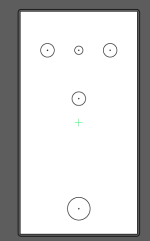
Yes, when I prepare a file for UV printing in Illustrator, I actually copy the PPCB template on the Tayda artboard and center it vertically and horizontally. It lines up great with the predrilled enclosures, and if I'm using the custom drill option, I measure from the illustrator file (but it should basically be the same measurements from center as the PPCB template).Had a quick question about this UV printing. I am attempting to try and do this for the first time but I am confused about the measurements. The template for UV printing is 62mm x 117mm, but the the drill template seems to be more like 66mm x 120mm. How do you measure where the drill holes are going to be on the art file? If you use the same measurements from the center on the UV print file as you use on the drill template, will they match? This is probably the case I just wanted to see if anyone could confirm this. Thanks!

Emboss has been off the menu for 3 or 4 months at least. According to someone in a pedal making discord server I’m in, Hugo told them that they took it off the menu temporarily because it takes a much longer time to print, and they’re too backlogged to have prints that take so much more time. The emboss gloss looks amazing on sand black though, so I hope they bring it back soon.This emboss effect looks super professional.
Is "emboss" an add-on like the gloss layer ($2) you can purchase at checkout? I can't find an emboss option anywhere on Tayda's site! Thanks!
Emboss has been off the menu for 3 or 4 months at least. According to someone in a pedal making discord server I’m in, Hugo told them that they took it off the menu temporarily because it takes a much longer time to print, and they’re too backlogged to have prints that take so much more time. The emboss gloss looks amazing on sand black though, so I hope they bring it back soon.
Wow! June to December is 6 months— Has it really been that long? Year flew byThanks! I was just about to erase my question. I'm reading this entire thread and I just got caught up to June, when the emboss option was removed. Thanks for chiming in. Hopefully, they can bring it back. It's too cool.
I think the only way to do a gradient with uv printing is to do it in halftones.Thanks everyone for your answers I have finally started putting together files for some UV prints. Trying to get a few done before I place my next Tayda order.
I had a few other questions regarding white in adobe illustrator that I could not find answers for in this thread.
If I have a vector of a character with white eyes, what happens if I just use the image as is? Will tayda not print it due to white being inside the color layer? Does white in the color layer get translated by the printer as a different color? or does the white in the color layer get ignored by the printer?
Lets say I have a circle with a gradient that is black on the outside and fades to white on the inside. How would I go about getting something like that printed? do I need to use something other then white if I want to have gradients? or are gradients not really possible with UV printing?
Is there some kind of tool in adobe illustrator that allows you to move all of the white to a different layer? Or is there any easy method to do this?
Thanks everyone! All the designs I saw while reading through this thread were amazing!

I have been putting white in my white and color layer. It makes the white print out stronger.Thanks everyone for your answers I have finally started putting together files for some UV prints. Trying to get a few done before I place my next Tayda order.
I had a few other questions regarding white in adobe illustrator that I could not find answers for in this thread.
If I have a vector of a character with white eyes, what happens if I just use the image as is? Will tayda not print it due to white being inside the color layer? Does white in the color layer get translated by the printer as a different color? or does the white in the color layer get ignored by the printer?
Lets say I have a circle with a gradient that is black on the outside and fades to white on the inside. How would I go about getting something like that printed? do I need to use something other then white if I want to have gradients? or are gradients not really possible with UV printing?
Is there some kind of tool in adobe illustrator that allows you to move all of the white to a different layer? Or is there any easy method to do this?
Thanks everyone! All the designs I saw while reading through this thread were amazing!
For the B/W gradient, not so sure, but for color gradients, I've been experimenting with color ones and the came out great.Thanks everyone for your answers I have finally started putting together files for some UV prints. Trying to get a few done before I place my next Tayda order.
I had a few other questions regarding white in adobe illustrator that I could not find answers for in this thread.
If I have a vector of a character with white eyes, what happens if I just use the image as is? Will tayda not print it due to white being inside the color layer? Does white in the color layer get translated by the printer as a different color? or does the white in the color layer get ignored by the printer?
Lets say I have a circle with a gradient that is black on the outside and fades to white on the inside. How would I go about getting something like that printed? do I need to use something other then white if I want to have gradients? or are gradients not really possible with UV printing?
Is there some kind of tool in adobe illustrator that allows you to move all of the white to a different layer? Or is there any easy method to do this?
Thanks everyone! All the designs I saw while reading through this thread were amazing!
The problem is that the printer that Tayda uses has a limitation on how it prints white. Technically, you could put white in a color layer...but it's not recommended. The reason is that the color printed might not come out as pure white, thus the reason for the white layer.Thanks everyone for your answers I have finally started putting together files for some UV prints. Trying to get a few done before I place my next Tayda order.
I had a few other questions regarding white in adobe illustrator that I could not find answers for in this thread.
If I have a vector of a character with white eyes, what happens if I just use the image as is? Will tayda not print it due to white being inside the color layer? Does white in the color layer get translated by the printer as a different color? or does the white in the color layer get ignored by the printer?
Lets say I have a circle with a gradient that is black on the outside and fades to white on the inside. How would I go about getting something like that printed? do I need to use something other then white if I want to have gradients? or are gradients not really possible with UV printing?
Is there some kind of tool in adobe illustrator that allows you to move all of the white to a different layer? Or is there any easy method to do this?
Thanks everyone! All the designs I saw while reading through this thread were amazing!
Yes indeed. That's what I do.The problem is that the printer that Tayda uses has a limitation on how it prints white. Technically, you could put white in a color layer...but it's not recommended. The reason is that the color printed might not come out as pure white, thus the reason for the white layer.
Like someone else mentioned, you could get around this by making it more of an off-white...but even then you still run the risk of it being too dark and not white enough. The best solution is to punch out the white out of your color layer and transfer it to the white layer with the correct color for the printer to use. It's more time consuming but the result is much better.
Also, if you want white to be REALLY white, Tayda does offer a way to printer white twice.
Yeah, that’s the real rub. I tend to avoid overly complex graphics if I know I’ll be layering them on white. Way too much trouble than it’s worth.Yes indeed. That's what I do.
You're right to mention that this method is definitely the way to go if you want true white, but it can be daunting for people not familiar with vector drawing applications, especially if you have complicated graphics.
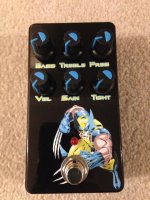
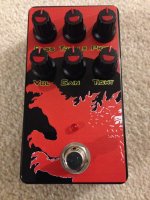
My first UV prints came out way better than I could have hoped for! Super glad I got everything right my first time— big thanks to @SYLV9ST9R for verifying my files to make sure I had my pdf layers arranged correctly!