What’s on *YOUR* workbench?

While there may not be anything to discover, it doesn't much stop me from being compelled to buy something just because it is aesthetically pleasant.

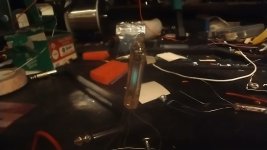
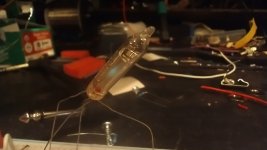
In yet another case of not looking at any measuring scale to know what to expect, I am floored by the size of a Tung-Sol 6977 VFD tube.

I guess I expected the size of a 6418, this is half of that. ( Anyone want any 6418s? I have dozens. You should see what happens if you accidentally send 9 volts up the filament )

Datasheet suggests amplification factor of 30.

No instructions, no build guide, no diy forum threads ( although I'm sure they exist ) just fock around and find out.

View attachment 94179
Curious to see what you do with it, I don't have any experience with "indicator triodes with a fluorescent anode" that were designed to replace neon lamps. There's certainly a level of "a triode is a triode", but that's an obscure one. Hoping for a build thread where we find out this is cooler than we ever imagined.

Also I may be a simpleton, but I don't like dealing with filamentary cathodes.
 
There are no failed experiments, only more data.

I'll look closer at some build threads before typing.

I have a circuit I have adapted to a lot of tubes, based on a document you can find on the Valve Wizard website. It uses pull up grid-leak biasing and results in an effects-friendly clean tube amp. I've used 6111, 6112, 6948 ( favorite ) and a couple of different nuvistor tetrodes with added handling of the screen grid. So that's what I'm going to wire up first.

I get you completely about filamentary cathodes. Mongo no know how to understand the gobbldygook Korg prints on thier application notes regarding a cathode follower. My head still hurts. I see it, I read it, I can do it blindly but that rarely goes well.
 
I don't like those kind of contacts... But they can be rehabilitated.

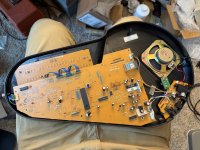
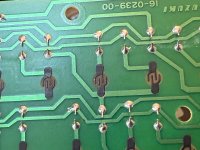
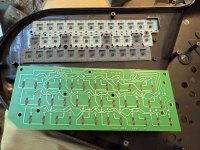
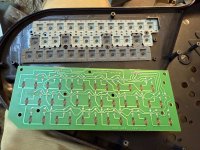
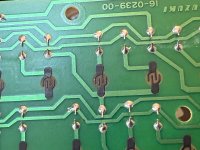
A simple cleaning with IPA didn’t really help. What’s the secret to getting them in working order?

The pads on the silicone keys look alright and are cleaned as well. They now work if I press hard and at an inconsistent angle.

IMG_1837.jpeg
 

Attachments

  • IMG_1836.jpeg
    IMG_1836.jpeg
    409.4 KB · Views: 4
A simple cleaning with IPA didn’t really help. What’s the secret to getting them in working order?

The pads on the silicone keys look alright and are cleaned as well. They now work if I press hard and at an inconsistent angle.
First discern what isn't conducting. The pad on the button/key or the contacts on the PCB.
The footprint on the PCB looks a little worn so I'm guessing both have lost some luster.
There's a ton of diy fixes, up to you to pick. Conductive paint, graphite and modeling glue, silver pen. As for the pad on the button/key, you can get TV remote repair kits that come with conductive pads that you may be a blue to trim down. I've seen Neolube #2 recommended, which seems to be a graphite based lubricant. Won't fix it but will afford more pathway for the pixies to jump across.
If the button/pad is good, I'd try mixing some raw graphite(solder as keyhole lube at hardware stores, near the door knobs and hinges) and isopropyl and brushing it on to the contacts on the PCB, taking care not to bridge the two contacts.
 
First discern what isn't conducting. The pad on the button/key or the contacts on the PCB.
The footprint on the PCB looks a little worn so I'm guessing both have lost some luster.
There's a ton of diy fixes, up to you to pick. Conductive paint, graphite and modeling glue, silver pen. As for the pad on the button/key, you can get TV remote repair kits that come with conductive pads that you may be a blue to trim down. I've seen Neolube #2 recommended, which seems to be a graphite based lubricant. Won't fix it but will afford more pathway for the pixies to jump across.
If the button/pad is good, I'd try mixing some raw graphite(solder as keyhole lube at hardware stores, near the door knobs and hinges) and isopropyl and brushing it on to the contacts on the PCB, taking care not to bridge the two contacts.

Right on, this is great. So basically what’s happening is that the black pad on the key is bridging the 4 fingers on the pad? And the black fingers are conductive and basically completing the circuit when pressed on.

As a frist quick try apply "graphite" by rubbing the contact on the PDB with a soft pencil. Measuring the resistance can also narrow down the problem.

Awesome- thanks!
 
Exactly
So if the pad on the button/key is worn or dirty, or the conductive carbon/graphite is worn on the finger on the PCB, no dice.
Basically 90s remote control tech.
If you have to replace the pad, take care to match the height otherwise the stroke may feel taller/shorter than the others , or worse, always/never make contact.
If you have to go down that road, probably good to do an inspection of the other pads too
 
You can't really replace the PCB contacts, only augment them with more conductive material.
Pencil lead can work as a short term fix but will eventually fail.
I'm sure Google will return many results of instructions and products.
Having a legit product on hand could be beneficial as you'll run across these in drum machines and front panel controls from the 80s and 90s too
 
You can't really replace the PCB contacts, only augment them with more conductive material.
Pencil lead can work as a short term fix but will eventually fail.
I'm sure Google will return many results of instructions and products.
Having a legit product on hand could be beneficial as you'll run across these in drum machines and front panel controls from the 80s and 90s too
Fantastic- thanks for the explanation. Really appreciate it!
 
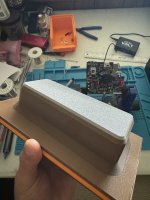
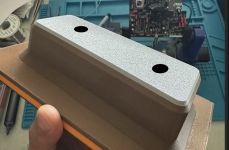
Here is the finished 3d printed male die for punching/stamping enclosures. I’m going to be printing the female die today. Not really sure how they will perform. Temol mentioned deformation of the dies which is the biggest concern. I did account for and print them in a way that the direction of pressure being applied is in its favor. Let’s see what happens!
IMG_3781.jpeg
 
Here is the finished 3d printed male die for punching/stamping enclosures. I’m going to be printing the female die today. Not really sure how they will perform. Temol mentioned deformation of the dies which is the biggest concern. I did account for and print them in a way that the direction of pressure being applied is in its favor. Let’s see what happens!
View attachment 94254
What thickness aluminum are you gonna try this with? What temper designation? Fully annealed?

How many tons of force does that brake put out?

Video please.
 
What thickness aluminum are you gonna try this with? What temper designation? Fully annealed?

How many tons of force does that brake put out?

Video please.
I was planning on using 5052 18ga aluminum. I was thinking of how thick it should be and wanted to go thicker but I’m thinking it will strengthen itself after the forming.

I wasn’t thinking of annealing the aluminum but I was for sure going to with steel lol I will be using oil as well to help reduce heat and friction

I ended using ChatGPT to give me a rough estimate of the tonnage needed. It calculated it to be about 7.8 tons but that was with 1.2mm steel. My press brake can handle up to 25 tons. I’m sure it will be lower with aluminum.

Will absolutely upload a video! Just need to print out the female die and will test right away!
 
I was planning on using 5052 18ga aluminum. I was thinking of how thick it should be and wanted to go thicker but I’m thinking it will strengthen itself after the forming.

I wasn’t thinking of annealing the aluminum but I was for sure going to with steel lol I will be using oil as well to help reduce heat and friction

I ended using ChatGPT to give me a rough estimate of the tonnage needed. It calculated it to be about 7.8 tons but that was with 1.2mm steel. My press brake can handle up to 25 tons. I’m sure it will be lower with aluminum.

Will absolutely upload a video! Just need to print out the female die and will test right away!
I wonder if it would be worth drilling a couple holes through that male die so you could poke rods through to free your workpiece when you're done.
 
I wonder if it would be worth drilling a couple holes through that male die so you could poke rods through to free your workpiece when you're done.
What an amazing idea! I can easily adjust the female file to compensate for that. Definitely doing it now 🤣🤘
 
So I was going to add those same holes but in the female die so I can easily push out the enclosure!

Oh! Ok. I think that makes sense now. I guess I was imagining the female die without a bottom.

I would also maybe suggest you don't align the holes in the two dies. That way if you're pushing through the female die, the aluminum you're pushing against will be backed up by the male die.

If the holes were lined up, you'd dent the aluminum there.

How'd you work out the clearance between the two dies? The aluminum on the sides is going to end up getting thicker, but I have no idea how you would calculate that.
 
Oh! Ok. I think that makes sense now. I guess I was imagining the female die without a bottom.

I would also maybe suggest you don't align the holes in the two dies. That way if you're pushing through the female die, the aluminum you're pushing against will be backed up by the male die.

If the holes were lined up, you'd dent the aluminum there.

How'd you work out the clearance between the two dies? The aluminum on the sides is going to end up getting thicker, but I have no idea how you would calculate that.
So when designing the dies, I started with the male die first in order to get the shape I wanted. I then created the female die by creating a box around the male and subtracting the die portion to get the contour. From there I off set the male die 1.2mm or 1.6mm since I just checked and that’s what I have in aluminum 🙂 in other words you want to offset the die by whatever the material thickness is to compensate for material spacing!

This is the workflow I used but tailored it towards what I wanted to do with it!


Edit:
I also read that when offsetting you should account for it by 1.5 to 2 times the material thickness!
 
Last edited:
Back
Top