Yes, that what I meant by preset, however, I saw somewhere the CMYK settings for the swatch, I don't think you really need the package no ?Just to be sure you know that it's not a CYMK preset, but a specific spot color that you can get from the Roland Swatch package.

You are using an out of date browser. It may not display this or other websites correctly.
You should upgrade or use an alternative browser.
You should upgrade or use an alternative browser.
Tayda UV Printing
- Thread starter dmnCrawler
- Start date
So the Gloss layer is just a size matching square ? What differentiate the varnish vs the matte ? Is it based on the color selected on the layer ?The gloss is if you want a clear top coat on it. You choose either varnish(gloss) or matte. It gives a nice sheen and added protection. You don't have to get the gloss layer though.
OK just saw you posted the tutorial.. I'll go check that out first... sorry if I asked questions answered in your thread...The gloss is if you want a clear top coat on it. You choose either varnish(gloss) or matte. It gives a nice sheen and added protection. You don't have to get the gloss layer though.

SYLV9ST9R
Well-known member
You can have the varnish just over your artwork, or over all the surface, as you prefer. The gloss varnish is that, more shiny, glossy texture, as where the matte varnish has a bit of a duller almost checkered texture.So the Gloss layer is just a size matching square ? What differentiate the varnish vs the matte ? Is it based on the color selected on the layer ?
The UV print has a bit of a grainy texture by itself, I find the gloss varnish really helps to even out the color surface and make them "pop" a bit more.
benny_profane
Well-known member
If you try to emulate the WHITE or GLOSS spot color by substituting the CMYK values, you will end up with a grey print. You must use the (Roland swatch) spot colors and ensure that 'honor spot colors' is enabled when you export the pdf.Yes, that what I meant by preset, however, I saw somewhere the CMYK settings for the swatch, I don't think you really need the package no ?
PangeaDestructor
Active member
I'm trying to figure out what I'm doing wrong on my gloss layer, wondering if anyone else has encountered this. Tayda keeps rejecting my pdfs with a note that says "Your artwork has severe issues. Please contact us using Help Desk section in your Tayda Electronics account."
When I opened a help ticket, here was the response:
Hello,
I looked at our internal notes, it says, your gloss layer, some parts are painted with rdg_gloss but some parts are not, they are just blue but not painted with actual rdg_gloss.Thanks,Hugo
I'm using Inkscape to do the initial layout following the tutorials here, then in Affinity - yeah, I know Hugo doesn't like AF but I don't want to subscribe to Adobe - I'm selecting everything and applying RDG_GLOSS. I've gone back into my Inkscape and made sure that every single element is ungrouped and vectorized, so I'm not understanding how it's possible that some of the items in my gloss layer are the right color swatch, and some are just blue.
When I opened a help ticket, here was the response:
Hello,
I looked at our internal notes, it says, your gloss layer, some parts are painted with rdg_gloss but some parts are not, they are just blue but not painted with actual rdg_gloss.Thanks,Hugo
I'm using Inkscape to do the initial layout following the tutorials here, then in Affinity - yeah, I know Hugo doesn't like AF but I don't want to subscribe to Adobe - I'm selecting everything and applying RDG_GLOSS. I've gone back into my Inkscape and made sure that every single element is ungrouped and vectorized, so I'm not understanding how it's possible that some of the items in my gloss layer are the right color swatch, and some are just blue.

tapatioLORD
New member
Hi, I recently moved over from Affinity to Illustrator. I believe I've got everything covered; CMYK conversion, appropriate artboard size, Roland Swatch spot colour, etc. But being my first one I was hoping someone might be able to eye it over quickly in case there's something silly I missed.
I've used the "high quality print" pdf export preset, but altered to Acrobat 8 Compatibility and enabled top level layers.
Cheers
I've used the "high quality print" pdf export preset, but altered to Acrobat 8 Compatibility and enabled top level layers.
Cheers
Attachments
benny_profane
Well-known member
There are things you can do to enhance the vector image and limit the 'posterized' effect. I think that the image would be fine as-is, though. It's going to be quite small and the printer resolution will limit have fine the detail can be anyway. Take a look at a render of the graphic at the print size. How does it look?
benny_profane
Well-known member
I think the main issue you’re running into is the outlines around the different color blocks. That’s a strange artifact that must be a part of the Corel vectorization. You could try removing the background before tracing. Also, manipulating the color space to reduce the amount of colors and maybe applying a slight Gaussian blur before tracing might help as well. If you try to increase the ‘resolution’ after the trace, I think the amount of work vs payoff would be a wash. Your best bet would be to get a better initial trace.

szukalski
Well-known member
Loved that book series (though I felt it struggled towards the end) and 'Childe Roland' is one of my favourite poems. That should look great!I am going with Roland from the Dark Tower for my Paragon Mini rehouse. I love the Michael Whelan art from the books and landed on the cover image of the Dark Tower VII:
benny_profane
Well-known member
Interesting--that looks a lot better. Were you able to merge them? Or are there layers on top of each other?


Hello,Firstly, thank you to take the time to check my pdf! Appreciate it!
Yeah, I checked all that.
I even do a “union” command to avoid things to get separated, so yeah everything should be ungrouped and vectorized….
I got 3 or 4 alerts “you don’t have anything on the white layer”
A mystery to me…

Just to give you the "end of the story", Tayda ended up printing the enclosure anyway and the white layer didn't print. The gloss layer kinda make it a little better. At the end it wasn't too bad.
On a side note, I got a partial answer but I'm still not getting it right.
On the Affinity forum this was discussed: https://forum.affinity.serif.com/index.php?/topic/146258-multi-layer-pdf-export-problems/
(thanks @Grubb for the link)
As suggested on that forum, I've checked the entire template for things outside of the template and it still got my layers clipped into one when opened with Illustrator (thanks again @Grubb for checking it for me).
Somebody's having the same problem?
Attachments
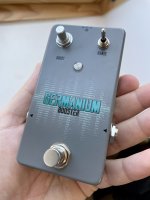

PapaBear
Well-known member
Looks goodHello,
Just to give you the "end of the story", Tayda ended up printing the enclosure anyway and the white layer didn't print. The gloss layer kinda make it a little better. At the end it wasn't too bad.
On a side note, I got a partial answer but I'm still not getting it right.
On the Affinity forum this was discussed: https://forum.affinity.serif.com/index.php?/topic/146258-multi-layer-pdf-export-problems/
(thanks @Grubb for the link)
As suggested on that forum, I've checked the entire template for things outside of the template and it still got my layers clipped into one when opened with Illustrator (thanks again @Grubb for checking it for me).
Somebody's having the same problem?

jeffwhitfield
Well-known member
Hey folks, just submitted a print job to AmplifyFun the other day. Don’t have the prints yet but I will say that the process was good. Also learned that he accepts pretty much any format…including Affinity Designer files. That alone is a win. Plus, you don’t have to hassle with the white layer as much. As long as there‘s a clear separation I think he can work with it.
Tayda has been good to me but…I really want to get out from under Adobe Illustrator.
Tayda has been good to me but…I really want to get out from under Adobe Illustrator.
benny_profane
Well-known member
My understanding is that Spencer will either order tayda enclosures or you can drop ship to him. Last I checked they didn’t offer powder coating services.what is the pricing like for an enclosure? Also how is the enclosure selection and do they powder coat?
jeffwhitfield
Well-known member
Yeah, he will just buy the enclosure of your choice. Costs a bit more to buy them but if you figure the shipping cost in with it, it's more or less the same. Quicker for him just to buy the enclosures. Ended up being like $10 for each enclosure. No biggie.what is the pricing like for an enclosure? Also how is the enclosure selection and do they powder coat?
jeffwhitfield
Well-known member
$8 for 125b. $9 for 1590BB.How much for the actual printing?

Phil hodson
Well-known member
I have just submitted 4 files with Spencer at amplifyfun and wow what a difference. I’m not sure if it will be the same if he gets busy but we had a back and forth conversation for a few weeks while I ironed out some issues I had. He is happy to tell you if it will, or won’t look good and gives you time to change it before he continues.
We worked together and finally got something I think I will be happy with, and that he thinks will look good. All worked from Inkscape in .svg files. He will do the drilling too. And can work off coordinates or a drill template put in a layer of the graphic. So far so good. I’m looking forward to seeing the results!
We worked together and finally got something I think I will be happy with, and that he thinks will look good. All worked from Inkscape in .svg files. He will do the drilling too. And can work off coordinates or a drill template put in a layer of the graphic. So far so good. I’m looking forward to seeing the results!