Tayda UV Printing

This is what I see when I open it with Affinity Designer:

The spot color name is ok (RDG_WHITE), but the CMYK values are not C25% M25% Y25% K25%, but C43% M39% Y39% K2%:

View attachment 54647

But that's all I see. There seems to be no other "problem", or at least nothing I can see at first glance. I have no idea if that's a problem or not. tbh. But I know it's not what they recommend, and it seems that their system is a bit finicky...
Hmm, I don't think that should matter much, but I did notice that when I messed with those values, they change how the spot colour looks (but again, that shouldn't matter since it's a spot colour?). However, what might be the issue is that the grey border on the color layer image (rasterized) also changed color. That is weird. And maybe that could be messing it up?

Sigh, I'll try remaking it again and submitting that if it bounces back again.

Edit: I did actually save an almost complete version so it wasn't too bad. Cleared out the border I mistakenly also rasterized, plus noticed there's an option in the rasterization dialog to "Preserve spot colours", I turned that off too just in case. I didn't mess with the spot colour CMYK values because I don't think that's important.
 

Attachments

Last edited:
Hmm, I don't think that should matter much, but I did notice that when I messed with those values, they change how the spot colour looks (but again, that shouldn't matter since it's a spot colour?). However, what might be the issue is that the grey border on the color layer image (rasterized) also changed color. That is weird. And maybe that could be messing it up?

Sigh, I'll try remaking it again and submitting that if it bounces back again.
I see everything ok. You image is just an image and its content should not be important to the system. Yes, the sport color's content should not be important, and if the system just replace whatever color is named RDG_WHITE with white ink, it should not be a problem which CMYK values you have.

That image border will print as grey, because it's already rasterized and the image is CMYK, so no spot there (iirc, there is a way to use spot colors in raster images, but I think their system may no be capable of using that).

I have no idea why their system is reporting problems, but as said, it's a finicky system... I hope you can solve the problem soon.
 
I see everything ok. You image is just an image and its content should not be important to the system. Yes, the sport color's content should not be important, and if the system just replace whatever color is named RDG_WHITE with white ink, it should not be a problem which CMYK values you have.

That image border will print as grey, because it's already rasterized and the image is CMYK, so no spot there (iirc, there is a way to use spot colors in raster images, but I think their system may no be capable of using that).

I have no idea why their system is reporting problems, but as said, it's a finicky system... I hope you can solve the problem soon.
I'm fairly sure it's because the spot colour was used in the raster image. That shouldn't have happened, if it comes back I'll resubmit the fixed version. Or maybe they can print it by just ignoring that one spot colour.
 
I have had good luck both drilling and enlarging holes with a step drill bit – it may not be the nicest one in the world but I have a fairly inexpensive one from Amazon (maybe $10 – $15?) that has held up well, so long as you use WD-40 or some other cutting lubricant on it while drilling. I also bought a complete set of them with a case for maybe around $20 on Amazon but I don’t use them as much because I can accomplish most of what I need with a single step drill bit that runs from 2 mm to 12 mm.

But for enlarging existing holes by only a millimeter or two, I just find that a hand reamer tool (also maybe $10 on Amazon) works just great, and really allows you to enlarge the hole very precisely, rather than by whole millimeter increments as a step drill bit might require you to do.

Mike
Hot tip on cutting lubricants - pre-pedal building, WD40 was always my go-to cutting fluid for aluminum, but for a surface that will be painted later the residue can be a problem. I switched to using isopropyl alcohol for all my enclosure drilling, and it's really nice. It keeps the bit cool and keeps aluminum from building up on the cutting edges, and there's no mess to deal with.
 
Hot tip on cutting lubricants - pre-pedal building, WD40 was always my go-to cutting fluid for aluminum, but for a surface that will be painted later the residue can be a problem. I switched to using isopropyl alcohol for all my enclosure drilling, and it's really nice. It keeps the bit cool and keeps aluminum from building up on the cutting edges, and there's no mess to deal with.
Hey, thanks for the tip. I actually have to drill a lot of holes in an enclosure today or tomorrow so I will try the isopropyl alcohol to see how it works for me. Much appreciated!

Mike
 
Hot tip on cutting lubricants - pre-pedal building, WD40 was always my go-to cutting fluid for aluminum, but for a surface that will be painted later the residue can be a problem. I switched to using isopropyl alcohol for all my enclosure drilling, and it's really nice. It keeps the bit cool and keeps aluminum from building up on the cutting edges, and there's no mess to deal with.

When I try it:

giphy.gif
 
FWIW the print went through once I fixed that spot color issue. It's a bit annoying since it got delayed by almost a week because of that, or at least a few days if I had fixed it instantly if the error message was more clear - but to be fair, the original mistake was by me when I messed up with that spot color. Now I'm just hoping they look ok since this is the first time I'm printing raster images.
 
They seem to be pretty backed up right now. 8 days in for 3 orders and only drilling’s done.
They definitely are. I place an drill/UV order on the 17th that shipped today 11 days later. That's actually faster than my previous order which took 15 days. So maybe they're catching up a bit...
 
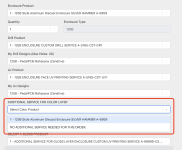
Have any of you printed on one of the "hammer" finish enclosures? I placed an order and am now configuring my job, and I see an unexpected option in the Additional Service for Color Layer dropdown:

Screenshot 2023-09-10 at 12.21.39.png

I'm accustomed to choosing the "No Additional Service Needed..." option here, but this is also my first time printing on a hammer finish so I'm not sure if it's special in some way.
 
What options are proposed when you select your enclosure ?
Is the double white under those options ?
I only see the "1 - 125B Style Aluminum Diecast Enclosure SILVER HAMMER" option in the enclosure list (I had already set up the jobs for the other pedals in my order — previously they appeared here too but they seem to disappear once you create a job for them). I don't see double white as an option anywhere. I think I would have had to have purchased that option when I placed my order (which I did not do because it hasn't been necessary thus far).
 
I don't remember exactly but I thought every options had a menu but you would get nothing available if you did not buy that option.
I've never bought an hammered enclosure so not sure what to be expected.
Still wondering if some new options appear if you select your enclosure.
 
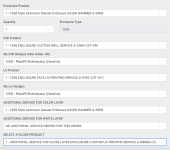
Oh, I might have misunderstood your previous message @Nic. I thought you were referring to the first dropdown on the page, but maybe you were suggesting that I select my enclosure in the Additional Service for Color Layer dropdown? I just tried that and nothing else appeared on the page.

1694383344680.png
 
Oh! I get it, it's weird, but yeah you basically tell that there is a color layer to be printed ! That's how you want it I would think. Funny I ordered one two days ago (no hammered finish) but since I had only one enclosure, I just select every options where there is somethong available. If you did not purchase, you can only select : no additiobnal...
 
Yeah, the strange thing is that none of the other 9 pedals in the order appeared under that Additional Service for Color Layer dropdown, so I just chose the "No additional service..." option like I always had in the past when I set up their respective projects. But it seems wrong to leave this option "dangling" and not assigned to any project, so maybe I should just select it here and hope for the best. 😅
 
I've had a print on a hammered copper one, I don't remember any extra options then. I have noticed that "extra options for color layer", but I haven't found any extra options on the site. AFAIK that configuration part works so that you pick things from your order, so if nothing shows up, it's because you didn't order any "extra options for color layer". But like I said, I don't think there are any. Maybe it was put in place in case they want to do metallic colors in the future or something like that?
 
Back
Top