Ever had a JLCPCB manufacturing defect?

MattG

Well-known member
So tonight I finished up a pedal based on a PCB of my own design. And when I powered it on... nothing! After some debugging, I found that one of the signal nets was shorted to ground. I narrowed it down to what I assumed were three possibly bad components. Fortunately, this part of the circuit is optional (it's a RF filter I wanted to test out). So I bypassed those components with a jumper wire, and it worked.

What I thought was interesting was, even after removing the suspect components, the net they shared (i.e. leads connected by the same trace) still showed continuity to ground.

So I got one of the bare PCBs and checked - same issue! In fact, all four of the unpopulated PCBs have the same issue - a net that should not have continuity to ground is in fact shorted to ground.

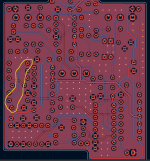
Here's a picture of the PCB with only the copper layers visible. This is a two layer board, with top (red) and bottom (blue) ground planes. The net I circled in yellow is the one that's shorted to ground. Kicad would throw a DRC error if I short two distinct grounds. And just now, I dropped a ground via on that trace, ran the DRC, and it indeed throws an error.

So this leads me to believe that either (1) the Gerbers Kicad generated are bad, or (2) JLCPCB had a manufacturing error.

Anyone ever experienced anything like this? @Robert, I believe you've ordered a lot of PCBs from JLC, has something like this ever happened to you?

Any further way I can be sure if it's a fabrication issue or a Kicad software issue?

churl_of_toan_pcb_20260220.png
 
Is it possible that you dragged one of those components a tiny bit, and generated your gerbers before running a zone refill?
If you move a component just a little bit, it's easy to drag it into a ground plane fill. (ask me how I know).
The default when you run DRC is to fill zones first, so if yougo back and run DRC now it probably looks fine. (ask me how I know)

JLC should still have the gerbers that you uploaded so you might be able to see if there's an overlap somewhere in the files
they used -- it should be easier to spot since you know right where the defect is.
I think you can get to the gerbers from the order history page by clicking on the little photo of your board, there's a tab
for 'layers'.
 
Is it possible that you dragged one of those components a tiny bit, and generated your gerbers before running a zone refill?
If you move a component just a little bit, it's easy to drag it into a ground plane fill. (ask me how I know).
The default when you run DRC is to fill zones first, so if yougo back and run DRC now it probably looks fine. (ask me how I know)

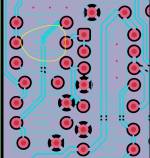
I've made that mistake before (submitted Gerbers with zones not filled properly), so ever since I refill zones like it's my job. But you're exactly right, I somehow managed to generate those Gerbers with non-refilled zones. I actually loaded up the same gerber zip file I sent to JLC directly in Kicad, and it's plain as day!

The funny thing is - I also managed to swap the position of two pots, so even before this issue, I was planning on a board revision.

churl_of_toan_gerber_20260220.png
 
b b b b b b b b b b

I dunno what you use to generate the gerbers, but the Bouni tools have a plugin that works very well which you
can configure to force-fill zones before export. Of course that doesn't help if you fill the zones and cause some kind
of DRC problem, but at least it's something. It'd be nice to have a plugin that filled zones, and also forced a DRC
run and that all errors are cleared or acknowledged.

I should add this to my pitfalls doc :-)
 
I've done this exact thing more than I care to mention. Last time, though, Jlcpcb sent me an email notifying me of the error! I always go the cheapest route, with no "in-house inspection", so not sure why a tiny fill layer issue caught attention. In the past, they have completely ignored such small issues on my boards..
 
Anyone ever experienced anything like this? @Robert, I believe you've ordered a lot of PCBs from JLC, has something like this ever happened to you?

It's extremely rare, but I have had a few manufacturing defects over the years.

Never anything that affected an entire batch of PCBs unless "someone" made a mistake.... which usually means me.

There have been a couple occasions where engineers at the fabricator (I can't recall if it was JLCPCB or someone else) decided to make some adjustments to my design and caused an issue but it has been years since this happened.


Every now and then they have contacted me wanting to move or add mousebites / tabs to one of my panels for added stability but recently they have started giving me the option to go ahead as submitted with the caveat that any breakage would just be my loss and I would have to accept the shortage. So far, no issues.

For example, they always want to add a breaktab at the red X to make the board more stable... absolutely not.

That's way too close to the I/O pads, and it makes it harder to break the boards out by hand.

1771744038589.png
 
It's extremely rare, but I have had a few manufacturing defects over the years.

Never anything that affected an entire batch of PCBs unless "someone" made a mistake.... which usually means me.

There have been a couple occasions where engineers at the fabricator (I can't recall if it was JLCPCB or someone else) decided to make some adjustments to my design and caused an issue but it has been years since this happened.


Every now and then they have contacted me wanting to move or add mousebites / tabs to one of my panels for added stability but recently they have started giving me the option to go ahead as submitted with the caveat that any breakage would just be my loss and I would have to accept the shortage. So far, no issues.

For example, they always want to add a breaktab at the red X to make the board more stable... absolutely not.

That's way too close to the I/O pads, and it makes it harder to break the boards out by hand.

View attachment 111940

I've had one PedalPCB board with a trace fault - from memory it was a Parentheses board, and I'm fairly sure it was something like the buffer not being connected to the octave input (which was VERY obvious once I got it built). I could physically see the trace between the two components but there was no connectivity, so I just ran a wire between them and everything was good.

Do JLC have a fit every time you have a daughterboard on a single board too? I just spent 3 days fighting with them over it as they wanted to charge me 500% of the original board cost to include a daughterboard which sat within the original board outline :ROFLMAO:
 
Do JLC have a fit every time you have a daughterboard on a single board too? I just spent 3 days fighting with them over it as they wanted to charge me 500% of the original board cost to include a daughterboard which sat within the original board outline :ROFLMAO:

Never had any issues with that, but I always specify that there is more than one design in the file. There is a surcharge for panels. It doesn't make a huge impact on large quantities but it's probably significant on quantities of 5 - 10.


1771804063570.png

PCB fabricators consider any differences to be a separate design except for duplicates separated by a V-Cut, but there can't be any differences between the portions that are separated by the V-cut. Silkscreen, shape, anything different and it's considered multiple designs.

Even a line of drill holes (like a perforation) qualifies a design as "multiple".

I will give them credit where credit is due. They have never considered the surrounding retainer (like the outline board in the picture above) an additional design. Technically that is three designs since it is three pieces connected by break-tabs, but I always specify two and they accept that.
 
Last edited:
Never had any issues with that, but I always specify that there is more than one design in the file. There is a surcharge for panels. It doesn't make a huge impact on large quantities but it's probably significant on quantities of 5 - 10.


View attachment 112003

PCB fabricators consider any differences to be a separate design except for duplicates separated by a V-Cut, but there can't be any differences between the portions that are separated by the V-cut. Silkscreen, shape, anything different and it's considered multiple designs.

Even a line of drill holes (like a perforation) qualifies a design as "multiple".

I will give them credit where credit is due. They have never considered the surrounding retainer (like the outline board in the picture above) an additional design. Technically that is three designs since it is three pieces connected by break-tabs, but I always specify two and they accept that.
I couldn't find it originally on their website, but was originally told that as long as the sections aren't electrically connected they're a separate design. Spent a little time back and forth on whether this was right or not after I found their own guidelines, and they eventually just said that if there was any way to 'easily' separate the boards it would be different designs - I just left a gap that I can machine the two apart on my CNC with and all was good.

Funnily enough when I reuploaded the modified files I fucked up and accidentally submitted the original one again (with slots/mousebites) and it got immediately approved :ROFLMAO:
 
Yes my understanding is that if you cut them yourself it's a single design.

Years ago I got a batch of PCBs that hadn't been V-cut. I didn't have a way to cut them cleanly myself, and when I contacted support they basically gave me a "What do you want us to do about it?" type of response. I just trashed them and moved on.

This wasn't JLCPCB.
 
Back
Top