
You are using an out of date browser. It may not display this or other websites correctly.
You should upgrade or use an alternative browser.
You should upgrade or use an alternative browser.
Tayda UV Printing
- Thread starter dmnCrawler
- Start date

ErickPulido
Active member
quick question did you upload AI file or PDF?
I was ordering through email but I got a response saying next time upload here etc..
I was sending AI, PDF and EPS files all the time and I asked several times with no answer which file worked for them hence my doubt
I was ordering through email but I got a response saying next time upload here etc..
I was sending AI, PDF and EPS files all the time and I asked several times with no answer which file worked for them hence my doubt

dmnCrawler
Well-known member
PDF prepared according to their instructions with help and guidance from Sylv9st9r.

BurntFingers
Well-known member
quick question did you upload AI file or PDF?
I was ordering through email but I got a response saying next time upload here etc..
I was sending AI, PDF and EPS files all the time and I asked several times with no answer which file worked for them hence my doubt
These days you send a PDF and get what you get. The ai file was to fix fuckups in people's files, such as not putting whites on the same layer etc, or not using their swatches to select white.
Understandably so, they can't be expected to verify everyone's files and I think they were surprised at the amount of business they'd be getting.
So.
Grab the datasheet from the enclosure you're looking at, if it's predrilled then whack that pdf in illustrator but set the canvas size to the print area (62x117mm for a 125b) as they can't print all the way to the edges.
Then download the roland versa swatch somewhere on the website (only relevant for any white ink or gloss overlays you intend to apply, otherwise the standard illustrator swatch will do) and use that for any white or gloss areas of the artwork.
Then design away.
If printing light on dark you need a white duplicate underneath the colour section so you're basically printing the same thing twice, once in white then once again with colour on top.
Dark on light is no drama.
300 dpi, cmyk, delete anything unnecessary such as their template, hardware mockups, and 100% ensure everything is vectorised (text - create outlines) because actual text without being vectored won't be printed and you'll be angry at them when you should be angry at yourself. Then export as a PDF.
Then enjoy.



mjh36
Well-known member
I was hoping to see how your's turned out wow!! So you ended up using Inkscape right? Sorry tech-slow here, but do I have it right that you download Inkscape for free, download that color swatch, design it per their instructions, send off in PDF? Because this changes the game for me, I don't have Illustrator and I want to evolve from stickers.PDF prepared according to their instructions with help and guidance from Sylv9st9r.

SYLV9ST9R
Well-known member
You have to send a pdf with layers, which I don't think Inskape does, or it opens weirdly in IllustratorI was hoping to see how your's turned out wow!! So you ended up using Inkscape right? Sorry tech-slow here, but do I have it right that you download Inkscape for free, download that color swatch, design it per their instructions, send off in PDF? Because this changes the game for me, I don't have Illustrator and I want to evolve from stickers.
SYLV9ST9R
Well-known member
These days you send a PDF and get what you get. The ai file was to fix fuckups in people's files, such as not putting whites on the same layer etc, or not using their swatches to select white.
Understandably so, they can't be expected to verify everyone's files and I think they were surprised at the amount of business they'd be getting.
Exactly!
Great detailed instructions, and great looking pedals!
dmnCrawler
Well-known member
I did the art in inkscape but my PDF does not export in layers. Others help me save the file with the correct swatches and layers. It is on my list of things to do to try to get the correct format to export from inkscape but I feel like it is going to be complicated. For the time being I will have to reply on the kindness of others or start shelling out money to Adobe. Really wish they would create some casual user pricing.I was hoping to see how your's turned out wow!! So you ended up using Inkscape right? Sorry tech-slow here, but do I have it right that you download Inkscape for free, download that color swatch, design it per their instructions, send off in PDF? Because this changes the game for me, I don't have Illustrator and I want to evolve from stickers.
mjh36
Well-known member
Ya I was looking into it last night. I read something about Inkscape doesn't do CMYK? Seems there's a way to export a PDF from Inkscape to some program named Scribus, which you can then change RGB to CMYK export. But I think that still doesn't solve the layers issue.I did the art in inkscape but my PDF does not export in layers. Others help me save the file with the correct swatches and layers. It is on my list of things to do to try to get the correct format to export from inkscape but I feel like it is going to be complicated. For the time being I will have to reply on the kindness of others or start shelling out money to Adobe. Really wish they would create some casual user pricing.
And so Illustrator isn't a program you can buy, but you have to pay $30 monthly for? I miss when you could actually buy software and own it, because that's ridiculous.
BurntFingers
Well-known member
You should still be able to buy earlier versions outright. Or you might be able to wrangle a student price code somewhere. Or there's always, ya know, illicit means.


Danbieranowski
Well-known member
This is what I use and it’s excellent.Check out Affinity Designer.
mjh36
Well-known member
0
Palettes and Swatches
-Use colours and palettes based on all the available colour models
-Automatically create palettes based on document colours
-Import Adobe® Swatch Exchange (.ase) files
Does that mean you can download and use the Roland Swatch that Tayda talks about?
This looks great. I found this on the bottom of the webpage:This is what I use and it’s excellent.
Palettes and Swatches
-Use colours and palettes based on all the available colour models
-Automatically create palettes based on document colours
-Import Adobe® Swatch Exchange (.ase) files
Does that mean you can download and use the Roland Swatch that Tayda talks about?
Danbieranowski
Well-known member
I honestly have no idea. Tayda has changed their requirements in the last few months so I haven’t looked into it in a while. I think you can download a free demo to try it out.0
This looks great. I found this on the bottom of the webpage:
Palettes and Swatches
-Use colours and palettes based on all the available colour models
-Automatically create palettes based on document colours
-Import Adobe® Swatch Exchange (.ase) files
Does that mean you can download and use the Roland Swatch that Tayda talks about?
ErickPulido
Active member
Thank you so much for your detailed reply.These days you send a PDF and get what you get. The ai file was to fix fuckups in people's files, such as not putting whites on the same layer etc, or not using their swatches to select white.
Understandably so, they can't be expected to verify everyone's files and I think they were surprised at the amount of business they'd be getting.
So.
Grab the datasheet from the enclosure you're looking at, if it's predrilled then whack that pdf in illustrator but set the canvas size to the print area (62x117mm for a 125b) as they can't print all the way to the edges.
Then download the roland versa swatch somewhere on the website (only relevant for any white ink or gloss overlays you intend to apply, otherwise the standard illustrator swatch will do) and use that for any white or gloss areas of the artwork.
Then design away.
If printing light on dark you need a white duplicate underneath the colour section so you're basically printing the same thing twice, once in white then once again with colour on top.
Dark on light is no drama.
300 dpi, cmyk, delete anything unnecessary such as their template, hardware mockups, and 100% ensure everything is vectorised (text - create outlines) because actual text without being vectored won't be printed and you'll be angry at them when you should be angry at yourself. Then export as a PDF.
Then enjoy.
View attachment 8284View attachment 8285
I think I did it ok, I sent the files just waiting to see the results.
It is not my first UV print order but the first using their new requirements.
So I don't know if they had to do something to my previous files or not hehe.
best regards
BurntFingers
Well-known member
Thank you so much for your detailed reply.
I think I did it ok, I sent the files just waiting to see the results.
It is not my first UV print order but the first using their new requirements.
So I don't know if they had to do something to my previous files or not hehe.
best regards
No worries, I've had many conversations with Hugo about the whole process and it seems to be making sense.
That's the link for the uploading of art files. If you have another artwork to upload then just hit refresh once it's gone through, hitting back will just take you to the custom drill template.
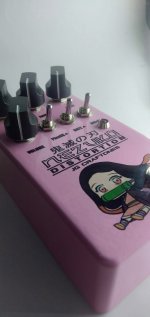
I had this box printed from tayda.
It has white layer on every single print, then the color layer then a Gloss Varnish.
I can Say that their print look's good, I just need to avoid fonts too small or has a little spaces from each other.
I choose Varnish Gloss, but the layer is thick that it looks embossed, which looks great. I will try the Gloss emboss next time to find out how thick it is and if it is
Some details might
It has white layer on every single print, then the color layer then a Gloss Varnish.
I can Say that their print look's good, I just need to avoid fonts too small or has a little spaces from each other.
I choose Varnish Gloss, but the layer is thick that it looks embossed, which looks great. I will try the Gloss emboss next time to find out how thick it is and if it is
Some details might
Attachments
BurntFingers
Well-known member
Very shiny.
I wonder if creating the artwork at 600dpi+ would make it sharper. Sometimes the edges get a bit ragged on mine at 300dpi.
I wonder if creating the artwork at 600dpi+ would make it sharper. Sometimes the edges get a bit ragged on mine at 300dpi.
i will try that next time, I'am new to illustrator so I'am not familiar on how to use the tools.Very shiny.
I wonder if creating the artwork at 600dpi+ would make it sharper. Sometimes the edges get a bit ragged on mine at 300dpi.

Grubb
Well-known member
The designs in here look great, well done everyone. I'm preparing a file for printing, I noticed the instructions on the Tayda website say nothing about Roland swatches, do I still need to do that step?
Another question, if I have my design in the white layer because I want it printed white, but it's black on the screen, is that an issue or not? I'm assuming everything in the white layer is printed white regardless, but I'd like to get that cleared up before committing to the print.
Another question, if I have my design in the white layer because I want it printed white, but it's black on the screen, is that an issue or not? I'm assuming everything in the white layer is printed white regardless, but I'd like to get that cleared up before committing to the print.