Tayda UV Printing

The designs in here look great, well done everyone. I'm preparing a file for printing, I noticed the instructions on the Tayda website say nothing about Roland swatches, do I still need to do that step?

Please double check with someone else because I haven't used the UV service yet, but they do mention it in their instructions:

"1- Create layer named "WHITE" , If you have anything on your artwork that needs to be printed in WHITE, please put that part of your artwork in to this layer. If you don't have anything in white then you can ignore this layer. Everything in WHITE layer must be painted with RDG_WHITE paint using ROLAND SWATCH, NOT normal white paint, it must be RDG_WHITE, when you use this paint whatever you paint will look greyish color instead of white, no worries, printer will still print it white, greyish color is just computer code to tell printer open white ink on those areas. You can import ROLAND SWATCH to your Adobe Illustrator using below link
Once you import it to your AI it will look like below image, you will need to use "RDG_WHITE" paint "
 
The link you had is the "old page", just got the above link through the contextual menu [Hardware]->[Enclosures]->[Enclosure UV Printing Service]
Thanks, that explains the confusion. Hopefully they take the old page down to avoid this problem in the future.
 
Quick question for Affinity Designer users: does converting every object (including texts) to curves satisfy the "vectorize everything" instruction from Tayda? (maybe @benny_profane knows?)
Essentially, yes. When you have a font in a document, it’s tagged with the font information and requires that the same font be installed on any machine opening the document. When you covert text to curves, it’s no longer editable text, but rather vector outlines of the text. You’ll want to convert all objects/text to curves to create a fully vector image.
 
Essentially, yes. When you have a font in a document, it’s tagged with the font information and requires that the same font be installed on any machine opening the document. When you covert text to curves, it’s no longer editable text, but rather vector outlines of the text. You’ll want to convert all objects/text to curves to create a fully vector image.
That's what I thought, thanks for confirming!
 
Hugo from Tayda has removed the incorrect UV printing link now. Many thanks to people on this forum for steering me straight to the updated instructions.
 
Looks like I can't really export a proper layered PDF from Affinity Designer. Did anyone find a proper way to do this without flattening all layers into one?
 
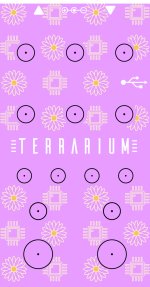
Just to give an example of why the white underlay is needed for the color to show, here's my latest build. I tought I was good with some cream colored graphics on light pink, but it would have needed it. It still shows from some angles, but better put it for good measure.

Edit: I had added a white underlay under the yellow dots. No I did not, I verified my pdf and it seems I did not, so the yellow does appear just by itself, but better safe than sorry.

OG design: Terrarium-A-5815_125B_LIGHT-PINK_alternate.jpg

Print: IMG_6530.jpg IMG_6532.jpg
 
Last edited:
Back
Top