
You are using an out of date browser. It may not display this or other websites correctly.
You should upgrade or use an alternative browser.
You should upgrade or use an alternative browser.
Tayda UV Printing
- Thread starter dmnCrawler
- Start date

finebyfine
Well-known member
On the form to upload my template, it says "No Enclosures Available" under the Enclosure product part. Is this normal? Has anyone else got this? Also, I can't change the selection of Enclosure type from 125B, and there aren't any options for enclosure colors.
It should populate with enclosure products once you enter the order number - there's about a 5-10 minute delay though
It did that for the UV Product, but not the enclosure productIt should populate with enclosure products once you enter the order number - there's about a 5-10 minute delay though
Did you order multiple drill services, one for each enclosure? For example, I ordered three and had to add three drill services to basket.It did that for the UV Product, but not the enclosure product
UPDATE - Enclosures arrived today. They tuned out perfect. Thanks everyone who helped!! As reported, used inkscape into Affinity. Separate layers showed in Adobe reader but not in illustrator. There was a sizing issue that I received and email about, which i fixed. No layer issue though and I used the Roland white and gloss. So stoked! Can't wait to do my dark rift and low tide on the way.
Sorry I was pretty dumb and I forgot to order the enclosure itself. I asked if they could refund my order for the print, which I got the express shipping on, so I can do it again with the enclosure in the same order.Did you order multiple drill services, one for each enclosure? For example, I ordered three and had to add three drill services to basket.
finebyfine
Well-known member
I have a question for you guys. How necessary do you feel the gloss coat is? Would you say the print is fragile and needs it or is it mainly aesthetic to you? Just wondering as only would do Either black or just white.
It depends. The print is kind of fragile - I've scratched off an uncoated drill mark that I misplaced with minimal effort - and the top coats do help. For prints on gloss enclosures - because you can use a gloss clear coat - I personally would still recommend spraying a few layers of a clear coat for a little more peace of mind. I've used satin clear coats on the colored matte enclosures but it dulled the print too much for me to say it's worthwhile. So if you know you're going to clear coat it anyway you don't need it, otherwise I would consider it necessary.

BurntFingers
Well-known member
The print isn't any more fragile than anything else. I've got pedals on my board from when Tayda first started offering UV and they've held up fine with no issues.I have a question for you guys. How necessary do you feel the gloss coat is? Would you say the print is fragile and needs it or is it mainly aesthetic to you? Just wondering as only would do Either black or just white.
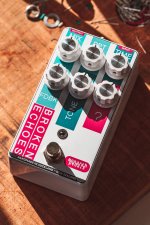
However, I now feel the gloss is necessary because the final product just looks way more professional with it than without it. Colors are deeper, designs pop more and it looks and feels more upmarket. That's worth the $3 or whatever it is.
Here I glossed anything that's the magenta colour and it just leaps off the white. Safe to say I'll be doing it on every design from now on.
finebyfine
Well-known member
I'm so used to the film free decals and how tough they are it's gonna be cool to compare to the first enclosure I get soon. I got the gloss varnish just in case.
They're miles more durable than film decals. Not even comparable.

Danbieranowski
Well-known member
Gave in and subscribed to Illustrator today. It is so frustrating trying to figure this software out after the ease of use in Affinity.
finebyfine
Well-known member
Gave in and subscribed to Illustrator today. It is so frustrating trying to figure this software out after the ease of use in Affinity.
Welcome to the dark side! Adobe sucks ass and their software is annoying as shit but they'll still get money from me every month until I do something else for money.
finebyfine
Well-known member
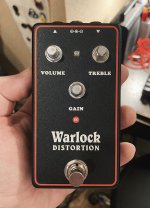
Distracting myself from how frustrated I am that I have no clue why this one isn't working by showing off the enclosure. Two passes of white, one pass of color, gloss varnish on matte black sand.


uranium_jones
Well-known member
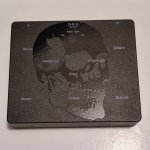
You guys really sold me on the emboss-over-black-sand.


Bricksnbeatles
Member known well
Is that just emboss, or did you print black underneath that?
uranium_jones
Well-known member
Good question. That's only emboss. The purple has a single layer of white underneath it, and the same emboss over it.Is that just emboss, or did you print black underneath that?
Bricksnbeatles
Member known well
Nice! That’s the exact look I’m going for on one of my designs (fully blacked out though) and I wasn’t sure if I should print black underneath, or just print emboss. Looking forward to getting it doneGood question. That's only emboss. The purple has a single layer of white underneath it, and the same emboss over it.
uranium_jones
Well-known member
I do notice a slight unevenness to the emboss, which I'm fine with. Not sure if printing a layer of black first may help smooth it out. Plus, then it's even more black. It's like, how much more black could this be? And the answer is none. None more black.Nice! That’s the exact look I’m going for on one of my designs (fully blacked out though) and I wasn’t sure if I should print black underneath, or just print emboss. Looking forward to getting it done
Danbieranowski
Well-known member
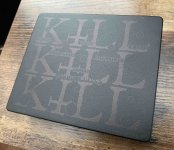
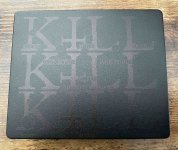
Here's what straight black print looks like on a black sand enclosure (no gloss coat). It's basically just a ghosted image. You can see it more depending on your angle and the light. In this case, this is what my buddy wanted it to look like (matte black print on a matte black sand enclosure). I think it actually looks pretty cool for a true blackout pedal.


finebyfine
Well-known member
Here's what straight black print looks like on a black sand enclosure (no gloss coat). It's basically just a ghosted image. You can see it more depending on your angle and the light. In this case, this is what my buddy wanted it to look like (matte black print on a matte black sand enclosure). I think it actually looks pretty cool for a true blackout pedal.
Is this CMYK 0,0,0,100% or a rich black? Either way I dig the execution

AubreySound
Member
Any word on this?? just checked my PDF export and it's 89.91mm X 115.57mm whereas my document in Affinity is 90mm X 115.48mmI really need to learn how to use Affinity. I currently doing everything in Inkscape and use Affinity for spot colors and pdf conversion.
I am also still working with Hugo on some issues I am still having with affinity and spot color and size. If you check your document size when it is an Affinity file is will be correct, but the conversion to PDF seems to make is slightly larger. I am trying to track that down.
Also. I've just used the Roland Swatch..or do I need to manually input some 'spot' colors??
Thanks!