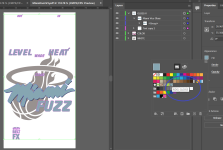
Tayda UV Printing

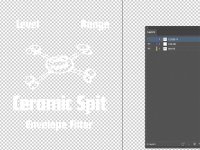
In the cases of the white prints here, that meant deleting the colour and gloss layers.

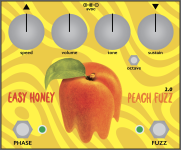
Those look great. The white only on black looks sharp. It's confirming my hunch that the gloss layer probably isn't necessary. x8 pedals, that's $16 saved.

Also, I'm thinking full block of gloss across the entire top sometimes makes it looks worse, especially on the sand texture enclosures.
 
Yeah, I got substantially more than 8 printed though, these are just the boxed up ones so far.

The general uniformity of your pedalboard will be impressive once you put them all together.

Pedalboards start to look haphazard when folks combine mini Mooer pedals next to big box EH pedals, next to sideways pedals (why is the echoplex booster always sideways? Is that a thing?) next to big blue Strymon boxes, etc.. Some of that is unavoidable of course. Until we can fit an Electric Mistress in a 125b, I'll always have a bit o' that.

To save a few dollars, I've skipped: drilling, printing, and now gloss. Next up: gonna skip the paint just for fun. 🙃
 
Are you all sure there is nothing in those layers when you export?

There was something in the gloss layer. Correct. That's what caused my problem.

I consistently send PDFs with unpopulated gloss and white layers with no issues.

Your assessment is accurate, I believe.
To be clear, I originally had a gloss box which I thought they'd simply skip over.
It delayed my order; I had to resubmit without the gloss layer. Or—after reading your comment—depopulating the gloss layer, but leaving it intact would also work. :)
 
Another Tayda UV tip:
A color layer must have something other than white in it, or your UV job will be rejected.

Maybe everyone knows this. But I just found out the dumb way.
Tayda error: Customer submit uv job form saying YES to both for white and color layer has data but actually there is only white layer.

I resubmitted it 3 times with a note that I don't care if the color layer prints because it's a dupe of the white layer. I made slight alterations between submission like merging layers so so all the white was on one single color layer. (I repurposed a black design which I've already successfully printed with Tayda.)

They don't see white on transparent. White is not a color—just like with your inkjet printer.
There was no way to resubmit the job to say "no color layer, just white and gloss, please proceed." Nor could I delete the color layer and have them accept that.

visible-white.jpg

So I added a couple pink elements and re-submitted a 4th time. We'll see if it works.
I know this is boring, but I hope it's helpful.
 
Last edited:
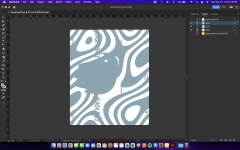
Does anybody know if the artboard goes all the way to the edge of the enclosure, or does it stop before the rounded edges? Also if I have an image and want to round the corners does anybody know the radius of say a 1590xx enclosure? I'm specifically working with this file, which has a gloss layer of a wavy background. The dark yellow I want to print in just gloss so that it's a low-key pattern in the same color of the enclosure that you can only see at certain angles in the light.

Screen Shot 2022-10-20 at 12.33.10 AM.png

Edit: this is what the gloss layer isolated looks like... I cant figure out how to round the corners on this one because it's a group of paths. Anybody know how to save it as a single image/symbol so that a radius can be added to the corners?

Screen Shot 2022-10-23 at 12.42.19 PM.png

Edit 2: I used a clipping mask to radius the corners.
 
Last edited:
Does anybody know if the artboard goes all the way to the edge of the enclosure, or does it stop before the rounded edges? Also if I have an image and want to round the corners does anybody know the radius of say a 1590xx enclosure? I'm specifically working with this file, which has a gloss layer of a wavy background. The dark yellow I want to print in just gloss so that it's a low-key pattern in the same color of the enclosure that you can only see at certain angles in the light.
View attachment 34362
-The artboard goes roughly to the apex of the corner radii
-The radius varies from brand to brand of enclosures, but the ones I most commonly see are 4mm, 3.5mm, and 2.5mm. I might have a Tayda 1590xx somewhere that I can check the radius on.
 
-The artboard goes roughly to the apex of the corner radii
-The radius varies from brand to brand of enclosures, but the ones I most commonly see are 4mm, 3.5mm, and 2.5mm. I might have a Tayda 1590xx somewhere that I can check the radius on.
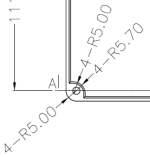
It looks like this could be the radius: 5mm. I'm a little weary though because it is taken from the bottom plate of the enclosure. Datasheet here -> https://www.taydaelectronics.com/datasheets/files/Tayda-A-5161.pdf

Screen Shot 2022-10-23 at 12.56.30 PM.png
 
Is the non-overlapping shapes a suggestion or a hard requirement? I ask because I have something mildly complex and there are some weird artifacts that would be super painful to clean up. There may be overlapping shapes but the shape on the bottom effectively has no size. Visually you don't see anything and there isn't really one color on top of another. All my other UV prints I did with AmplifyFun where this isn't a problem, but I wanted to give Tayda a go this time. I'm just curious if some automated system will reject my design outright, or if it's a YMMV kinda thing. I'm using Inkscape/Scribus so I want want to have someone doublecheck my work since this is my first time jumping through Tayda's hoops.
 
Is the non-overlapping shapes a suggestion or a hard requirement? I ask because I have something mildly complex and there are some weird artifacts that would be super painful to clean up. There may be overlapping shapes but the shape on the bottom effectively has no size. Visually you don't see anything and there isn't really one color on top of another. All my other UV prints I did with AmplifyFun where this isn't a problem, but I wanted to give Tayda a go this time. I'm just curious if some automated system will reject my design outright, or if it's a YMMV kinda thing. I'm using Inkscape/Scribus so I want want to have someone doublecheck my work since this is my first time jumping through Tayda's hoops.
I think it depends. I did have some overlapping on one design where I took the risk and it worked out well:

https://forum.pedalpcb.com/threads/some-cheeky-builds.13831/post-157519
 
I had a thought, but since it looks like you have the PDF open in the screenshot I'm probably wrong, but.... do you by chance have the option to convert spot colors to process colors checked when creating the PDF?
 
I had a thought, but since it looks like you have the PDF open in the screenshot I'm probably wrong, but.... do you by chance have the option to convert spot colors to process colors checked when creating the PDF?
I honestly don't see an option for that anywhere.
 
I honestly don't see an option for that anywhere.

I'm an Inkscape/Scribus user (I have my own pains), so I'm not sure exactly what it might be called. In Affinity Designer the options is something like "honor spot colors" in Scribus it's "Convert spot colors to process colors", I don't know about Illustrator.
 
Back
Top