Good, that's what I thought, but better be sure. I'm looking to try UV printing in the next week.That's depends on how the option is worded. You want to leave the spot colors in place and not convert them.

You are using an out of date browser. It may not display this or other websites correctly.
You should upgrade or use an alternative browser.
You should upgrade or use an alternative browser.
Tayda UV Printing
- Thread starter dmnCrawler
- Start date

UtilityBeltFX
Well-known member
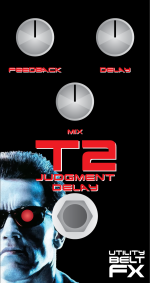
What do you think? Is Tayda gonna tell me to go screw myself? Fully vector'd image...


Mentaltossflycoon
Well-known member
Nice led placement

szukalski
Well-known member
You may have some bleed over the edge of the enclosure.What do you think? Is Tayda gonna tell me to go screw myself? Fully vector'd image...
View attachment 37025
How did you vectorise the image?
UtilityBeltFX
Well-known member
With High Fidelity image trace.You may have some bleed over the edge of the enclosure.
How did you vectorise the image?
vigilante398
Authorized Vendor
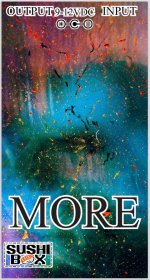
Tayda says that all images should be vectorized, but it doesn't actually seem to matter. I submitted this one a while ago, background is not vectorized, they didn't say anything and went ahead with it, print came out great.


justin23000
Active member
Tayda says that all images should be vectorized, but it doesn't actually seem to matter. I submitted this one a while ago, background is not vectorized, they didn't say anything and went ahead with it, print came out great.
This is true. I think Tayda makes an issue of vectorizing elements for two reasons: 1. Font issues. If we send in files with a bunch of fonts they don’t have installed, there’s issues. and 2. Overall, vectorized images should print better. But there’s a million other factors in good printing. It’s simpler to just say ’send us vector art’… Just theories, of course...
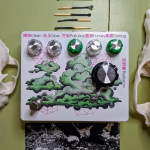
Below example: Fonts are vectorized, or converted to curves or whatever. The background is just a raster image I created in Procreate and sent over to Affinity. Don’t tell Hugo.
UtilityBeltFX
Well-known member
Okay, so you guys think they'll print my T2 pedal? I was scared it had too many colors or something...
vigilante398
Authorized Vendor
I expect they'll still print it, I say go for it. As long as their software can load it I don't think they really care, you just may have to accept that the colors don't always come out the way you expect. I did one a little while ago with a neat gold-ish color that should have printed light-brown (at least it does on my printer), not realizing that they explicitly say no gold colors allowed. They still printed it without saying anything to me, but it came out straight yellow instead of the light brown I expected.Okay, so you guys think they'll print my T2 pedal? I was scared it had too many colors or something...
UtilityBeltFX
Well-known member
I expect they'll still print it, I say go for it. As long as their software can load it I don't think they really care, you just may have to accept that the colors don't always come out the way you expect. I did one a little while ago with a neat gold-ish color that should have printed light-brown (at least it does on my printer), not realizing that they explicitly say no gold colors allowed. They still printed it without saying anything to me, but it came out straight yellow instead of the light brown I expected.
Alright cool, thanks. I'm gonna go for it!
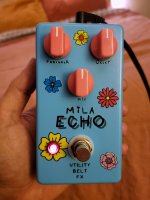
Also check out my first Tayda printed enclosure! My sisters daughter is named Mila Echo so I built a delay for my brother in law!

swyse
Well-known member
i'd consider rounding the image, the corners being square end up looking a little strange sometimes.Alright cool, thanks. I'm gonna go for it!
Also check out my first Tayda printed enclosure! My sisters daughter is named Mila Echo so I built a delay for my brother in law!
View attachment 37149
UtilityBeltFX
Well-known member
i'd consider rounding the image, the corners being square end up looking a little strange sometimes.
View attachment 37151
Aww jeez, you're 12 minutes too late


giovanni
Well-known member
That’s really nice!Alright cool, thanks. I'm gonna go for it!
Also check out my first Tayda printed enclosure! My sisters daughter is named Mila Echo so I built a delay for my brother in law!
View attachment 37149
UtilityBeltFX
Well-known member
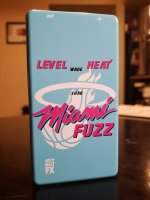
Omg omg omg. It came out great! And tayda is flying right now. Finishing on 11/29. Shipped 11/30. In Los Angeles 12/2!

swyse
Well-known member
that came out great, what was the gloss issue?Omg omg omg. It came out great! And tayda is flying right now. Finishing on 11/29. Shipped 11/30. In Los Angeles 12/2!
View attachment 37222
giovanni
Well-known member
Looking great! Is this non vectorized?Omg omg omg. It came out great! And tayda is flying right now. Finishing on 11/29. Shipped 11/30. In Los Angeles 12/2!
View attachment 37222
UtilityBeltFX
Well-known member
I'm still not positive but I THINK that at one point I created a drop shadow in the gloss layer using the cmyk values of RDG_GLOSS rather than actually selecting that color (which you can't from drop shadow?) Eventually I deleted the gloss layer and started over with drop shadow which i believe corrected the issue.that came out great, what was the gloss issue?
Its fully vectorized but the image i pulled the miami logo from wasn't the highest resolution, so I had to do a lot of manual cleanup. Thankfully it has a brushstroke quality to begin with so I think it looks okay at this size.Looking great! Is this non vectorized?
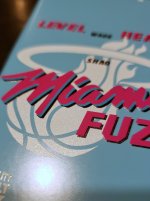
I opted to have all the lettering gloss but leave the basketball logo matte white. It took on an almost metallic sheen which was a pleasant surprise. Kind of resembles the dimples on a basketball.

xefned
Well-known member
View attachment 37236
I opted to have all the lettering gloss but leave the basketball logo matte white. It took on an almost metallic sheen which was a pleasant surprise. Kind of resembles the dimples on a basketball.
Very cool! I'd love to know the secret of how the faux metallic sheen was specified, if you can tell from the original file's difference with the other white halo (or does that have the same effect?)
UtilityBeltFX
Well-known member
I honestly didn't specify anything. It's just RDG_White on their matte blue enclosure! That's it!Very cool! I'd love to know the secret of how the faux metallic sheen was specified, if you can tell from the original file's difference with the other white halo (or does that have the same effect?)