Thank you, it helps to at least confirm my understanding. I wasn't sure how much of a manual process the printing is, but I updated the pdf just in case.You can just to be safe, but I'm pretty sure they would know which side was the top based on the holes drilled.

You are using an out of date browser. It may not display this or other websites correctly.
You should upgrade or use an alternative browser.
You should upgrade or use an alternative browser.
Tayda UV Printing
- Thread starter dmnCrawler
- Start date

Fama
Well-known member
At first I was going to say "but why would they change it manually", but then I realized they probably take the enclosures manually from one machine and put them in the printer, so they would presumably orient them there, and it's not the same machine... but I can't know for sure.You can just to be safe, but I'm pretty sure they would know which side was the top based on the holes drilled.
Just to be sure I oriented my PDF's the same way as the drill template is - I think the Low Tide is also 90 degrees rotated from "normal".
shazbat1966
New member
So the the fuzz factory was pretty out there and I've decided to go back to the drawing board on that design. Just for anyone reading this thread who wants to know if you can work your Tayda printing art out for free using inkscape to draw the art and scribus to adjust colours to cymk and add roland white and gloss spot colours create and export layers all that meets their well defined requirements. I only discovered all this a short while ago and having a lot of time using sketchup 3d drawing for many things I do, i thought I'd have a crack at it. I'm not paying for illustrator, way too expensive for the small use I want it for. I would pay for affinity if I needed to but wanted to see if I could be an absolute cheap bugger and do it for free. Took a bit of persistance to learn the ropes but as you can see from the pics I've added. IT WORKED woohoo. I bit the bullet and ordered these with fingers crossed it would work. The final pdf showed 3 layers white colour and gloss, everything was there. I also was a bit encouraged by Nic's posts showing how it worked for him, so thanks NIC. I've built a new (smaller believe it or not) pedal board which I intend to fill with only pedals I've made and I love transparent overdrives. So a Timmy, cranked ac30 ( j201's, gonna have to solder smds to an adaptor for that one). the scarab silicon fuzz. digital delay and im going to do 2 different versions of the honey. got 1 in white and 1 in metallic champagne.
Anyways thought I'd post this for any other cheap buggers out there
Anyways thought I'd post this for any other cheap buggers out there
Attachments
![20230621_180212[1].jpg](https://pedalpcb-forum.nyc3.digitaloceanspaces.com/data/attachments/50/50865-3d652b4379a1449eaa43712643ba4f09.jpg?hash=PWUrQ3mhRJ)
![20230621_180235[1].jpg](https://pedalpcb-forum.nyc3.digitaloceanspaces.com/data/attachments/50/50866-e5f5c0c5751f9eabca4c0d5b6f0ed13c.jpg?hash=5fXAxXUfnq)
![20230621_180726[1].jpg](https://pedalpcb-forum.nyc3.digitaloceanspaces.com/data/attachments/50/50867-38f310e0916c17f52cceaf4ba9256d34.jpg?hash=OPMQ4JFsF_)
![20230621_180831[1].jpg](https://pedalpcb-forum.nyc3.digitaloceanspaces.com/data/attachments/50/50868-9ae486ca810d20c2281ab7e9c495f493.jpg?hash=muSGyoENIM)
![20230621_180927[1].jpg](https://pedalpcb-forum.nyc3.digitaloceanspaces.com/data/attachments/50/50869-67e55b9780d74c88a23303db7d8b91ef.jpg?hash=Z-Vbl4DXTI)
![20230406_164912[1].jpg](https://pedalpcb-forum.nyc3.digitaloceanspaces.com/data/attachments/50/50870-7cab60b1d8811ca7e97c15fa73eb1ab7.jpg?hash=fKtgsdiBHK)
Fama
Well-known member
Those look great! FYI if you're using PPCB PCB's (or veroboard I guess), you could go with the pre-drilled enclosures, which are not much more expensive than the undrilled ones (maybe like a dollar more or something like that?). I use the drilling service, but that's in the ballpark of 3-4 dollars and you need to make sure your drill template is correct, so if you have a decent drilling setup doing it yourself might be better.So the the fuzz factory was pretty out there and I've decided to go back to the drawing board on that design. Just for anyone reading this thread who wants to know if you can work your Tayda printing art out for free using inkscape to draw the art and scribus to adjust colours to cymk and add roland white and gloss spot colours create and export layers all that meets their well defined requirements. I only discovered all this a short while ago and having a lot of time using sketchup 3d drawing for many things I do, i thought I'd have a crack at it. I'm not paying for illustrator, way too expensive for the small use I want it for. I would pay for affinity if I needed to but wanted to see if I could be an absolute cheap bugger and do it for free. Took a bit of persistance to learn the ropes but as you can see from the pics I've added. IT WORKED woohoo. I bit the bullet and ordered these with fingers crossed it would work. The final pdf showed 3 layers white colour and gloss, everything was there. I also was a bit encouraged by Nic's posts showing how it worked for him, so thanks NIC. I've built a new (smaller believe it or not) pedal board which I intend to fill with only pedals I've made and I love transparent overdrives. So a Timmy, cranked ac30 ( j201's, gonna have to solder smds to an adaptor for that one). the scarab silicon fuzz. digital delay and im going to do 2 different versions of the honey. got 1 in white and 1 in metallic champagne.
Anyways thought I'd post this for any other cheap buggers out there
Also if you really like transparent drives, I can definitely suggest the Mach-1 overdrive, or any other one based on the Lightspeed, that one is great IMO.
shazbat1966
New member
Hey thanks mate. I am thinking about where next after this round and with so many options it gets time consuming. So many thanks for the suggestion. I'll put it on my next list. I can see star wars somehow for the artwork already haha . I'm a real nerd.
I'm using PCB board. I suppose for me it's a lot about having things made from scratch. I did consider the drilling option. It was already a good portion of my budget gone with everything else I ordered from Tayda. And US dollars are close to twice New Zealand. I have also read on some threads ( possibly even earlier posts here about alignment issues). I have noticed on a couple of the pedals I just received the print is a bit off center and I did add a transparent box to the drawings as suggested by Tayda which I presumed was for alignment purposes. I have a reasonable small drill press and it fits my do it yourself motto anyways.
In line with the posts above this I received the goods 7 days after order. Man...that's impressive. the whole order was exact except for one packet of incorrect knobs and it was a decent stock up order. It would seem that the drilling process is a bit of a holdup
I'm using PCB board. I suppose for me it's a lot about having things made from scratch. I did consider the drilling option. It was already a good portion of my budget gone with everything else I ordered from Tayda. And US dollars are close to twice New Zealand. I have also read on some threads ( possibly even earlier posts here about alignment issues). I have noticed on a couple of the pedals I just received the print is a bit off center and I did add a transparent box to the drawings as suggested by Tayda which I presumed was for alignment purposes. I have a reasonable small drill press and it fits my do it yourself motto anyways.
In line with the posts above this I received the goods 7 days after order. Man...that's impressive. the whole order was exact except for one packet of incorrect knobs and it was a decent stock up order. It would seem that the drilling process is a bit of a holdup
Fama
Well-known member
These are the pre-drilled enclosures I meant https://www.taydaelectronics.com/hardware/enclosures/drilled-enclosures-for-pedalpcb.html, they're not much more expensive than the non-drilled ones - alignment is a bit of a pain when designing the graphics, but in my experience as long as I use the same coordinates for the placeholder knobs when designing the art, it's always been pretty spot on. But that means I have to find the drilling template (PPCB store has links to the 3/4/5/6 knob templates in some products with that number of knobs), then open the Tayda drill tool, check the coordinates, and then in Illustrator I center the placeholder knob circle, and use the move tool to move it to the exact correct coordinates. It's a bit of work (and I should really do templates for myself for that), but it has worked without any issues so far.
FWIW my last order from Tayda (no enclosures, of course drilling, painting and printing takes a bunch of time and can have queues) came from Thailand to my local pickup point in around 56 hours with DHL Express from the time of ordering. That is insane. All for what, ~12 euros shipping including taxes?
FWIW my last order from Tayda (no enclosures, of course drilling, painting and printing takes a bunch of time and can have queues) came from Thailand to my local pickup point in around 56 hours with DHL Express from the time of ordering. That is insane. All for what, ~12 euros shipping including taxes?

Bricksnbeatles
Member known well
In the process of punching a metallic gold enclosure for drilling, and the Uv print comes off cleanly with just a touch of my fingernail. Disappointing to say the least, but I ordered it way back in early April so probably too late to complain about it. Just a warning for y’all

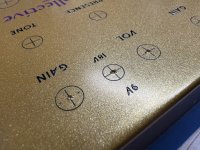
@Bricksnbeatles out of curiosity, was there a gloss layer on your UV print as well? If not, I just wonder if that would've made the print more resistant because otherwise that seems kind of disappointing that it would come off so easily.
Fama
Well-known member
I wonder the same thing, and also whether having such fine lines means they hold up worse? I have quite fine lines around the face of the pedal, as sort of a frame - I've had that break come off in one small part on one pedal, although IIRC I had a plug fall on it, and the end of the plug knocked that off.@Bricksnbeatles out of curiosity, was there a gloss layer on your UV print as well? If not, I just wonder if that would've made the print more resistant because otherwise that seems kind of disappointing that it would come off so easily.
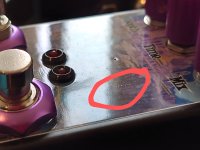
I had an another small mishap with the Gatekeeper build, where I used an old knife to clear the pot holes out of paint (so they could make contact with the enclosure), and the knife slipped and scraped the paint a bit. It's an old and dull knife, but with the flooded paint + flooded gloss, there was barely any mark, and it's very hard to see anything - I had to position the camera just right to get this:
You can also see the small blemish in the powder coat and/or UV printing. That one is more visible if you know what you're looking for, but not too visible either tbh.
Edit: And don't get me wrong, if you have decently priced alternatives in the US, they might be options worth considering. But I'm not aware of anything in the EU that could match Tayda prices - frankly I'm not even aware of any other enclosure UV printing services at all in the EU.
Bricksnbeatles
Member known well
Yeah, so update with the UV on the gold. Has nothing to do with the line thickness, since even thicker stuff came off cleanly with zero effort. That said, the stuff that comes off easily has all been drilling reference marks, which don’t have gloss over them at all. The actual graphics do have gloss, and they seem to be more durable, but of course I’m not going to risk testing that theory because I don’t want to F-up my nice, ready-for-use enclosure. I’ve done stuff in the past on other powder coats that had absolutely no durability issue having no gloss layer (for the sake of contrast between glossy areas and matte areas) so it does seem to be an issue specific to the “metallic gold” powder coat. Once the pedal is built up, I’ll report on the durability of the gloss printing, but my fingers are crossed that it’s just an issue for the non-gloss printing.
Fama
Well-known member
I wonder if it's the powder coat, or could something just have gone wrong with the curing process for the non-gloss ink? I don't know much about UV printing so I guess either is possible.Yeah, so update with the UV on the gold. Has nothing to do with the line thickness, since even thicker stuff came off cleanly with zero effort. That said, the stuff that comes off easily has all been drilling reference marks, which don’t have gloss over them at all. The actual graphics do have gloss, and they seem to be more durable, but of course I’m not going to risk testing that theory because I don’t want to F-up my nice, ready-for-use enclosure. I’ve done stuff in the past on other powder coats that had absolutely no durability issue having no gloss layer (for the sake of contrast between glossy areas and matte areas) so it does seem to be an issue specific to the “metallic gold” powder coat. Once the pedal is built up, I’ll report on the durability of the gloss printing, but my fingers are crossed that it’s just an issue for the non-gloss printing.
Bricksnbeatles
Member known well
I suppose that’s possible, but it was ordered at the same time as over a dozen other enclosures, and based on the timeline in the Tayda tool, they were all printed on the same two days. I would think the problem would exhibit elsewhere too if that was the case.I wonder if it's the powder coat, or could something just have gone wrong with the curing process for the non-gloss ink? I don't know much about UV printing so I guess either is possible.
Worth noting that the “metallic gold” has a very different surface texture from any of the other enclosures I’ve bought from Tayda. It’s sort of an satin/eggshell sheen that’s much shinier than any of the matte colors, and way more matte than any of the glossy colors.
Fama
Well-known member
Do you have any "metallic dark gold" enclosures, are those similar? I've got one of those and it's fine, print durability wise. Or at least I carefully tried scratching some thin parts with my fingernail and nothing happened. I obviously didn't use much force, but still.I suppose that’s possible, but it was ordered at the same time as over a dozen other enclosures, and based on the timeline in the Tayda tool, they were all printed on the same two days. I would think the problem would exhibit elsewhere too if that was the case.
Worth noting that the “metallic gold” has a very different surface texture from any of the other enclosures I’ve bought from Tayda. It’s sort of an satin/eggshell sheen that’s much shinier than any of the matte colors, and way more matte than any of the glossy colors.
Fama
Well-known member
What program did you make them with?Anyone ever had Tayda throw a “cant print gloss because no RDG_Gloss is in the gloss layer”?
I just pulled the files and all the PDFs have RDG_Gloss in there.
In stumped and they are already taking fucking forever to get this job done so I’m looking to resolve.
Files are here if anyone can give me a second set of eyes. Could be my error here as well:
UV Print Files - Google Drive
drive.google.com
Fama
Well-known member
I see, I can't get the pdf to open correctly in Illustrator (all in one layer and no swatches embedded, although this has happened before with pdf's that are fine, I think, so it could be something on my end), nor do I see anything in Scribus (I don't know how to use Scribus though, just installed it quickly to check). In Firefox and Acrobat it shows the layers correctly, but obviously I can't check the spot colors.Corel Draw.
I don't know enough about corel draw to be any help I guess. I've followed tutorials here on inkscape and scribus. Scribus also have an option to convert spot colors I think it must not be checked for rdg_ colors to be seen as such by the printer.I'm not sure. Hugo is saying RDG_White and RDG_Gloss are not showing, which i think may be a function of the color conversion, such that they have the right color components but are not being recognized by the printer.

Passinwind
Well-known member
Just for the white layer, which they never resolved to my satisfaction. Eventually they just printed some goofy white layer that looked nothing like any of my attempted fixes. Those two boxes were still OK for giveaways, barely. I really, really wish they would send out job proofs for approval, as virtually everyone else I deal with does.Anyone ever had Tayda throw a “cant print gloss because no RDG_Gloss is in the gloss layer”?
[/URL]
Passinwind
Well-known member
Your last PDF looked fine in Adobe Acrobat, but I don't have Illustrator so I can't look at it in there, which I assume is what's needed?Using Corel is part of my problem, as their process seems optimized to and geared towards AI.
I’m not learning a new workflow though so hopefully someone can help me troubleshoot this and I can just determine what the best output settings are.

flemming
Well-known member
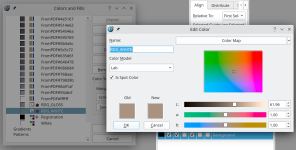
My workflow is a bit of a mess since I use Inkscape/Scribus neither of which can actually re-read the generated PDFs back correctly, but I've done several prints at Tayda with this method, so I know the output is fine. Looking at the files you shared with Scribus, here's what I see:
In 'The Pompeii (Color Test - 125B - UV Standard - Rev. 0002).pdf' the spot colors are there for RDG_GLOSS and RDG_WHITE, but they are using the "Lab" Color Model and not CMYK, which may or may not be problematic. But whatever you did for this file appears to be closer to correct than the others.

When I open 'Monk Buffer (125B - UV Blackout - Rev. 0002).pdf' and 'The Pompeii (125B - UV Standard - Rev. 0002).pdf' I do not see the spot colors at all.
In 'The Pompeii (Color Test - 125B - UV Standard - Rev. 0002).pdf' the spot colors are there for RDG_GLOSS and RDG_WHITE, but they are using the "Lab" Color Model and not CMYK, which may or may not be problematic. But whatever you did for this file appears to be closer to correct than the others.
When I open 'Monk Buffer (125B - UV Blackout - Rev. 0002).pdf' and 'The Pompeii (125B - UV Standard - Rev. 0002).pdf' I do not see the spot colors at all.