Butt Head Pedal Not Working Correctly

Hi All,

So out of the dozen or so PedalPCB projects I've built in past few weeks, all of them are working perfectly, except for the Butt Head pedal. The way that it's not working has me scratching my head, though, so I thought I'd post here and see if anyone has any ideas on where to even start. (Honestly, I'm leaning toward just ordering a new PCB and rebuilding it, but maybe some of you folks have more experience with this sort of issue than I do.)

So the pedal "works," in the sense that the indicator LED is functioning correctly, the bypass mode sounds fine, and the effect clearly "kicks on" when I press the switch. The problem is that it just sounds terrible, and the knob functions are out of whack. Here's the list of issues I'm noting:

1. Volume drops precipitously when engaged. Like, even with the Volume knob up all the way, it's barely at parity.
2. The Grunge knob doesn't introduce any distortion. It sort of just acts like another volume knob, but it gets sort of muffled as it's turned clockwise.
3. The High knob doesn't appear to do much of anything.
4. The Low knob does increase the low end notably, and it also increases the overall volume.

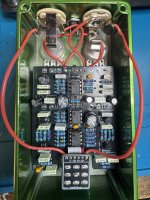
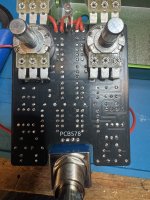
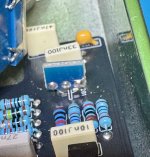
I'm pretty clueless as to what the issue might be. My soldering looks good to me, but here are some pics of the board, in case anyone sees anything I'm missing, either with assembly or components:

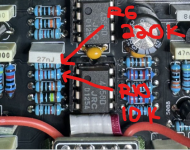
IMG_8465.jpeg IMG_8466.jpeg
It may be that this sort of issue isn't really solvable without hands-on access, but I figured it couldn't hurt to ask. If anyone has any troubleshooting workflow suggestions, or recognizes the issue and its possible cause(s), I'd love to hear it.

Okay, I promise this is my last help request for a bit! :)

Thanks!
 
Last edited:
The audio probe connects to your amplifier. Try a site search here to find examples. It’s very simple to build.

With any audible signal as input, you use it to track back to where the audio stops. In that vicinity lies the problem. Then inspect the board to find the exact problem, whether a cold solder joint, too much or not enough solder and so on.
Thanks for the info! So, just to double-check, I can feed a random tone generator signal from my phone into the pedal for testing with the audio probe?
 
Thanks for the info! So, just to double-check, I can feed a random tone generator signal from my phone into the pedal for testing with the audio probe?
Depending what I’m trying to troubleshoot, I’ve often just played music from my phone. Works fine for finding where the signal dies and a lot less annoying to listen to than a beeeeeeeeeeeep from a tone generator.

If it’s something where you really need to hear what the pedal is doing to a guitar signal, a looper is handy if you’ve got one.
 
Depending what I’m trying to troubleshoot, I’ve often just played music from my phone. Works fine for finding where the signal dies and a lot less annoying to listen to than a beeeeeeeeeeeep from a tone generator.

Plug for the MasFX DIY tower thingie (https://mas-effects.com/tower/), if you're building a lot of pedals this thing is awesome.
It has an add-on for a signal generator which has a dozen or so short guitar and bass loops in different styles, plus the plain beeeeeeep
tones, and an add-on for a speaker to keep things really self-contained on your bench. And it has a built-in audio probe pin.
 
To fully spell it out as well, here is how I would approach it...

I would plug my guitar into my cheap looper, record a basic loop, then move the looper pedal to IN FRONT of this pedal, then I would start the looper. I would then enable the effect and probe starting from the left and work to the right, using these points to check due to ease of finding them. Once you find where something weird is happening you can then start to poke around that specific area. Starting at the IN is a good way to prove the probe is working and I am happy with the volume level of my amp the probe is plugged into (should just sound like clean guitar or whatever sound with the effect "bypassed")

1771380831363.png
 
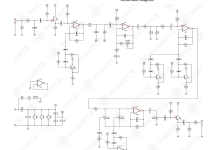
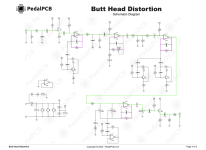
Here's the schematic with the main audio-path outlined in green, and of course you'll find audio elsewhere, such as in the pink boxes and any bits connected to them, op-amp IC3.1 for example will have audio on it.

BUTT HEAD schematic & main audio path.png

So using your audio-probe, follow the signal from the IN along the path and if you got to, say for example C11 and it sounds horrible, but it sounded okay just before that at C8, then you'd start exploring the components around IC1.1: C9, R12, R13, C10 and the GRUNGE pot...
Check them with the audio-probe;
inspect their solder-joints and reflow;
look for damage to the components that may have been missed when populating them;
look for gossamer-strands of solder causing shorts...

[EDIT]
DOH! xconverge beat me to it.
 
Both posts are helpful! Honestly, I have no idea how people figured this stuff out before internet forums existed. At least not in any timely fashion!


For more than a thousand generations of DIY-Padawans,
the JEDIY-Mentors gave guidance, of circuit-knowledge and electronics-wisdom,
within the Old Mentorships.

OBI & LUKE solder-tuter.jpeg

Before the Dark Times, before the Internet-Experts.
 
How people figured it out pre-Web? Trial and (in my case, mainly) error.

The breadboard is your friend here, especially with finicky frustrating Fuzz Faces (just for you, Feral 😎) and other so-called beginner circuits which tripped me up big-time in my early days. Nowadays I breadboard stuff more often than not beforehand to test tweaks and so forth.
What’s my point, you ask?

Big fun when a) things work but bigger when you b) more or less understand why and how they do the marvellous things they do.
 
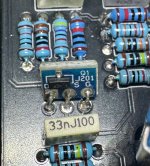
Finally some possible progress! I started working through the circuit following the image @Feral Feline posted, and I got as far as the J201 transistor before hitting an issue. I don't know if it's THE issue, but I got tone through R2 and C2, but when I touch the probe to any of the three leads on the J201, I get no tone at all. (I confess, I'm not 100% sure which lead is which on the J201, which is why I checked all three.) Would the next step be to remove and replace the transistor? Is it possible I've soldered the leads in the wrong order? The soldering looks fine to me as far as I can tell (pics posted below), so I'm not sure what else the issue would be here other than a faulty transistor? IMG_8504 2.jpeg IMG_8505.jpeg
 
Last edited:
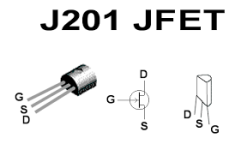
Look at the schematic, you'll see Q1's legs are numbered.
Match the schematic up with this:
J201 PINOUT.png

So ...

1=DRAIN
2=SOURCE
3=GATE


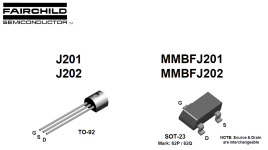
Now take your pinout of the SMD-J201 and see that it matches up with the adapter and in turn to the PCB's silkscreen...


J201 FAIRCHILD PINOUT DATASHEET.png


The catch is, a J201 will probably function normally even if the SOURCE and DRAIN are swapped.

SO ... I'm guessing that maybe the SMD JFET was damaged when soldering it to the adapter board
or
more likely that the solder needs to be reflowed somewhere —
I'd start with reflowing the SMD's solder, then make sure there's continuity through each of its legs to the corresponding pad of the main PCB.
 
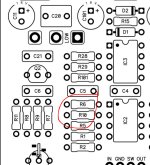
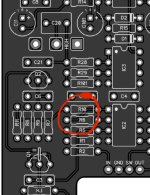
R10 / 10K on top, R6 / 220K on bottom, assuming op has the current version of the PCB.

It's always possible they have a previous revision but the values printed on the PCB itself would be the correct values in either case.
I had swapped them temporarily last week to see if it made a difference, but I put them back when it didn't. They're currently in the correct place according to the silk screening on the PCB itself.
 
Update: I reflowed the solder on the J201 and I'm getting tone from legs 2 and 3 now, as well as tone through C3 and legs 1, 2, and 3 on IC2.1. The tone on leg 1 of IC2.1 is much louder than the previous test points, which I assume means IC2.1 is doing its job. I'm getting good tone from R10 as well, but I'm getting no tone from either leg of C8. Would that be an issue? I'm also not getting noticeable tone from legs 2 and 3 of IC1.1. I am getting tone from leg 1 of IC 1.1, but its volume is lower than the tone coming into the input jack. All pots are turned all the way up. I haven't tested further than IC 1.1 yet. My gut tells me I should poke around in the area of C8 and IC1.1, but I'd welcome any suggestions on what, specifically, to poke at.
 
Last edited:
Keep on keepin' on. Continue to work your way through the circuit.

Reflow C8, then see if that gets you better signal strength through IC1.1, remove the IC and reflow its socket if need be — check for solder-bridges/shorts as you work your way along the signal path...
 
Update: I reflowed the solder on the J201 and I'm getting tone from legs 2 and 3 now, as well as tone through C3 and legs 1, 2, and 3 on IC2.1. The tone on leg 1 of IC2.1 is much louder than the previous test points, which I assume means IC2.1 is doing its job. I'm getting good tone from R10 as well, but I'm getting no tone from either leg of C8. Would that be an issue? I'm also not getting noticeable tone from legs 2 and 3 of IC1.1. I am getting tone from leg 1 of IC 1.1, but its volume is lower than the tone coming into the input jack. All pots are turned all the way up. I haven't tested further than IC 1.1 yet. My gut tells me I should poke around in the area of C8 and IC1.1, but I'd welcome any suggestions on what, specifically, to poke at.
No tone from either leg of C8 (especially the R10 side of the component) seems suspicious if you say R10 is fine, both legs of R10 are fine? I would check continuity between all nodes at that junction (C7, R11, can be used/checked also etc) Also be aware when you are checking, you can check by trying to touch the pad (hard of course with solder on it, but can poke around at different areas of the joint), and you can also check by touching the lead of the component, a bad solder joint
 
Back
Top