Butt Head Pedal Not Working Correctly

Hi All,

So out of the dozen or so PedalPCB projects I've built in past few weeks, all of them are working perfectly, except for the Butt Head pedal. The way that it's not working has me scratching my head, though, so I thought I'd post here and see if anyone has any ideas on where to even start. (Honestly, I'm leaning toward just ordering a new PCB and rebuilding it, but maybe some of you folks have more experience with this sort of issue than I do.)

So the pedal "works," in the sense that the indicator LED is functioning correctly, the bypass mode sounds fine, and the effect clearly "kicks on" when I press the switch. The problem is that it just sounds terrible, and the knob functions are out of whack. Here's the list of issues I'm noting:

1. Volume drops precipitously when engaged. Like, even with the Volume knob up all the way, it's barely at parity.
2. The Grunge knob doesn't introduce any distortion. It sort of just acts like another volume knob, but it gets sort of muffled as it's turned clockwise.
3. The High knob doesn't appear to do much of anything.
4. The Low knob does increase the low end notably, and it also increases the overall volume.

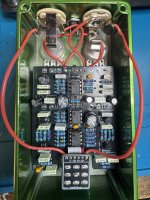
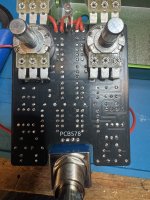
I'm pretty clueless as to what the issue might be. My soldering looks good to me, but here are some pics of the board, in case anyone sees anything I'm missing, either with assembly or components:

IMG_8465.jpeg IMG_8466.jpeg
It may be that this sort of issue isn't really solvable without hands-on access, but I figured it couldn't hurt to ask. If anyone has any troubleshooting workflow suggestions, or recognizes the issue and its possible cause(s), I'd love to hear it.

Okay, I promise this is my last help request for a bit! :)

Thanks!
 
Last edited:
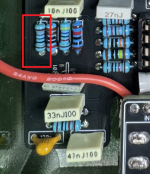
Make sure R7 is 10K, it looks like you might have a 1K installed there.

View attachment 110932
I double-checked this one, because it did look different, but I think I've got 10k resistors from two different suppliers, and they just look slightly different. The red band doesn't show up great in the picture, unfortunately. Both R7 and R11 in the picture tested at 10k.
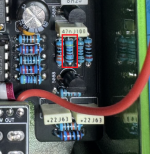
You might have a 4K7 installed in R20 as well, which should be 47K.

View attachment 110935
This one also checked out as 47k. I appreciate the close look, though!
 
Last edited:
I've been pondering this since yesterday evening, and I'm wondering if it's possible that maybe some solder made some unwanted connections under the breakout switch board. I don't really know if something like that would cause the sound to go wonky while not cutting it off entirely, but do any of you think that a useful troubleshooting step would be to remove the switch and breakout board entirely and wire up a new switch without the board? I don't want to do it if that's unlikely to be the problem, and I don't see any clear evidence of solder misflow, but I also can't see under the board, which makes it the only component I can't visually inspect. Thoughts?
 
Last edited:
Well, I wired in a new switch without the breakout board, and no dice. I checked the value of every component and everything looks good, except that I found two discrepancies between the build docs and the PCB silk screen. First, I found R6 and R10 being reversed between the two, so I swapped those. Still no dice. Then, I found C1 and C2 being switched between the two, so I switched those. If anything, it sounded worse. I also reflowed all the solder connections and swapped out the ICs to make sure they weren't faulty. Nothing has this thing grunging. So, unless someone else has any additional suggestions, I think I'm just going to order a new Butt Head PCB with my next order and start from scratch, since I've already got the enclosure.
 
Like DGWVI suggested, make sure your transistors are the correct part number.

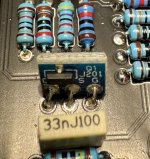
Make sure the MMBFJ201 is facing the right direction (the SMD transistor itself should be facing the 33n capacitor below it).

Pull out the opamps and reseat them firmly.

Your build is pretty dang clean, it'd be a shame to abandon it, but if you do I'll send you another PCB, no need to buy it.
 
Have you double checked the transistor part numbers?
I ask because I recently ordered a bag of 2n3906, that somehow had a bunch of 2N5306 which had me chasing my tail on a couple builds
The 2n5088s are correct--at least, that's what's stamped on the side of each one. The J201 is using the surface mount adapter, but the soldering appears clean, and I oriented it the same as on some other pedals where they're working fine. So I feel like the transistors are okay.
 
Like DGWVI suggested, make sure your transistors are the correct part number.

Make sure the MMBFJ201 is facing the right direction (the SMD transistor itself should be facing the 33n capacitor below it).

Pull out the opamps and reseat them firmly.

Your build is pretty dang clean, it'd be a shame to abandon it, but if you do I'll send you another PCB, no need to buy it.
That's much appreciated! And yeah, I hate to give up on it, but I'm afraid at this point there's not much else to sort through that I actually know how to do. I'm going to give it another once-over this weekend, but if that comes up snake eyes, I'll reach out.
 
Weird shot in the dark - are those ceramic capacitors okay? Sometimes I’ve had leads pull and split the capacitor. Looking at the schematic and where there’s issues, there’s 50pf caps there.

Other stab at it - what about the electrolytics? Are they good? Correct orientation?

Just a couple thoughts. Maybe check voltages and if you have an audio probe, find where the signal has issues.
 
Weird shot in the dark - are those ceramic capacitors okay? Sometimes I’ve had leads pull and split the capacitor. Looking at the schematic and where there’s issues, there’s 50pf caps there.

Other stab at it - what about the electrolytics? Are they good? Correct orientation?

Just a couple thoughts. Maybe check voltages and if you have an audio probe, find where the signal has issues.
Thanks for the tips. I don't have an audio probe, but I think I can check most of the other things you mentioned this weekend!
 
I'd be curious to see a pic that shows the orientation of that smd adapter, and maybe some that show all the pins of that middle opamp made it into the socket.
I can confirm that all of the opamp pins are correctly seated, because I pulled them yesterday and tried other ones to make sure the issue wasn't with one of the opamps themselves. I double-checked the seating when I put them back. I can probably grab a pic of the J201 adapter board when I get home. The SMD transistor itself is facing the 33n cap directly under it in the pic above. Maybe there's something else wonky with it, though, so I'll post the pic this evening hopefully!
 
I have to underline the advice about the audio probe, in my (limited) experience it's been the most useful tool for diagnosing issues on my builds. It's really helpful to find the place on the circuit where the audio dies, it helps narrow down what part of the board you need to squint at.

One thing you could do in the absence of a probe is voltage measurements of the IC pins - sometimes you can also identify at least the rough sections of the schematic where something has gone wrong. Usually on the op-amps with a 9v supply, the voltages on pin 1,2,3 will be roughly 4.5v, 4 will be gnd, 5,6,7 will be 4.5v and 8 will be ~9v. If they differ much from that, look at the stuff around that op-amp section in the schematic.
 
Back
Top