Butt Head Pedal Not Working Correctly

Hi All,

So out of the dozen or so PedalPCB projects I've built in past few weeks, all of them are working perfectly, except for the Butt Head pedal. The way that it's not working has me scratching my head, though, so I thought I'd post here and see if anyone has any ideas on where to even start. (Honestly, I'm leaning toward just ordering a new PCB and rebuilding it, but maybe some of you folks have more experience with this sort of issue than I do.)

So the pedal "works," in the sense that the indicator LED is functioning correctly, the bypass mode sounds fine, and the effect clearly "kicks on" when I press the switch. The problem is that it just sounds terrible, and the knob functions are out of whack. Here's the list of issues I'm noting:

1. Volume drops precipitously when engaged. Like, even with the Volume knob up all the way, it's barely at parity.
2. The Grunge knob doesn't introduce any distortion. It sort of just acts like another volume knob, but it gets sort of muffled as it's turned clockwise.
3. The High knob doesn't appear to do much of anything.
4. The Low knob does increase the low end notably, and it also increases the overall volume.

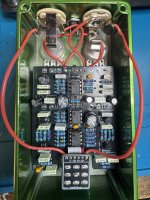
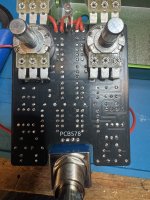
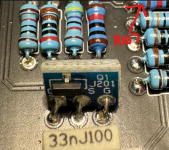
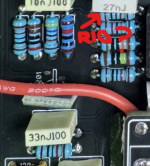
I'm pretty clueless as to what the issue might be. My soldering looks good to me, but here are some pics of the board, in case anyone sees anything I'm missing, either with assembly or components:

IMG_8465.jpeg IMG_8466.jpeg
It may be that this sort of issue isn't really solvable without hands-on access, but I figured it couldn't hurt to ask. If anyone has any troubleshooting workflow suggestions, or recognizes the issue and its possible cause(s), I'd love to hear it.

Okay, I promise this is my last help request for a bit! :)

Thanks!
 
Last edited:
One thing you could do in the absence of a probe is voltage measurements of the IC pins - sometimes you can also identify at least the rough sections of the schematic where something has gone wrong. Usually on the op-amps with a 9v supply, the voltages on pin 1,2,3 will be roughly 4.5v, 4 will be gnd, 5,6,7 will be 4.5v and 8 will be ~9v. If they differ much from that, look at the stuff around that op-amp section in the schematic.
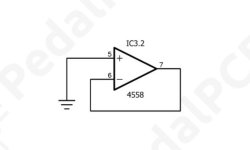
Okay, so this has led to my first unexpected reading. IC1 and IC2 checked out fine based on the numbers you provided, but IC3 (the one in the middle on the PCB) had some odd readings on pins 5, 6, and 7. Instead of 4.5v like on the other two ICs, 5 was 0, and 6 and 7 were both about 8.5. 1-4 and 8 all gave normal readings. While I don't necessarily understand what 5, 6, and 7 are doing in the circuit, I did note in the schematic that they're all three in their own small portion of the overall schematic:
Screenshot 2026-02-14 at 10.27.11 AM.jpeg
All of my ICs are socketed, so I pulled the current IC3 and replaced it with a new one, and I got the exact same readings on 5, 6, and 7. If anyone can verify whether these readings are, in fact, problematic for pins 5, 6, and 7 on IC3 in this particular circuit, and, if so, what I might check to fix them, it'd be greatly appreciated. And thanks, @z2amiller, for the guidance!
 
Last edited:
I did some thinking.

I’m wondering if the grounding isn’t solid - as in it’s not all connected together or not well grounded to the chassis.

Barring that, I would think a bad capacitor somewhere, like a bad electrolytic
 
I did some thinking.

I’m wondering if the grounding isn’t solid - as in it’s not all connected together or not well grounded to the chassis.

Barring that, I would think a bad capacitor somewhere, like a bad electrolytic
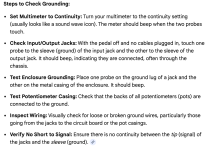
I can definitely go in and check the caps. Heck, at this point, I might just pull all of the electrolytics and replace them, just to see what happens. I can also check the grounding for sure. Just because I haven't really gone hunting for a problem like this before, would this sequence root out any issues that could be causing problems?:

Screenshot 2026-02-14 at 5.57.33 PM.png
Thanks for the tips--it gives me some more things to try!
 
I can definitely go in and check the caps. Heck, at this point, I might just pull all of the electrolytics and replace them, just to see what happens. I can also check the grounding for sure. Just because I haven't really gone hunting for a problem like this before, would this sequence root out any issues that could be causing problems?:

View attachment 111272
Thanks for the tips--it gives me some more things to try!
Noooo don’t go randomly desoldering stuff. That’s how lifted pads happen. The frustration doubles then. 😁 audio probe should be your next step.

 
Yeah, I probably won't actually do that. :) I've been putting off the audio probe because I don't really understand what it is or how it works, but I'm thinking I've reached the point where it's time to learn a new skill...
It's not as complicated as it sounds.

The tool is simple, the process is almost as simple as the tool. Lots of info online on how to go about it. Some videos, too, that are all too long... 15-minute videos that could be 3-minutes...

Here's one that's only 6-minutes long:


Amplified Parts has a simple diagram:

audio_probe_figure2.svg


Cody's DIY FEVER...

audio_probe.gif


Or you can use a female jack so you can extend a regular guitar-lead to the amp...

audio_probe_socket1.gif
 
Last edited:
It is always difficult checking soldering from a photo, because you don't get the full 3D view of he joint, but from the 2D some of those solder joints look as if they didn't get enough solder or enough heat to me. I would double check the joints and maybe reflow.
 
I can definitely go in and check the caps. Heck, at this point, I might just pull all of the electrolytics and replace them, just to see what happens. I can also check the grounding for sure. Just because I haven't really gone hunting for a problem like this before, would this sequence root out any issues that could be causing problems?:

View attachment 111272
Thanks for the tips--it gives me some more things to try!
When I read the symptoms of how the potentiometers didn’t quite act right, it makes me wonder if the grounding isn’t solid. Just a thing to check.

And don’t shotgun replace the electrolytics. It was only a thought because there are a handful of 10uF connected via a resistor to ground on the low/high potentiometers. Again, just a thought, but without the audio probe, we can’t quite pin it down yet.
 
So just a quick check-in on today's troubleshooting: I went through the "Steps to Check Grounding" checklist I posted above, and everything checked out except that the backs of the pots didn't have any connection to ground. Would that be an issue? I tried it with the footswitch in both the on and off positions. Everything else on the list checked out fine. I also checked connection from any component in the schematic that connected to ground on one side, and they all had continuity. Not sure what else to check ground-wise.
 
No, the pot housings don't need to be grounded, but they will be as soon as you install them into the enclosure... unless the powdercoat insulates them. Regardless, that wouldn't cause the issue you're having.
 
So I'm going to put together a down-and-dirty audio probe over the next few days, hopefully, to try to pinpoint where the issue is with this pedal. Two quick questions: first, can anyone point to a good "audio probing an effects pedal for dummies" resource? I did a search in the forum, but couldn't find anything that wasn't specific to individual pedals. I understand how the probe works, but I'm not entirely sure how to move through the schematic. Do I just test each point in the signal to output, or do I check everything? Second, can I just find a tone generator online to feed into the pedal for testing, or is there a particular sound I need to use?

Many thanks!
 
The audio probe connects to your amplifier. Try a site search here to find examples. It’s very simple to build.

With any audible signal as input, you use it to track back to where the audio stops. In that vicinity lies the problem. Then inspect the board to find the exact problem, whether a cold solder joint, too much or not enough solder and so on.
 
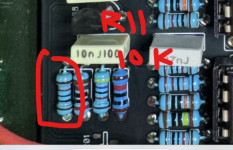
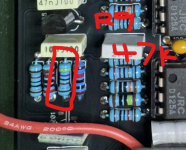
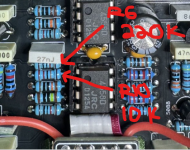
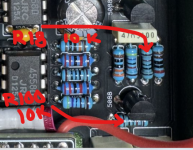
Looking at this pic, I can clearly see the red band on R11, so you're probably good on those.

I'm confused about R10 though.

If I'm understanding the angles of these pics right, those should be the same resistor from different angles, but they definitely don't look the same.

Did you swap that one? Am I seeing something wrong there?

1771342880369.png

1771342957420.png
 
Looking at this pic, I can clearly see the red band on R11, so you're probably good on those.

I'm confused about R10 though.

If I'm understanding the angles of these pics right, those should be the same resistor from different angles, but they definitely don't look the same.

Did you swap that one? Am I seeing something wrong there?

View attachment 111532

View attachment 111533
I really appreciate the thorough once-over! I'll double-check all of these when I get home this evening!
 
Back
Top