Don't forget to set everything in cmykI think I got it to work! Further down in this thread, another member stated that they needed needed to import the Roland swatch as an application palette rather than a system palette. Once I did that, I was able to see RDG_GLOSS and RDG_WHITE in the exported file.
View attachment 40797

You are using an out of date browser. It may not display this or other websites correctly.
You should upgrade or use an alternative browser.
You should upgrade or use an alternative browser.
Tayda UV Printing
- Thread starter dmnCrawler
- Start date


giovanni
Well-known member
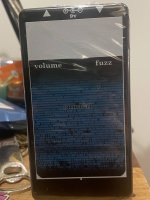
Well this was a bummer! My first UV print was a bit of a failure. There are two problems. First, the rounded corner rectangle that was supposed to frame the design printed all white and with straight edges (?!?). Second, the image colors (it's just a raster) were covered by what I assume was the gloss layer. I am very confused by this. I used Inkscape to make the graphics and then converted to pdf with Affinity Designer. I reopened the file in AD and it definitely does not look right. I think I may have messed up the way I applied the swatch to the white and color layers but I am not sure what I did wrong 

Attachments


Brett
Well-known member
I'm sorry to hear that your first enclosure wasn't what you'd hoped.Well this was a bummer! My first UV print was a bit of a failure. There are two problems. First, the rounded corner rectangle that was supposed to frame the design printed all white and with straight edges (?!?). Second, the image colors (it's just a raster) were covered by what I assume was the gloss layer. I am very confused by this. I used Inkscape to make the graphics and then converted to pdf with Affinity Designer. I reopened the file in AD and it definitely does not look right. I think I may have messed up the way I applied the swatch to the white and color layers but I am not sure what I did wrong
View attachment 40873
Using an image is something I've not tried before so I can't say for sure how to get through that part of it. Checking your PDF in Affinity Designer, the image does not appear to be rasterized, so that could be part of the problem.
I would recommend expanding your strokes at a minimum. In all layers, you have a plain white stroke around the word "sundial" which will not be recognized by the printer (nothing will get printed).
In ALL layers, any objects that are pure white (CMYK 0,0,0,0 - example: almost all text and drill markers in your COLOR layer) will not print any data. It does appear that you converted all text objects to curves (good job!).
Please don't take my criticism the wrong way, it's only meant as constructive criticism in hopes that your next print will turn out exactly as you'd hoped! I can take a look at your file(s) for you before submitting to Tayda the next time if you'd like a second set of eyes.
Hopefully the next one will turn out great now that you've been through the process!
giovanni
Well-known member
OK, I think I fixed the box: apparently I had to convert the object to path because I think AD does not understand the Inkscape "box" object. Now the pdf looks more reasonable (attached), but I don't know how to fix the incorrect color. One thing I did notice is that in the pdf I do not see the Versa swatches but it looks like it's just regular colors, is that normal? Any help will be greatly appreciated!Well this was a bummer! My first UV print was a bit of a failure. There are two problems. First, the rounded corner rectangle that was supposed to frame the design printed all white and with straight edges (?!?). Second, the image colors (it's just a raster) were covered by what I assume was the gloss layer. I am very confused by this. I used Inkscape to make the graphics and then converted to pdf with Affinity Designer. I reopened the file in AD and it definitely does not look right. I think I may have messed up the way I applied the swatch to the white and color layers but I am not sure what I did wrong
View attachment 40873
Attachments
Brett
Well-known member
Please see my post above.OK, I think I fixed the box: apparently I had to convert the object to path because I think AD does not understand the Inkscape "box" object. Now the pdf looks more reasonable (attached), but I don't know how to fix the incorrect color. One thing I did notice is that in the pdf I do not see the Versa swatches but it looks like it's just regular colors, is that normal? Any help will be greatly appreciated!
I think the object structure and the objects with white stroke applied are more important than the Roland swatches right now.
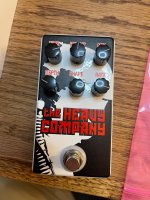
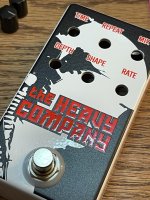
Following up here, my enclosures arrived from Tayda today and I couldn't be happier with how they turned out! I'm looking forward to getting more creative with my artwork in the future, but this sure beats everything I've done in the past (ink stamps, hand-labeling with paint markers, etc.). Thanks to all who helped along the way!

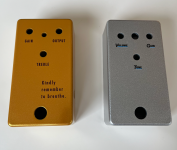
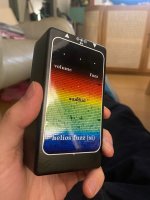

mkstewartesq
Well-known member
Hello, all:
Thank you for all the information here. I’m about to send my first UV printing job off to Tayda and had two questions:
1. What are peoples’ current experiences with tayda doing both a custom drill and the printing on the same enclosure as far as the art lining up with the drill holes?
2. One job I am printing will be on a regular (glossy) enclosure. If I were to do the entire top layer in gloss varnish just to protect the whole thing, is it likely to come out as a smooth finish or will it be more wavy? I see some recent ones immediately above that seem to have a lot of gloss and appear to be very smooth – but I saw some others here where either the gloss or the paint was a lot more wavy than it had been on colored enclosures I had purchased from Tayda before, and I don’t know if that is attributable to the gloss layer. .
Thank you.
Thank you for all the information here. I’m about to send my first UV printing job off to Tayda and had two questions:
1. What are peoples’ current experiences with tayda doing both a custom drill and the printing on the same enclosure as far as the art lining up with the drill holes?
2. One job I am printing will be on a regular (glossy) enclosure. If I were to do the entire top layer in gloss varnish just to protect the whole thing, is it likely to come out as a smooth finish or will it be more wavy? I see some recent ones immediately above that seem to have a lot of gloss and appear to be very smooth – but I saw some others here where either the gloss or the paint was a lot more wavy than it had been on colored enclosures I had purchased from Tayda before, and I don’t know if that is attributable to the gloss layer. .
Thank you.
mkstewartesq
Well-known member
OK, actually a late breaking but potentially very important thing I need to be clear on: I am of course double checking that the drill holes on the custom templates that I created using Tayda’s custom drill templates tool match up with the coordinates for the drill holes on my UV print art, which I created in illustrator again using Tayda’s preferred artboard.
I noticed the following earlier but just disregarded it because “they know what they’re doing“ – but I don’t want to be wrong on this. The custom drilling template coordinates are exactly opposite from the art board that they provide. For example, the upper row of knobs on the drilling template is on the Y axis at 38.1 mm – however, when drawing on the art board, the position is -38.1 (negative, as in “in the opposite direction“) on the Y axis. I certainly didn’t flip the art board around in illustrator. Do I run the risk of all my art being upside down on my drilled cases?
Sorry if this was referenced somewhere in the thread long ago.
Thanks very much.
I noticed the following earlier but just disregarded it because “they know what they’re doing“ – but I don’t want to be wrong on this. The custom drilling template coordinates are exactly opposite from the art board that they provide. For example, the upper row of knobs on the drilling template is on the Y axis at 38.1 mm – however, when drawing on the art board, the position is -38.1 (negative, as in “in the opposite direction“) on the Y axis. I certainly didn’t flip the art board around in illustrator. Do I run the risk of all my art being upside down on my drilled cases?
Sorry if this was referenced somewhere in the thread long ago.
Thanks very much.
Last edited:
Brett
Well-known member
About question 1:Hello, all:
Thank you for all the information here. I’m about to send my first UV printing job off to Tayda and had two questions:
1. What are peoples’ current experiences with tayda doing both a custom drill and the printing on the same enclosure as far as the art lining up with the drill holes?
2. One job I am printing will be on a regular (glossy) enclosure. If I were to do the entire top layer in gloss varnish just to protect the whole thing, is it likely to come out as a smooth finish or will it be more wavy? I see some recent ones immediately above that seem to have a lot of gloss and appear to be very smooth – but I saw some others here where either the gloss or the paint was a lot more wavy than it had been on colored enclosures I had purchased from Tayda before, and I don’t know if that is attributable to the gloss layer. .
Thank you.
If high precision artwork/drilling alignment is very important to you, don’t have Tayda do the drilling.
About question 2:
Doing a flood fill with gloss varnish is probably overkill but it’ll likely be smooth. I tend to do spot gloss on my stuff because it adds depth to the design.
Drill tool coordinates:
The coordinates are backwards between the drill tool and graphic design software. As long as both the design and drill template are in the same orientation and they both look right, they probably are.

Bricksnbeatles
Member known well
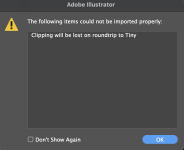
Tried importing some of my now-completed Inkscape SVG graphics into illustrator to apply the swatches to the white and gloss layers. Getting this message…
“clipping will be lost on roundtrip to tiny”
Anyone know what this might mean? Everything is fill-only vector graphics, so not really sure what the problem might be.
“clipping will be lost on roundtrip to tiny”
Anyone know what this might mean? Everything is fill-only vector graphics, so not really sure what the problem might be.

Guardians of the analog
Papi Fuego
FYI, order printing on a bare enclosure at your own risk, for real. The first one I did turned out great. The one I just got not so much...the UV print is coming off the enclosure. I can't see contacting tayda because they warn this could happen. I'll just have to do it on a color again
Bricksnbeatles
Member known well
Here's one of them, as an exampleYou have an SVG Tiny file for some reason and it has a clipping mask in it. Try it and see what happens. Otherwise, either open it in a browser and print as pdf or send it to me and I can check it out for ya.

Bricksnbeatles
Member known well
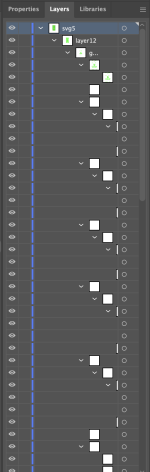
As you can see, for some reason there are also tons of weird nested layers when I import it- many of which are empty
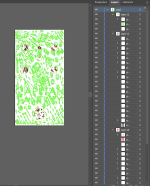
.....And they nest deep