Tayda UV Printing

Attachments

  • IMG_1486.jpeg
    IMG_1486.jpeg
    1.1 MB · Views: 70
Last edited:
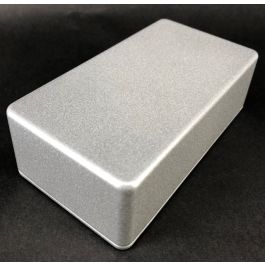
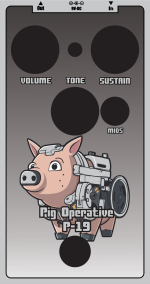
I had an idea for a print where I would use the chromium enclosure with a robot type creature, have a fill in white (or whatever color) inside my outlines, and cut out parts of the robot creature to use the chromium as a "color".

Now, that would probably work fine - all of the parts would just be in one solid color, but it could be fine.

But does anyone have experience with just using bare tones on the enclosure for something like that? So I would skip the white layer and just use the color layer, so it would still shade the chromium a little, but it would show through? Does Tayda allow that (or if they complain that there's no white layer, I could say "it's intended, go ahead"), or does it look bad? Anyone done this before?
Tayda also recently dropped a Matte Clear enclosure that should allow you to print on silver with no problem. Theoretically of course.
 
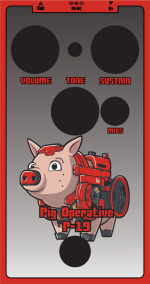
Here's the idea I had - I used a red background so it pops off and it's easy to notice which parts would be see-through. I think it would work very nicely with a chromium enclosure. I did a similar trick with the text - they should come out as black outlines with chromium inserts.

I'm not quite sure what to do with the fill on the outline though, I used a simple black-white gradient here, and it's passable, but not great. Some sort of a steel tile style pattern might work, I tried something out but it was much too busy. Any single color fill seems like it would be too much too.

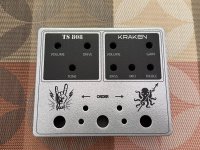
Btw, semi-related, does anyone know if there's any official Tayda drill template for the "3 knobs plus a switch"? I used one I made by measuring from the PDF for the simulcast, but I had to file the switch hole a bit to make it bigger (btw, chromium paint held up without issues there). I made the hole bigger in anticipation for this one (Danube fuzz, in case it wasn't obvious), but if there was an official one it would be better.

P19_WIP.png
Edit: Attached also a mockup chromium version for comparison.
 

Attachments

  • P19_chromium.png
    P19_chromium.png
    137.5 KB · Views: 12
Last edited:
Anyone have any pictures of/experience with the white sand textured enclosures? I've used white gloss before and liked i as it was a pretty pure white - but am interested in knowing whether the white sand is similarly "white" or more an "off-white". Thanks.

Mike
 
Anyone have any pictures of/experience with the white sand textured enclosures? I've used white gloss before and liked i as it was a pretty pure white - but am interested in knowing whether the white sand is similarly "white" or more an "off-white". Thanks.

Mike
I got a white sand enclosure printed up recently and it seems to be the same color temperature as the normal white enclosures— that is to say, it’s a neutral white and not off-white
 
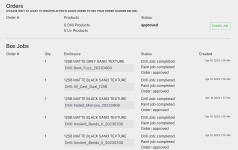
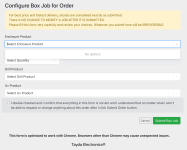
I got an error after drilling was completed on a few enclosures that I paid for gloss but no rgb_gloss was detected (which I don't understand, since I did the same thing that worked last time). I hit the "start over" to submit the order with a new pdf (that I triple checked had an rgb_gloss from the roland swatch).....but when I click on "create job" to resubmit there are no options in the drop-down menus on the next screen.

Has anyone had this happen, or know what to do?


SCR-20230425-pkom.png SCR-20230425-pkib.png
 
I got an error after drilling was completed on a few enclosures that I paid for gloss but no rgb_gloss was detected (which I don't understand, since I did the same thing that worked last time). I hit the "start over" to submit the order with a new pdf (that I triple checked had an rgb_gloss from the roland swatch).....but when I click on "create job" to resubmit there are no options in the drop-down menus on the next screen.

Has anyone had this happen, or know what to do?


View attachment 47056 View attachment 47057
Yes, I had the exact same thing happen last month. The start over button didn’t really do anything to let me upload a new file and I couldn’t create a new job because it is looking for a new enclosure not already assigned to a current job.

What I did is went into the My Account page where you can open a trouble ticket and selected the trouble ticket be directed to the UV printing department. I included the job number, told them that I could not upload a corrected file, and attached the corrected file to the trouble ticket message. They never responded but my print job eventually went through so either they used the corrected file I submitted or were able to make the original file work (I don’t know which because the page on the drill toolbox still showed the old file that they claim didn’t have any color in the gloss layer).

As far as the issue with the painting, I don’t know what causes it either but when I opened up the PDF that I submitted in illustrator, even though the color “looked like“ RDG gloss, adobe was showing it with a “?” In the little window that shows what color the paint is. I think it had something to do merging all of the graphics on one layer into a single image/group. When I ungrouped them, illustrator at least showed each individual item as being painted with the proper RDG gloss. (at least I hope that’s what the issue is, because I submitted a print job just today where I ungrouped everything in the hopes of avoiding this error again).

edit to add – I bet if you go back and check that page later, you’ll see that your old “error“ job pops back up in the job list and still shows the error. That’s what happened with me - I hit start over, the job disappeared and I couldn’t create a new one, and then when I looked back a little bit later, the old error job and error message had reappeared. That’s when I decided to write them directly and send the file through a trouble ticket.

M
 
I've had an order of just 2 enclosures in-progress since 4/19. I feel like lately Tayda usually prints these in like 2 days. Have I been spoiled or should I be concerned?
 
I've had an order of just 2 enclosures in-progress since 4/19. I feel like lately Tayda usually prints these in like 2 days. Have I been spoiled or should I be concerned?
I ordered 7 enclosures on 4/19 (or 19.4. if you will), mine are all "in progress" for UV printing. I feel like they were drilled and painted at reasonable speeds (although not quite as fast as before), now "in progress" for UV printing. I assume there might be a big order or a lot of other orders now and it's just swamped?
 
Well, this isn’t good to hear. The first job I submitted in March took about three weeks but the one I submitted earlier this month only took about eight days, and that was including correcting an issue that they claimed with the gloss layer. So I submitted a new job a couple of days ago so that, if they again claimed an issue with the print file, I could resolve it before I left on some travel May 6 since I won’t have a computer with me then. It’s only been a few days but they haven’t even gotten around to drilling it yet whereas on my last order they had drilled it and started painting within about 24–36 hours.
 
Well, they do say it can take a lot of time. It's on us if we think it goes faster than what they claim.
 
Mine just got shipped... but the drill site still says the UV print is in progress 😅


I assume someone just needs to click them to "finished" status, but it does evoke some funny mental images.
I ordered the same day as you, it just finally went to "UV printing completed" this morning. Still showing as "packing" though, same as it has been for several days. But at least there were no nastygrams on the UV print file, unlike the last time.
 
Back
Top