
You are using an out of date browser. It may not display this or other websites correctly.
You should upgrade or use an alternative browser.
You should upgrade or use an alternative browser.
Tayda UV Printing
- Thread starter dmnCrawler
- Start date

cooder
Well-known member
I have done some graphics with different transparency levels. Here the black is full on, the background and red text outline are at reduced opacity.I’d love to do a series of test prints with a variety of transparency levels and gradients for white, gloss, colors, and combinations for a handful of the powder coat colors for reference.
Works great on metallic kinda enclosures I think. More experimenting will be good.


Same here, the red has reduced opacity so the silver metallic shines through. No white underneath.


jessenator
Well-known member
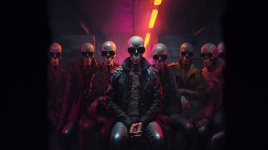
Someone, do something with these bois
High res: https://www.dropbox.com/scl/fi/j1a8...bois.png?rlkey=izign7juqhegwg2kwxm50lw2i&dl=0

High res: https://www.dropbox.com/scl/fi/j1a8...bois.png?rlkey=izign7juqhegwg2kwxm50lw2i&dl=0

Mentaltossflycoon
Well-known member
Yeah, it's dubious af. I told myself I would only use them on pedal enclosures that I would never sell but even that is starting to feel sketchy. I liked the absurdity but you're right about the addicting nature of it all.An update: I had to delete my account on the AI Graphics site. I saved a few really good ones.
I’ve never become so insidiously addicted to something so fast. Things were alright until I figured out you could “evolve” an existing drawing and until the stuff I was making started getting liked and comment on.
Before I knew it I had something like 300 free drawing credits and I lost like 3 hours last night.
Very cool stuff but the creation and social incentives are WAY addicting. Not for me ultimately.

Bricksnbeatles
Member known well
Anyone do side printing yet?

Fama
Well-known member
I for sure got addicted for a bit with Midjourney (I've had the "one month as many as you want (but it's a bit slower)" plan twice now I think), but I work IT remotely so I could just go hit the generation buttons in the pauses between doing work tasks. I'm much less enthusiastic now, but on the other hand I never had any social incentives in the mix, which might have made things worse for sure.An update: I had to delete my account on the AI Graphics site. I saved a few really good ones.
I’ve never become so insidiously addicted to something so fast. Things were alright until I figured out you could “evolve” an existing drawing and until the stuff I was making started getting liked and comment on.
Before I knew it I had something like 300 free drawing credits and I lost like 3 hours last night.
Very cool stuff but the creation and social incentives are WAY addicting. Not for me ultimately.
Definitely followingJust sent off an email to Tayda to see about getting a pedal UV printed. I want more detail than what I can do with paint pens and I am interested in the process. I will chronicle how the experience goes for those that are interested, I do not have illustrator so we will see if they accept a file created with Inkscape. Here is what the enclosure should look like when done:
View attachment 6745

southpaw-dd
Well-known member
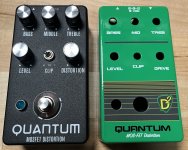
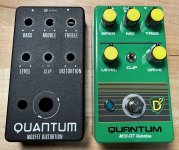
Finished two more Aion kit rehousing into Tayda UV prints and again using the new line cut feature offered by Tayda for the DC jack cutout. I like for the pedal art to either be totally creative and/or simply a reminder of what the pedal is based on (and these are only for my use so I'm not concerned with trade dress). After a second batch of enclosures under my belt, I'm beginning to learn the lessons of what not to do especially with the gloss layer.
A lighter paint glossy color with UV varnish only on the words (e.g., control labels) can show horizontal streaking. Had that happen on several prints in the last batch so now I tend to gloss the entire surface to be safe. These two examples are both varnish gloss on the entire front area. The only problem I've noticed lately is small raised bubbles/flaws every now and then with a large printed or varnish area.
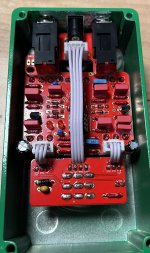
Forgive my no-clean flux especially on the footswitch/power board - this is before I started cleaning post solder process.


A lighter paint glossy color with UV varnish only on the words (e.g., control labels) can show horizontal streaking. Had that happen on several prints in the last batch so now I tend to gloss the entire surface to be safe. These two examples are both varnish gloss on the entire front area. The only problem I've noticed lately is small raised bubbles/flaws every now and then with a large printed or varnish area.
Forgive my no-clean flux especially on the footswitch/power board - this is before I started cleaning post solder process.
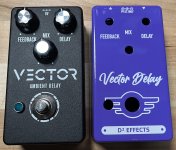
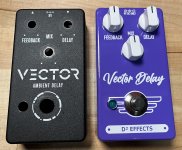
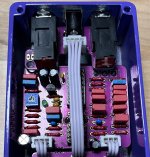
jessenator
Well-known member
off-topic, but I've been thinking a lot about that. I love my paste/gel flux, but I've been thinking about a small ultrasonic. Keyword there 'thinking' and not actually doing…this is before I started cleaning post solder process
awww, that's a shameThe only problem I've noticed lately is small raised bubbles/flaws every now and then with a large printed or varnish area.
 my luck's been good, but that's a bummer to get things back like that.
Alright, I got a reply from Hugo, and he said:Got a question for you that have done this: doing "grayscale" on a dark enclosure with the opaque rdg_white
I'm fairly positive I've seen someone post (either here on on madbean) about doing it, but it also would make sense that it should work, based on the fact you can do it with the gloss coating.
Should one use the swatch TINT percentage or adjust the opacity? My print prepress brain goes directly to adjusting the tint, since that's what we did for Pantone plates in a document.
I might just bite the bullet and do it. My design is rather high contrast anyway, so there will be plenty of "black" from the enclosure, should there be a problem. I'm fairly confident about it. Others have mentioned RDG_GLOSS can be metered like I'm wanting to do with the white, and my smidge of prepress experience is telling me TINT is the way to go—is is what we do with Pantones after all. It'll be an adventuresorry I never tried this option so I am not sure but reducing rdg_white would just make machine put less white color and I am not even sure if it is possible to adjust that since rdg_white is spot color, not cmyk. It is difficult to get gray like colors in uv printing.

Last edited:

justin23000
Active member
I’ve got two side D’s pending… I remembered to add an extra gloss, but forgot to add an extra white pass for side D. There’s a lot of stuff to remember now between drilling and UV. Will report back...Anyone do side printing yet?

finebyfine
Well-known member
I have done some graphics with different transparency levels. Here the black is full on, the background and red text outline are at reduced opacity.
Works great on metallic kinda enclosures I think. More experimenting will be good.

Same here, the red has reduced opacity so the silver metallic shines through. No white underneath.
These look awesome. I’m on my phone and can’t pull up my bookmark but Roland has some really cool examples of playing with stuff like this - gradient masks on gloss layers, etc. Should come up with something like “Roland Versaworks documentarion”
southpaw-dd
Well-known member
I like how this one turned out. The Matte Army Green looks great. The middle rectangle area is gloss/varnish.
Now I just need the PCB to get back in stock!

Now I just need the PCB to get back in stock!
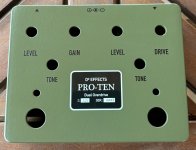

KR Sound
Well-known member
The glossed block is perfect against the flat paint.I like how this one turned out. The Matte Army Green looks great. The middle rectangle area is gloss/varnish.
Now I just need the PCB to get back in stock!
View attachment 61718

PapaBear
Well-known member
I got a spare board I'll trade for that artwork!I like how this one turned out. The Matte Army Green looks great. The middle rectangle area is gloss/varnish.
Now I just need the PCB to get back in stock!
View attachment 61718
southpaw-dd
Well-known member
I got a spare board I'll trade for that artwork!
100% deal! I’ll PM you this evening.
Have my first UV print on order with I/O rear labels courtesy of help from the ever talented @jessenatorAnyone do side printing yet?
But, I forgot to order the gloss layer and this design really revolves around the gloss layer.
I triple checked everything, and it let me select the matte/gloss?¿
Anyone know how I get Hugo $2 to get this done?
Enclosure is ready for print...

jessenator
Well-known member
PM'dHave my first UV print on order with I/O rear labels courtesy of help from the ever talented @jessenator
But, I forgot to order the gloss layer and this design really revolves around the gloss layer.
I triple checked everything, and it let me select the matte/gloss?¿
Anyone know how I get Hugo $2 to get this done?
Enclosure is ready for print...
 but definitely see what others have to say.
mkstewartesq
Well-known member
Let us know how it turns out. I had an issue like that once and Hugo got grumpy and told me he could only cancel the order and refund my money and I had to place the order again. Another time, I had a special request after I submitted the print job (mixing the matte and gloss layer) and he happily did it at no charge. Earthquakes are easier to predict than Hugo.Have my first UV print on order with I/O rear labels courtesy of help from the ever talented @jessenator
But, I forgot to order the gloss layer and this design really revolves around the gloss layer.
I triple checked everything, and it let me select the matte/gloss?¿
Anyone know how I get Hugo $2 to get this done?
Enclosure is ready for print...
M
Fama
Well-known member
I don't think their system can do anything else than refund and reorder.Let us know how it turns out. I had an issue like that once and Hugo got grumpy and told me he could only cancel the order and refund my money and I had to place the order again. Another time, I had a special request after I submitted the print job (mixing the matte and gloss layer) and he happily did it at no charge. Earthquakes are easier to predict than Hugo.
M
I also don't think it's fair to call someone out for getting grumpy because you were not doing the literal thing you have to check like three different checkboxes saying "yes, I did do it" and it turns out that no, you did not do it.
Also, yes, I have also done that, and they did a refund and I reordered. I bet they get quite a few of those requests, with the whole "yes I have checked multiple times", and it probably takes up a considerable amount of time. I would be very grumpy too.
mkstewartesq
Well-known member
Well, to be fair I wasn’t exactly “calling out“ Hugo for being grumpy – I just noted it, just as many here have reported getting somewhat salty replies from Hugo. In the very next sentence, I cited another instance where I had a special request after the order was placed that Hugo “happily“ went out of his way to accommodate. My point being: Hugo is just like every other human being on this planet - some days he’s in a good mood, other days he isn’t.I also don't think it's fair to call someone out for getting grumpy because you were not doing the literal thing you have to check like three different checkboxes saying "yes, I did do it" and it turns out that no, you did not do it.
M