Tayda UV Printing

I have a question for you guys who order drilling and uv printing. I'm ordering a 1590XX enclosure and having it drilled, I always dill my own but this has tube vents. This is my first time having tayda drill for me, do I need to orient the UV print file to match the drilling? My thought process is if I don't orient it the same as the drilling then there is a chance they print it upside down. I've never thought twice about it before since I drill at home. Appreciate any feedback.

I always orient my design to the way shown in the drill tool because of this too but can't comment on if it's something they'll fix before printing.
 
I have a question for you guys who order drilling and uv printing. I'm ordering a 1590XX enclosure and having it drilled, I always dill my own but this has tube vents. This is my first time having tayda drill for me, do I need to orient the UV print file to match the drilling? My thought process is if I don't orient it the same as the drilling then there is a chance they print it upside down. I've never thought twice about it before since I drill at home. Appreciate any feedback.
I ordered like this once and has the same realization a day later. When it came it was oriented as I hoped it would be, but I probably wouldn’t want to risk it again— not sure if I just got lucky, or if it was figured out by the folks at Tayda, but I’d just rotate my file to be consistent just to be safe.
I’m 99% sure the drilling machine and Uv printing machine are both loaded manually and they could easily infer what belongs where based on the file previews or something, but why take the chance when it’s 15 seconds of extra work to orient the file so you’re not responsible for any potential mix ups.
 
So far I’ve never had any issues with it being printed incorrectly. As long as it’s obvious which is the top of the enclosures, it should be foolproof.

Maybe they need to modify their print and drill templates with Top,Bottom,L,R designators to avoid any possible mistakes.
 
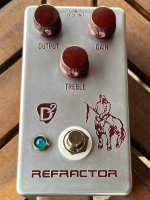
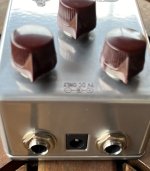
In my normal path of finding yet another way to update a project and spend additional money, I wanted to re-house my Aion Refractor kit build for a more custom Klone like appearance. This is tricky as the Aion kit enclosures have the rectangular cut for the PCB mounted DC jack. This is my first run at the rehousing and I carefully measured and setup the line cut for the rectangle using the newly available Tayda drill template feature.

Turned out to be a great fit and I'm going to rehouse some other kits soon. I've shared the Tayda drill template below (for the Refractor or other 3-pot kits) and to offer how to setup the DC and 1/4" jacks in case anyone is interested.

D2 Pedals Refractor Front.jpeg D2 Pedals Refractor Jacks.jpeg

https://drill.taydakits.com/box-designs/new?public_key=OXZJK2E2UkV6SHdiVUxJcTJURmtVUT09Cg==
 
In my normal path of finding yet another way to update a project and spend additional money, I wanted to re-house my Aion Refractor kit build for a more custom Klone like appearance. This is tricky as the Aion kit enclosures have the rectangular cut for the PCB mounted DC jack. This is my first run at the rehousing and I carefully measured and setup the line cut for the rectangle using the newly available Tayda drill template feature.

Turned out to be a great fit and I'm going to rehouse some other kits soon. I've shared the Tayda drill template below (for the Refractor or other 3-pot kits) and to offer how to setup the DC and 1/4" jacks in case anyone is interested.

View attachment 60192View attachment 60193

https://drill.taydakits.com/box-designs/new?public_key=OXZJK2E2UkV6SHdiVUxJcTJURmtVUT09Cg==
That looks great. do you have the jacks and power on a board?
 
Yes - it is the board that Aion FX uses for all of their kits. I got started DIY (again) with his kits a few years ago. Aion has the DC jack protrude out through the enclosure so the rectangular cutout is required.

It is the same as this:
https://aionfx.com/project/input-output-module-kit/
Nice- I’ve never bought an actual kit from him. There are a couple guys here that have some cool breakouts like that that also house the polarity and over voltage handling.
 
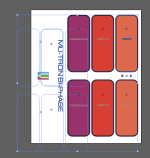
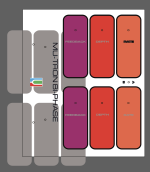
Hey everyone. Can someone who is better at this than me please have a look at my design and let me know if there are any issues?

In particular I'm asking about the colours. Will the colours I have chosen look weird on UV printing?

You helped my with my last Tayda UV print which turned out great. Thanks so much for that. My last design was just rdg_white and rdg_gloss, however this design has colour.
 

Attachments

Hey everyone. Can someone who is better at this than me please have a look at my design and let me know if there are any issues?

In particular I'm asking about the colours. Will the colours I have chosen look weird on UV printing?

You helped my with my last Tayda UV print which turned out great. Thanks so much for that. My last design was just rdg_white and rdg_gloss, however this design has colour.
I'm on my phone now, so I don't see the layers, but I notice only one label has a black outline.

What color will the enclosure be ?
 
Hey everyone. Can someone who is better at this than me please have a look at my design and let me know if there are any issues?

In particular I'm asking about the colours. Will the colours I have chosen look weird on UV printing?

You helped my with my last Tayda UV print which turned out great. Thanks so much for that. My last design was just rdg_white and rdg_gloss, however this design has colour.
Here's what I'm seeing:
1. No separation of white, color and gloss into layers
2. Hidden objects (looks like the UV gloss for the control sections are duplicates and just hidden—need to be deleted.
3. There are some strange artefacts, like strokes on text that seem to be non intentional (top right "RATE" text)
4. What look like drill markers as circles. IMO if you want to drill yourself (which is what I'm assuming), it might be better to use crosshairs vs circles, and with a lighter stroke weight (0.5 point or even 0.25)

screen_shot_2023-11-21_at_12.23.04_pm.png
screen_shot_2023-11-21_at_12.30.37_pm.png

I think you could easily fix this by pulling the rdg_white and rdg_gloss into their own layers and eliminating the hidden objects.
 
Here's what I'm seeing:
1. No separation of white, color and gloss into layers
2. Hidden objects (looks like the UV gloss for the control sections are duplicates and just hidden—need to be deleted.
3. There are some strange artefacts, like strokes on text that seem to be non intentional (top right "RATE" text)
4. What look like drill markers as circles. IMO if you want to drill yourself (which is what I'm assuming), it might be better to use crosshairs vs circles, and with a lighter stroke weight (0.5 point or even 0.25)

View attachment 61144
View attachment 61145

I think you could easily fix this by pulling the rdg_white and rdg_gloss into their own layers and eliminating the hidden objects.
Thanks. This does look weird. I initially had them all in separate layers but I’ll investigate what has happened here and why they are so misaligned. Glad I asked here first!

I’m planning on printing on a polished plain enclosure.

I’ll try the crosshairs for drilling holes.
 
I’ve been casually messing around with an AI art generator the last few nights.

It definitely depends on how you prompt it, but I’ve generated these 4 out of maybe 40 total:

View attachment 61160View attachment 61161View attachment 61162View attachment 61163

And now I’m thinking of doing a mixed media thing for fun. The prompts themselves read as short story prompts so I think I’m going to design 4 semi-original circuits around each prompt and write some corresponding short stories for each.

For anyone who doesn’t know, consuming, and occasional writing, Horror, Sci-Fi and Fantasy short stories is another hobby of mine.
What service did you use to make those? They look pretty great. Did you have to specify the style of the painting?
 
I’ve been casually messing around with an AI art generator the last few nights.

It definitely depends on how you prompt it, but I’ve generated these 4 out of maybe 40 total:

View attachment 61160View attachment 61161View attachment 61162View attachment 61163

And now I’m thinking of doing a mixed media thing for fun. The prompts themselves read as short story prompts so I think I’m going to design 4 semi-original circuits around each prompt and write some corresponding short stories for each.

For anyone who doesn’t know, consuming, and occasional writing, Horror, Sci-Fi and Fantasy short stories is another hobby of mine.
Impressive pistol in the cowboy picture, although the fingers probably suffered instead. I've found guns to be really hard to get right. What did you use for these?

In my experience, sometimes making a lot of pictures and picking the good one works well, other times it's a case of trying different things until you hit the great picture on first try. I'll post how the latest batch (just 3) came out once they get here (just ordered them late on Monday so will take a while).

If someone is curious about it, I would suggest going for either the cheapest Midjourney plan, or maybe the one month endless plan. That has worked well for me in the past. I think the free Microsoft generator uses Dall-e 3 maybe, so it should be pretty good, but it can take a long time to get pictures depending on congestion/time of day.

Of course if you have a gaming GPU you can try generating your own, but that's a pretty technical undertaking, so I would only recommend it for IT people. I use SDXL with ComfyUI nowadays (and use Automatic1111 for upscaling to get a good quality for the image trace process), which can be pretty complicated, but the nice thing is you can share the pictures you created and someone else can open it up in ComfyUI and it opens up as the exact same workflow which generated the original image.

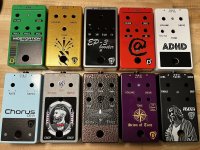
Looking to stay busy during the holiday week!

View attachment 61181
These look great, especially loving the Chop Shop!
 
Got a question for you that have done this: doing "grayscale" on a dark enclosure with the opaque rdg_white

I'm fairly positive I've seen someone post (either here on on madbean) about doing it, but it also would make sense that it should work, based on the fact you can do it with the gloss coating.

Should one use the swatch TINT percentage or adjust the opacity? My print prepress brain goes directly to adjusting the tint, since that's what we did for Pantone plates in a document.
 
Got a question for you that have done this: doing "grayscale" on a dark enclosure with the opaque rdg_white

I'm fairly positive I've seen someone post (either here on on madbean) about doing it, but it also would make sense that it should work, based on the fact you can do it with the gloss coating.

Should one use the swatch TINT percentage or adjust the opacity? My print prepress brain goes directly to adjusting the tint, since that's what we did for Pantone plates in a document.
It might be best to ask Hugo about it, but I think Opacity is probably how it should work at least? I don't remember seeing that in here, but I could be wrong. I think someone printed something on a dark enclosure with no rdg_white intentionally, and I think someone tested the opacity (or gradient) with gloss, but don't remember anyone posting about doing it with white before.

I think another way to do it would be to do a full on rdg_white and then a gray color layer on top.
 
Back
Top