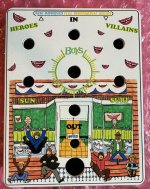
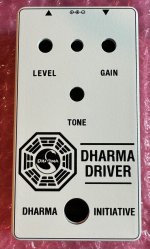
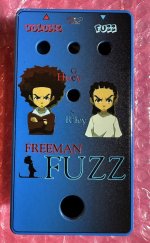
Tayda UV Printing

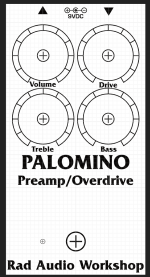
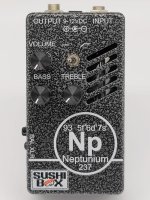
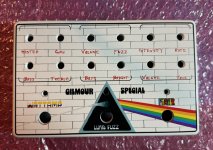
I did something similar last year. It’s an iconic design and it’s where I ended up pulling my name from.
Same here. Like you said, it's an iconic design. I really like Big Monk's idea of moving the control labels into the arrows; gonna have to borrow that for a future build.

(And I also need to make sure to double check the footswitch drill coordinates next time.)
IMG_2690.jpeg
 
I finally got a newer computer from my sister in law and installed Affinity Designer 2. How are y'all measuring the distance between knobs for a 3 knob pedalpcb style layout? I've got a couple of my own circuits I want to make artwork for and I always use the pedalpcb drill template measurements. I'm just not sure how to translate that to AF2 yet.
 
I finally got a newer computer from my sister in law and installed Affinity Designer 2. How are y'all measuring the distance between knobs for a 3 knob pedalpcb style layout? I've got a couple of my own circuits I want to make artwork for and I always use the pedalpcb drill template measurements. I'm just not sure how to translate that to AF2 yet.
In that scenario I would probably just use the template as a layer and overlay knob mockups of the appropriate size, aligned to the drill locations.
 
Same here. Like you said, it's an iconic design. I really like Big Monk's idea of moving the control labels into the arrows; gonna have to borrow that for a future build.

(And I also need to make sure to double check the footswitch drill coordinates next time.)

View attachment 76994

Didn't realize how iconic this thing is.
I like that all 3 of you included the mysterious text "pre-set button."
 
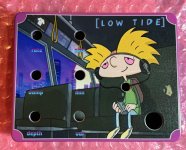
I've been working for a little bit trying to just get things sized and moved around, which is frustrating when you don't know how to use the damned software at all lol. I think I got everything where it needs to be. I'm using some of the knob surrounds Pachyderm Pedals shared on their blog. I'd like to get some of the knob surrounds like on the Way Huge pedals. Thought about drawing some Orange style pictographs too, but I don't want to get ahead of myself.


Screen Shot 2024-06-22 at 7.30.43 PM.png
 
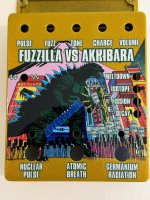
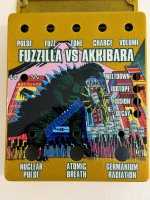
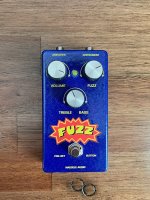
Newest design arrival today. Will post more about its features/controls when I finish the build. Part of it is a fuzz circuit I designed using the Toshiba Ge transistors I found in Akhibara (and included them in the art). Tayda Metallic Candy Gold.

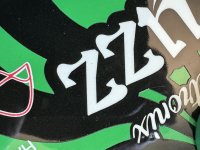
One thing I have an issue with is the white and colors appear very grainy… they’re not clear at all especially the white compared to previous prints. Not sure why… (see close up and comparison to prior print)
IMG_0810.jpeg
 

Attachments

  • IMG_0813.jpeg
    IMG_0813.jpeg
    350 KB · Views: 39
  • IMG_0814.jpeg
    IMG_0814.jpeg
    535.7 KB · Views: 39
  • IMG_0810.jpeg
    IMG_0810.jpeg
    671.7 KB · Views: 37
Newest design arrival today. Will post more about its features/controls when I finish the build. Part of it is a fuzz circuit I designed using the Toshiba Ge transistors I found in Akhibara (and included them in the art). Tayda Metallic Candy Gold.

One thing I have an issue with is the white and colors appear very grainy… they’re not clear at all especially the white compared to previous prints. Not sure why… (see close up and comparison to prior print)
View attachment 77617
That's weird. Was it a raster or vector image? I don't think the candy enclosure should affect it, hammered ones would make it uneven but that looks weird indeed.
 
That's weird. Was it a raster or vector image? I don't think the candy enclosure should affect it, hammered ones would make it uneven but that looks weird indeed.
It’s vector, just like all my prior orders and it’s never been grainy, even on the other two Candy sparkle enclosures I’ve ordered… I even ordered double print white layer like I always do which should give a buffer from the enclosure color… not sure but I emailed Hugo so will see.
 
FWIW many of my prints have come out grainy like that— fully vector too. Even pure pigments— 100% black, 100% white, 100% cyan, etc.
I always figured that was just a normal part of UV print quality.
 
FWIW many of my prints have come out grainy like that— fully vector too. Even pure pigments— 100% black, 100% white, 100% cyan, etc.
I always figured that was just a normal part of UV print quality.
Hmm none of mine ever have, they have always been very clear. This one had the most individual colors I’ve ever ordered before but don’t see why that would effect it as the colors all came out correct, just grainy.
 
스크린샷 2024-07-27 130043.png


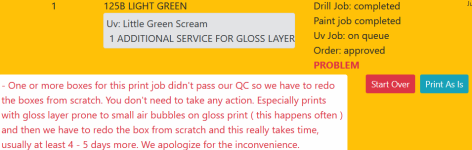
TAYDA contacted me to say there was a problem with the UV printer QC problem.
They tell me I don't need to take any action.
But there is a "print as is" button next to it, do I need to click it or can I just wait?
 
View attachment 79169


TAYDA contacted me to say there was a problem with the UV printer QC problem.
They tell me I don't need to take any action.
But there is a "print as is" button next to it, do I need to click it or can I just wait?
I had the same message and mine shipped the same day, but I think they maybe marked it up for the wrong enclosure https://forum.pedalpcb.com/threads/whats-in-the-mailbox-📬-📦.12436/page-326#post-285561

The one with the message was flawless as far as I could see, one other pedal had a blemish in the powder coat.
 
View attachment 79169


TAYDA contacted me to say there was a problem with the UV printer QC problem.
They tell me I don't need to take any action.
But there is a "print as is" button next to it, do I need to click it or can I just wait?
This happened for me before, but they didn’t notify me that there was a problem. I just noticed the print job was stalled at In Progress for a few days and contacted Hugo. He said the gloss coat frequently can get bubbles during the print job and they have to start from scratch. Nothing you need to do, they’ll redo the job and ship it when it’s ready just takes a few more days of anticipation!
 
I totally whiffed on my first shot but I think I have the kinks worked out with the help and tutorials of a few people around here. I'm guardedly optimistic and if it works I just need to upgrade my graphics game. No small undertaking but at least it won't be a Tayda shortcoming.
 
After numerous successful batches I finally got the dreaded "One or more boxes for this print job didn't pass our QC so we have to redo the boxes from scratch" message. I hit the "print as is" button to clear the message, and a couple days later I got the same message again on the same design. It's a color print with no white and no gloss on a winked silver enclosure, the same thing I've done literally hundreds of times now, but for some reason they're having trouble with this one. I want my boxes :confused:
 
Back
Top