You are using an out of date browser. It may not display this or other websites correctly.
You should upgrade or use an alternative browser.
You should upgrade or use an alternative browser.
Tayda UV Printing
- Thread starter dmnCrawler
- Start date

Bricksnbeatles
Member known well
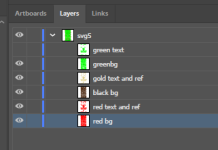
So it’s because things are grouped together even though there’s not any actual clipping going on? I’ll give it a shot with ungrouping everything- thanks!Ya, looks like tons of clipping paths. PITA. See what happens if you just ungroup everything a few times and try to delete all those empty clipping paths. Or you may have to release them first. I’m putting my daughter to bed right now and can do it later.

KR Sound
Well-known member
I'll PM you.So it’s because things are grouped together even though there’s not any actual clipping going on? I’ll give it a shot with ungrouping everything- thanks!

KR Sound
Well-known member
I just did that and got it all cleaned up.Have you tried Select All, then Object>Clipping Mask> Release a few times until it no longer has masks to release?
Bricksnbeatles
Member known well
I had in inkscape, and it was showing as there being no clipping masks remaining. @KR Sound was able to do that within illustrator it seems, but I do wonder why there's a lack of congruency with them- after all SVGs should be more or less consistent between platforms if they're just vector graphics. I'll have do do some more digging to get to the bottom of thisHave you tried Select All, then Object>Clipping Mask> Release a few times until it no longer has masks to release?

Passinwind
Well-known member
Inkscape is unfortunately notorious for using their own SVG format by default:I had in inkscape, and it was showing as there being no clipping masks remaining. @KR Sound was able to do that within illustrator it seems, but I do wonder why there's a lack of congruency with them- after all SVGs should be more or less consistent between platforms if they're just vector graphics. I'll have do do some more digging to get to the bottom of this

How can I set Inkscape to save as plain SVG by default?
Inkscape, for reasons unclear to me, saves by default in bloated format. Fortunately there is "plain SVG" option when saving. How can I make it the default?
 graphicdesign.stackexchange.com
Bricksnbeatles
Member known well
thats one of the big reasons why I use Inkscape a lot. If I’m trying to put together text from a source other than a font (I love finding old hand-lettered stuff and old 1800s brass-press type and assembling full character sets by bitmap-tracing the best examples of each character across many sources, and then cleaning them up and evening them out for some manual typesetting stuff— I really should just create ttf files with them once I’m done, but then that’s a whole other program for me to learn)That’s good to know. I use inkscape’s bitmap tracing a lot because in certain cases it works better than Illustrator. Saving it like that would be a lot cleaner than all their stuff they put in the svg.
The other reason is that I spent 7 years not being able to afford Adobe, so now I’m really used to Inkscape and can’t break the learning curve of Adobe programs
Bricksnbeatles
Member known well
With this graphic, did you create the corner radii via a clipping mask with rounded corners, or were those pixels converted to 0% opacity in the original bitmap image? I’m guessing the clipping mask, since I know transparency in PNG images often defaults to whatever the Key tone is in sign and textile print jobs, but figured I’d ask since it really could go either way…I tried some new things with my latest print/drill and I am really pleased with the results. The pedal is the Narcissus Overdrive (DOD Looking Glass clone).
1. I had heard of people submitting non-vector designs successfully, but was still nervous from all the warnings about it on the Tayda website. The background image on this pedal is NOT vectorized at all and looks great.
2. I tried to make the entire top of the pedal gloss (same area as the background image), but kept getting error messages from Tayda about the GLOSS layer not existing - even though it did. I eventually gave up and printed it without the gloss, but I don't know if they did not like a full gloss or I just submitted something wrong (I have gotten a more sparse gloss layer to work in the past).
3. Since Tayda now offers cutting straight lines and even encourages people to make interesting designs, I decided to try a bit of an experiment. For unknown reasons I get irrationally upset when my small DC jacks get loose and rotate in the enclosure...which they always seem to since I buy it the cheapest mini DC jacks. I was able to cut a shape that had a flat top and bottom and sides that get close to arcs (but are really small straight lines). It worked! The mini DC jack does not fit as snuggly as I would like, but the concept was a success and the jack still cannot rotate.
View attachment 40391View attachment 40392
benny_profane
Well-known member
benny_profane
Well-known member
Maybe round/taper the end of the swash a bit; otherwise, it looks spot on.How's this look:

mkstewartesq
Well-known member
Which color do you plan to put this on? I wanted to do a case with a "bare metal" look but have heard it ranges from "hit or miss" to "no bueno" as to whether the UV print will stick to bare aluminum. Since both Ball Silver and Chromium have such horrible reputations for durability, I was planning to settle on Winked Silver even though it's not exactly the effect I was going for.
Bricksnbeatles
Member known well
There’s the new matte clear. Probably a good alternative to printing on a bare enclosureWhich color do you plan to put this on? I wanted to do a case with a "bare metal" look but have heard it ranges from "hit or miss" to "no bueno" as to whether the UV print will stick to bare aluminum. Since both Ball Silver and Chromium have such horrible reputations for durability, I was planning to settle on Winked Silver even though it's not exactly the effect I was going for.

PedalBuilder
Well-known member
Have you considered the the matte clear option? Should work better than the bare aluminum for UV printing while still giving you the bare metal look.Which color do you plan to put this on? I wanted to do a case with a "bare metal" look but have heard it ranges from "hit or miss" to "no bueno" as to whether the UV print will stick to bare aluminum. Since both Ball Silver and Chromium have such horrible reputations for durability, I was planning to settle on Winked Silver even though it's not exactly the effect I was going for.
mkstewartesq
Well-known member
I was not even aware that was an option, thank you. But now @Big Monk has me leaning toward Winked Silver just through peer pressure ….Have you considered the the matte clear option? Should work better than the bare aluminum for UV printing while still giving you the bare metal look.

Mentaltossflycoon
Well-known member
Probably my favorite tayda color.Winked Silver is incredible in person.
mkstewartesq
Well-known member
So what is everyone currently experiencing as far as turnaround times? I know that the Tayda UV printing page states 12 business days – but I also see other pages that are warning people about delays due to the “long holiday“ that happened back in January so I’m not really clear on how much effort Tayda makes to keep those announcements/estimated timelines current.
My current order (my first) has been “in progress” for going on three weeks now and was just curious as to how much longer I should expect before it’s completed and shipped (I stupidly put a lot of components I needed in the same order to save on shipping, so I’m not going to receive them until the enclosures are done).
Thanks,
Mike
My current order (my first) has been “in progress” for going on three weeks now and was just curious as to how much longer I should expect before it’s completed and shipped (I stupidly put a lot of components I needed in the same order to save on shipping, so I’m not going to receive them until the enclosures are done).
Thanks,
Mike
Bricksnbeatles
Member known well
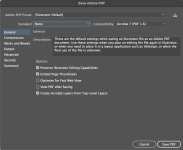
Just expporting my ai files to PDF to send off to tayda. I looked around a bit, and haven't seen specifics on PDF specs, but i might have just missed it...
Y'all just saving as Illustrator Default?or are there any export setting to be changed?
Y'all just saving as Illustrator Default?or are there any export setting to be changed?