Tayda UV Printing

What's a safe distance in your experience?
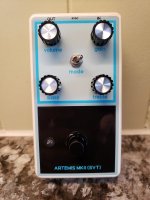
Something like 2mm I think. I go with feeling. See the bottom corners, I would have to get that pdf to compare spacing.
20221226_140742.jpg
The white doesn’t have perfect alignment to the color always, and it can look goofy.
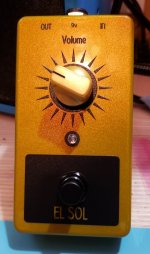
I guess I've been lucky, but did not do the black on black either. I've never had white overflowing but I see how it could easily happens. I really love black and matte over the new gold ... really gives some textures.
20230518_100442.jpg
 
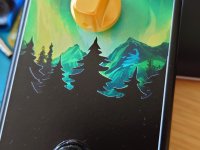
I have a good example of white not being perfectly aligned. But thankfully in this case it just looks awesome. I really love that effect. So I'm not really worried about it in the future either. The black here was just blank on the print file, so it's the natural color of the enclosure showing through. For sure my favourite design I've done so far.

DSC_2416.JPG
 
Last edited:
I'm looking to do a white-only design on a red enclosure sometime very soon, so just to clarify, if I wanted to do double white does the white in the colour layer also have to be RDG_WHITE or can it just be "normal" white?
 
I'm looking to do a white-only design on a red enclosure sometime very soon, so just to clarify, if I wanted to do double white does the white in the colour layer also have to be RDG_WHITE or can it just be "normal" white?
If your design is only white, then don't need the COLOR layer, but you'll want to add this item to your order so that they print the WHITE layer twice:


I assume you'll want a gloss layer of some kind, so in the end your PDF will only have WHITE and GLOSS-V or GLOSS-M.
 
If your design is only white, then don't need the COLOR layer, but you'll want to add this item to your order so that they print the WHITE layer twice:


I assume you'll want a gloss layer of some kind, so in the end your PDF will only have WHITE and GLOSS-V or GLOSS-M.
Amazing, and correct about the gloss. Thank you very much!
 
For anyone else wondering about the queue, I placed the order on the 1st and currently (after 8 days) they have been drilled and one has been painted, but the rest have not even started being painted yet (previously they seemed to always move to painting "started" after drilling being complete, this time they're still pending). So I think it will take probably until the 12th or so at the very least until they are ready, maybe even longer. But tbh they do post the expected delays on the site, and even if it usually always is faster than that, you can't rely on it always being faster.

Thanks for confirming this, I placed an order June 6 and it still hasn't moved, good to know it's just backlog and (probably) not something I did wrong.
 
Thanks for confirming this, I placed an order June 6 and it still hasn't moved, good to know it's just backlog and (probably) not something I did wrong.
FWIW the rest of them finished being painted on late Friday or on Saturday I think, and I think they went really quickly from started to finished, so I'm not sure if someone forgot to check them in for the status change or if it just went quickly. All are now in "UV Printing: Started", so I'm hopeful they'll be done today or tomorrow.
 
Ordered on thursday morning, painted, no drilling, with uv printing. It was completed friday. Still waiting for shippment.
 
Mine was shipped today (in contrast to Musikding which was "shipped" on the 1st but isn't actually yet shipped).
 
  • Like
Reactions: Nic
Ordered on thursday morning, painted, no drilling, with uv printing. It was completed friday. Still waiting for shippment.
Drilling always seems to be where they get backed up. Once the drilling has been completed the rest of the steps tend to go pretty quick. I wish I didn't need so many damn holes :confused: I'm not in a huge hurry for these though, I don't actually need them until July.
 
Drilling always seems to be where they get backed up. Once the drilling has been completed the rest of the steps tend to go pretty quick. I wish I didn't need so many damn holes :confused: I'm not in a huge hurry for these though, I don't actually need them until July.
Drilling a lot of holes seems to slow Amplifyfun down a bit too, IME. But hopefully he's mostly just getting busier these days, which I hope is the case since mo viable long term options is mo bettah.
 
After submitting a few print and drill jobs, I realized that I made a mistake. In particular it was the Parentheses Fuzz enclosure where I didn't realize that the Tayda drill template linked in the Parentheses Fuzz product info is rotated 180 degrees compared to the drill template in the build doc pdf.

Does anyone have any experience with asking Tayda to make a fix after submitting a job? It's my mistake and there's plenty of warnings shown to make sure everything is correct before submitting, so I can understand if they can't help me with this but it would be really nice if they could.
 
After submitting a few print and drill jobs, I realized that I made a mistake. In particular it was the Parentheses Fuzz enclosure where I didn't realize that the Tayda drill template linked in the Parentheses Fuzz product info is rotated 180 degrees compared to the drill template in the build doc pdf.

Does anyone have any experience with asking Tayda to make a fix after submitting a job? It's my mistake and there's plenty of warnings shown to make sure everything is correct before submitting, so I can understand if they can't help me with this but it would be really nice if they could.
Try emailing Hugo?
 
Thanks again @giovanni , Hugo was able to cancel the job and allow me to fix the UV print file.

I'm really second guessing myself with something really basic and I'd appreciate if someone could confirm my thinking. The Parantheses Tayda Electronics Drill Template has the I/O jacks on the right side, while the drill template included in the build docs (Download Build Documentation) have it on the left side (and I used this when creating my print design). In order for me to use the Tayda drill template I would need to rotate my print design by 180 degrees in order for the design to match the drill template?
 
In order for me to use the Tayda drill template I would need to rotate my print design by 180 degrees in order for the design to match the drill template?
You can just to be safe, but I'm pretty sure they would know which side was the top based on the holes drilled.
 
Back
Top