Tayda UV Printing

Wow, that drawing is dope. Sent another design this morning, but I'll have to wait. Since they've been offering the snail mail option, I'm gladly cutting out the extra DHL fees and I've made numerous smaller order. (Thinking, I don't need to order more stuff, but then). Now if only those PCBs can get back in stock...

Edit: here it is, made good use of your indicators. I added a GLOSS-V to everything, we'll see hot it looks on the patterns of the cab.
View attachment 10474
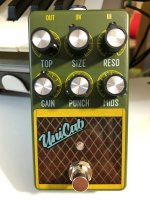
Really happy how this turned out. Gloss varnish on everything and white underlay under everything. The tweed in the cab + all the finer lines are excellent, and the gloss on the cab is just shiny and sleek enough, covers well. You can still feel some texture, like on the Unicab logo, which is nice for this application, but you might want to go for the emboss is you want a more even surface.
Again, thanks to @dmnCrawler for the indicators, looks so good with those knobs.
IMG_7402.jpg
 
Really happy how this turned out. Gloss varnish on everything and white underlay under everything. The tweed in the cab + all the finer lines are excellent, and the gloss on the cab is just shiny and sleek enough, covers well. You can still feel some texture, like on the Unicab logo, which is nice for this application, but you might want to go for the emboss is you want a more even surface.
Again, thanks to @dmnCrawler for the indicators, looks so good with those knobs.

View attachment 11171

You knocked it out of the park with this one, it's awesome!!

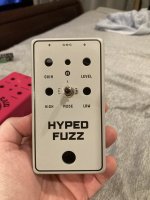
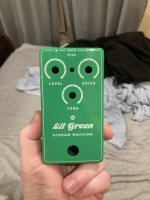
I got four in the mail today, including my hyped fuzz that I could not have done without ya! Your guidance has been sooo helpful dude. Also didn't come today but to continue the appreciation to @dmnCrawler, I snagged a pic of my lil green scream machine enclosure with his knob legends.

IMG_5779(2) (Medium).JPG IMG_5780(2) (Medium).JPG IMG_5781(4) (Medium).JPG IMG_5782(3) (Medium).JPG IMG_5783(3) (Medium).JPG

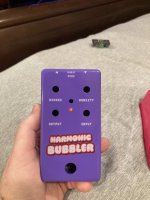
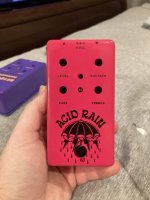
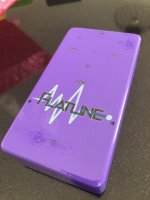
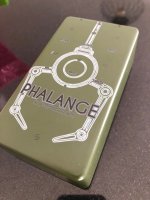
Really surprised by how much I like the matte gray. Harmonic bubbler is for Antithesis fuzz.
 
Most excellent stuff there, looking great!
I have my first ones ordered, can't wait to see how they turned out, twiddling thumbs as they seem quite busy and had holiday delays.
Thanks for all the help here and inspiration, especially to dmncrawler for kicking this off and the tutorial and all the help!
 
You knocked it out of the park with this one, it's awesome!!

I got four in the mail today, including my hyped fuzz that I could not have done without ya! Your guidance has been sooo helpful dude. Also didn't come today but to continue the appreciation to @dmnCrawler, I snagged a pic of my lil green scream machine enclosure with his knob legends.
Looks great. Love your aesthetics!
 
See this post
Turned out great. This was with a matte varnish because I wanted a more aged look to go with the old book theme.
Something with more vibrant colours and a gloss varnish would really pop nicely IMO.

Oh man that's way cooler than I was imagining. Probably would be possible to cop Devi Ever's enclosure style with 2 passes of color and white

iu
 
Does anyone have any tips / notes for Tayda's custom enclosure drilling for non standard pedalpcb templates? The drill design tool looks intuitive enough but wanna make sure it comes out right. I've been sitting on finished hyped fuzz and carcass fuzz boards procrastinating on figuring this out
I'm in the process of doing my first pedal and getting it printed at Tayda. My PCB is from madbeans. What I've done is open the 125B printing template from Tayda. In another project I've opened the drill template from MBP. I measured out the x and y coordinates for each drill hole (eg, vol knob is -19.70 x and 15.25 y I then went back to the Tayda template and created guides and added marks for pilot holes so as to match the MBP layout. This should sort out the slight difference in size between the Madbeans and Tayda layouts (it's only a couple mm but I think that's enough to really fuck up the drilling and artwork matching up..)
 
@AubreySound
The size difference is because the Tayda template has to stay inside the top of the enclosure and they are tapered. As log as all the knobs are the correct distances apart you will be fine. And send that svg :)
 
Does anyone know if the $2 charge for gloss emboss is in addition to the $4 printing charge if you’re only doing gloss printing? I want to do a black on black thing with a black sand enclosure and the gloss emboss printing option to make it really subtle and *classy* :cool:
 
I am ready to take the dive! I've always done photoshop, but have downloaded Affinity and Inkscape and have made considerable progress over the last couple days. A couple of questions. dmnCrawler, I saw you mentioned having problem with a white layer and mentioned "spot" color. Is this because you didn't use the Roland Swatch? I am not sure I understand what "spot" colors are so excuse my ignorance! Second, what is the consensus dpi to save at? I've seen 300, 400 and 600. I miss the marquee align from photoshop in inkscape. I gotta figure out how these nodes work.
 
I am ready to take the dive! I've always done photoshop, but have downloaded Affinity and Inkscape and have made considerable progress over the last couple days. A couple of questions. dmnCrawler, I saw you mentioned having problem with a white layer and mentioned "spot" color. Is this because you didn't use the Roland Swatch? I am not sure I understand what "spot" colors are so excuse my ignorance! Second, what is the consensus dpi to save at? I've seen 300, 400 and 600. I miss the marquee align from photoshop in inkscape. I gotta figure out how these nodes work.
I'm also in the same boat getting my head around this, the 'honoring spot color' is in last step in Affinity when you export to pdf under the 'more' tab, you'll see a few options and 'honor spot colors' should be checked I believe.
As for dpi I'm wondering myself, so far I have used 300 dpi. Would be great to hear other chime in on that.
 
Spot colors are colors that are printed in a single pass, as opposed to colors that printed by combining layers of cyan, magenta, yellow and black (this is called a few things: process printing, cmyk printing, four color, subtractive). If you've ever looked at an LED screen really close up and seen how there are grids of red, green and blue lights you're looking at the light equivalent of process printing. A single LED exactly a certain color would be the equivalent of spot color printing and is used in high end printing for absolute color matching, or speciality printing like in the case of UV printing to represent specific functions. (in this case, the Roland white spot color is actually representing a single pass of white ink)

As far as things specific to Affinity and Inkscape in handling spot colors, I can't really chime in because I use Illustrator but I know people have talked about it to some degree in here. I'm also not sure why DPI would factor into exporting vector art, again I don't use Affinity or Inkscape, but 300 or higher should be fine.

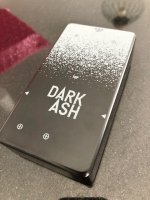
Does anyone know if the $2 charge for gloss emboss is in addition to the $4 printing charge if you’re only doing gloss printing? I want to do a black on black thing with a black sand enclosure and the gloss emboss printing option to make it really subtle and *classy*

The gloss emboss is a topcoat on the print itself and like the matte and varnish can be applied to any printing on any enclosure. I would describe a print without any topcoat as (depending on the enclosure, but generally) satin or semi-satin.

@dmnCrawler did a black on black enclosure here: https://forum.pedalpcb.com/threads/tayda-uv-printing.4245/post-50546 and I did one here: https://forum.pedalpcb.com/threads/tayda-uv-printing.4245/post-51824
 
Last edited:
Hello everyone,

I used the information I found on this thread to make my order and I'm happy with the results!
I do think that I can improve the coloring thought.

IMG_1485.jpg IMG_1484.jpg IMG_1486.jpg IMG_1483.jpg

I've checked the white layer and the code (C= 25% M= 25% Y= 25% K= 25%) and it was correct. The white came greyish nevertheless. I don't know if just a second layer of white will do it or it's something incorrect on my design.
 
I've checked the white layer and the code (C= 25% M= 25% Y= 25% K= 25%) and it was correct. The white came greyish nevertheless. I don't know if just a second layer of white will do it or it's something incorrect on my design.

I can't tell from the photos of your other enclosures but going off of the black, it looks like your files were set up correctly and resembles my results for printing white on Tayda's glossy black with a single white pass. I have several enclosures ordered with two passes of white on darker enclosures (without color going over the white) and will post to the thread with results. Awesome job on the enclosures : )

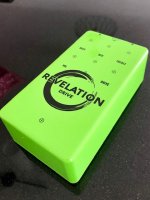
What does Tayda call that green one? The color is awesome
 
(apologies for the double post)

I'm looking to compile user photos of Tayda enclosures because of how small and mediocre their product photos are for them - if it's ok for me to use photos of your enclosures you've posted to the pedalpcb forum with credit for color representations on my website can you please like / react / etc to this reply?
 
Thank you for the reply! Right, next order I'll try with the double passes!

What does Tayda call that green one? The color is awesome
That's the "125B Style Aluminum Diecast Enclosure Lawn Green" - SKU: A-5850

I'm looking to compile user photos of Tayda enclosures because of how small and mediocre their product photos are for them - if it's ok for me to use photos of your enclosures you've posted to the pedalpcb forum with credit for color representations on my website can you please like / react / etc to this reply?
Yeah, no problem (y)
 
Back
Top