SYLV9ST9R
Well-known member
That's just how the UV comes out without gloss, i.e. some "grainy" textureI honestly didn't specify anything. It's just RDG_White on their matte blue enclosure! That's it!

That's just how the UV comes out without gloss, i.e. some "grainy" textureI honestly didn't specify anything. It's just RDG_White on their matte blue enclosure! That's it!

I honestly didn't specify anything. It's just RDG_White on their matte blue enclosure! That's it!
That's just how the UV comes out without gloss, i.e. some "grainy" texture
Put a redundant white layer under the yellow to ensure that the print isn’t affected by the substrate color.I've only done one enclosure without varnish, but it was yellow on magenta, and needless to day, it doesn't look nearly as cool.



I’m getting ready for my very first Tayda UV order and I am also trying the Inkscape route. I have my three layers at this point. Do you usually set the Roland swatch in Inkscape? Or in Scribus? And then what are the steps in Scribus? Is it trivial to convert to pdf or is there anything to be careful with?I'm an Inkscape/Scribus user (I have my own pains), so I'm not sure exactly what it might be called. In Affinity Designer the options is something like "honor spot colors" in Scribus it's "Convert spot colors to process colors", I don't know about Illustrator.
Thanks, I'll take a look!You make a one layer svg in inkscape and then import the svg in scribus.
Adjust all colors to cmyk
Import roland swatches
Duplicate layers And rename them
Apply swatches on the good layers.
Chack @Dan M answers in this post, he explains every step really clearly. https://forum.pedalpcb.com/threads/tayda-uv-printing.4245/post-118370
Just waiting for the results of my first batch of printing.
Did you ever figure this out? I am having the same issue (also on Mac).Converted the Roland swatch pdf to a .AI file since Scribus doesn't allow you to import PDFs. Anyone know why I'm getting this?
View attachment 25722
EDIT: I was able to get it by redownloading the swatch file from tayda (when you click the link, it saves as a pdf, but if you do "save as", it saves as the original .ai file. I guess conversions from ai to pdf and back to ai aren't too fun hahah), but this is what my color palette looks like now–– way more than what's supposed to be there, and all labeled weird. anyone know which spot colors are the white and gloss here?
View attachment 25723

Nope. I gave up on scribus since I needed to get an Adobe subscription for some of my classses. SorryDid you ever figure this out? I am having the same issue (also on Mac).

Bleeeeerg!Nope. I gave up on scribus since I needed to get an Adobe subscription for some of my classses. Sorry


Has anybody else noticed pretty bad tolerances in the centering of their artboard on UV prints from tayda? It's nothing crazy but I have ordered a run of enclosures and found that my artboard or holes for some of the enclosures in the same batch are off by about a millimeter or more sometimes. Seems to mainly be the X... I'll post pictures about what I'm talking about tomorrow.
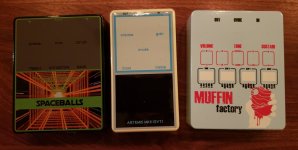
I haven’t noticed this yet, but I’ll take a close look at my enclosure coming in Monday and report back. I believe the drill page says +/- 1mm. I’ve had a hole in the side of an enclosure off by a bit, but other than that one it has been good as far as drilling. Do you have pictures of yours? I believe there is a good history of them fixing bad enclosures, but I’ve never had one bad enough to request a replacement.

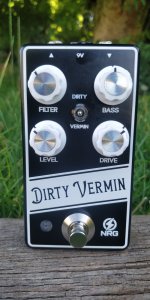
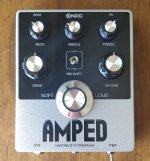
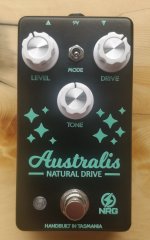


I've done it twice and it's worked good for me.Quick question, has anyone tried Tayda UV printing onto an unpainted enclosure? I have a design I think would suit being printed onto bare aluminium, but I have concerns about whether or not the printing will stick to an unprepared surface,

That is quite honestly amazing and will go perfectly with the grungy design I have in mind. Thanks for putting my mind at ease.I've done it twice and it's worked good for me.
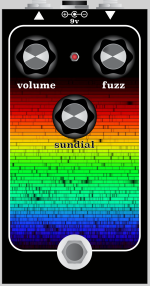
I am very excited to have submitted this to Tayda today! Fingers crossed it'll turn out well. I used Inkscape for the art and Affinity Designer to make the pdf, all thanks to @dmnCrawler for his amazing tutorial on his blog!Here's art for my Sun face (Si). The background image is the spectrum of the sun, which I thought was pretty appropriate, besides looking pretty cool.
View attachment 37292