
You are using an out of date browser. It may not display this or other websites correctly.
You should upgrade or use an alternative browser.
You should upgrade or use an alternative browser.
Tayda UV Printing
- Thread starter dmnCrawler
- Start date
shazbat1966
New member
Pretty sure once the stroke is put to path it becomes an object like everything elseIt just occured to me that I may be giving myself more work than I need to... The Tayda UV printing site makes no mention of having to convert strokes to paths, but every print I've done in the past, I went throught the file converting everything and carefully correcting each misshapen one, etc...
Anyone able to confirm that I've been wasting my time, and that its totally fine to have strokes instead of paths for any linework and outlines?
shazbat1966
New member
Although ? if the stroke isn't put to path will it show up on print pdf? well it shouldn't, but maybe does? I found overlapping stroke on fill a problem. is there a way to set the stroke to expand out from the main body only without spreading in and starting to cover the fill as it does by default? then there's no overlap. So when I converted my stroke to path I noticed a small overlap between it and the fill. I too painstakingly went through and differenced out all these overlaps. I'm trying to avoid stroke wherever I don't need it for that reason. If I could change those stroke settings it would be greatPretty sure once the stroke is put to path it becomes an object like everything else
Last edited:

Fama
Well-known member
FWIW Pig Operative came out pretty great, I tried to take a picture at an angle to emphasize the chromium look:

It mostly looks really cool in motion so you see how it reflects.
However, I'm not very happy with the Gladio:
Here's a screencap of how it looked before printing:

It's not just me who thinks the colors are pretty different, right? The printed one is much paler. I don't think it's my display either. I've checked, the file is in CMYK too. Any ideas what could have gone wrong here? Or is it just contrast or something? Basically it looks more yellow and paler, while the original is more reddish to me.
Also one other enclosure had a small blemish (some grain of sand or metal or whatever under the printing it looks like), but thankfully in a spot where it doesn't bother me much.

It mostly looks really cool in motion so you see how it reflects.
However, I'm not very happy with the Gladio:

Here's a screencap of how it looked before printing:
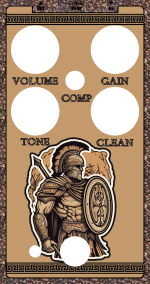
It's not just me who thinks the colors are pretty different, right? The printed one is much paler. I don't think it's my display either. I've checked, the file is in CMYK too. Any ideas what could have gone wrong here? Or is it just contrast or something? Basically it looks more yellow and paler, while the original is more reddish to me.
Also one other enclosure had a small blemish (some grain of sand or metal or whatever under the printing it looks like), but thankfully in a spot where it doesn't bother me much.
Attachments
Last edited:
benny_profane
Well-known member
What’s been folks’ experience with tayda explaining ‘severe issues’ with artwork files? I’ve had one flagged that I cannot find an issue with, and there’s been no response from tayda help / Hugo.
Fama
Well-known member
I've only had an issue with drilling and that was because I left one coordinate as null (it was supposed to be 0 so it looked correct in the preview). In my experience the response was good, but it took a few days. Maybe you can post the file here and we can take a look?What’s been folks’ experience with tayda explaining ‘severe issues’ with artwork files? I’ve had one flagged that I cannot find an issue with, and there’s been no response from tayda help / Hugo.
benny_profane
Well-known member
There's an aesthetic issue with the border I need to take care of, but I don't know what would trigger the flag from Tayda.Maybe you can post the file here and we can take a look?
Last edited:
Fama
Well-known member
If I open the file in Acrobat reader, you're missing the gloss layer - not sure if that's enough to trigger an issue. I think you should have it even if it's empty?Thanks. Please see the attached.
There's an aesthetic issue with the border I need to take care of, but I don't know what would trigger the flag from Tayda.
benny_profane
Well-known member
I've only ever included it if the design actually had gloss. I've never exported an empty layer. Is that common?If I open the file in Acrobat reader, you're missing the gloss layer - not sure if that's enough to trigger an issue. I think you should have it even if it's empty?
benny_profane
Well-known member
I think I figured it out. When I expanded the stroke on the triangle, I didn't get rid of the interference with the main shape.
vigilante398
Authorized Vendor
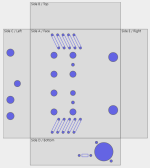
I screwed up. I have an enclosure design that has 41 holes, so I ordered the extra hole when I placed the order for 10 enclosures, but when I was setting it up on the drill/print side of things I forgot to change the quantity so one went through but it won't let me submit the others because I only had one "extra drill hole" in my order. Reached out to Hugo to resolve, I'm sure we'll get it settled.
But I feel dumb.
But I feel dumb.
benny_profane
Well-known member
That’s so many.41 holes
vigilante398
Authorized Vendor
You're not wrong. It was at 39 so it was fine, but then I added a couple more holes for the ground lift switch next to the XLR jack.That’s so many.
vigilante398
Authorized Vendor
Brief update on the 41-hole monstrosity, Hugo canceled my original order for me so I could reorder, new order (10 enclosures) placed on May 19, shipped May 24.

mkstewartesq
Well-known member
Was the order just for drilling or did you also have painting and printing done? 5 days seems an awful fast turnaround if anything more than just drilling bare enclosures. It's been taking my drill/paint/print jobs about 10 days on average of late.My current drill/paint/print order has been there for 4 days and they just finished drilling today.Brief update on the 41-hole monstrosity, Hugo canceled my original order for me so I could reorder, new order (10 enclosures) placed on May 19, shipped May 24.

vigilante398
Authorized Vendor
That was for drilling, powdercoating, and UV print for 10 boxes.Was the order just for drilling or did you also have painting and printing done? 5 days seems an awful fast turnaround if anything more than just drilling bare enclosures. It's been taking my drill/paint/print jobs about 10 days on average of late.My current drill/paint/print order has been there for 4 days and they just finished drilling today.
I'm just getting started with building pedals and I'm thinking of ordering a few enclosures and getting them printed by Tayda. I've read a few of the guide posts and looked at some of the templates offered by some of the members here, but I have a pretty basic question as I'd like to make sure I have everything lined up correctly.
I'm thinking of starting with the blank template from Tayda and use Adobe Illustrator. If I do this, I'd like to be able to mark exactly where the drill holes will be so that I can make sure the art will fit correctly. Can I simply create a circle/ellipse in AI and set the x/y/d using the exact values from the pedalpcb drill template (such as this: https://www.taydaelectronics.com/datasheets/files/125B-DrillTemplate_4Knob-1.pdf)? Would that place the drill mark exactly where Tayda will drill it (especially if using the pre-drilled enclosures)?
I looked at one of the art templates provided by one of the members, and in those cases it looked like the knob placement for example was off by a few mms compared to the drill template. I'm not sure if this is just due to the way I imported the files, or if that placement there is indeed correct, but if my basic method mentioned above would work then I wouldn't mind just going that way since it's not too much work.
I'm thinking of starting with the blank template from Tayda and use Adobe Illustrator. If I do this, I'd like to be able to mark exactly where the drill holes will be so that I can make sure the art will fit correctly. Can I simply create a circle/ellipse in AI and set the x/y/d using the exact values from the pedalpcb drill template (such as this: https://www.taydaelectronics.com/datasheets/files/125B-DrillTemplate_4Knob-1.pdf)? Would that place the drill mark exactly where Tayda will drill it (especially if using the pre-drilled enclosures)?
I looked at one of the art templates provided by one of the members, and in those cases it looked like the knob placement for example was off by a few mms compared to the drill template. I'm not sure if this is just due to the way I imported the files, or if that placement there is indeed correct, but if my basic method mentioned above would work then I wouldn't mind just going that way since it's not too much work.

Fama
Well-known member
That's what I do and it works great. For example, when planning for 20mm diameter knobs, create 20mm circles. I use the "center on axis" buttons (for both X and Y) and then the move function and input the drill tool measurements - one of the axis (Y maybe?) is flipped on AI so you need to change it from plus to minus or the other way, but otherwise it's pretty straightforward.I'm just getting started with building pedals and I'm thinking of ordering a few enclosures and getting them printed by Tayda. I've read a few of the guide posts and looked at some of the templates offered by some of the members here, but I have a pretty basic question as I'd like to make sure I have everything lined up correctly.
I'm thinking of starting with the blank template from Tayda and use Adobe Illustrator. If I do this, I'd like to be able to mark exactly where the drill holes will be so that I can make sure the art will fit correctly. Can I simply create a circle/ellipse in AI and set the x/y/d using the exact values from the pedalpcb drill template (such as this: https://www.taydaelectronics.com/datasheets/files/125B-DrillTemplate_4Knob-1.pdf)? Would that place the drill mark exactly where Tayda will drill it (especially if using the pre-drilled enclosures)?
I looked at one of the art templates provided by one of the members, and in those cases it looked like the knob placement for example was off by a few mms compared to the drill template. I'm not sure if this is just due to the way I imported the files, or if that placement there is indeed correct, but if my basic method mentioned above would work then I wouldn't mind just going that way since it's not too much work.
I would add some extra margin to be sure, but they give something like +/- 2mm or something like that for their accuracy. In practice it's usually been better than that for me, but for something special like LED's in someone's eye or something you might have to be careful and design it so that the tolerance is acceptable.
Not the greatest example picture, but you can see that the text worked out very well with the knobs (which are placeholder, the I need gold ones instead).
