
Rpschultz13
Well-known member
If my enclosure is white, then I wouldn't need anything on the white layer would I? Then any white in the color layer would just not get printed? Not sure how the gloss layer would work then.

Correct, you don't need the white layer if you're printing on a white enclosure. Gloss layer is up to you, it will get printed over the top of your c olor layer. Without a gloss coat the UV print has a matte finish. Personally I like the matte look and it works for the artwork I use on my pedals, but depending on the look you're going for, you may want to add some gloss over the top.If my enclosure is white, then I wouldn't need anything on the white layer would I? Then any white in the color layer would just not get printed? Not sure how the gloss layer would work then.
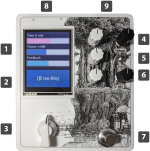
1) ExactlyOK, it's starting to make sense. So:
1) White layer can be empty if I'm using a White enclosure. And I don't need to worry about RDG_WHITE swatch.
2) Color layer has vectorized image and text converted to curves. No swatches necessary. Any white in image simply won't be printed.
3) Gloss layer has same image and text as Color layer, but the GLOSS-V swatch was applied to both. The text looks different color so I know that worked, but image didn't seem to change that I could tell.
4) Also, I cropped the image so it isn't beyond the artwork boundary per instructions. But I didn't cut any holes in the artwork. So it will just print through the holes, right?
Here's the pdf file (with 3 layers), anyone want to "check" it for me?
Should look like this when I'm done with it (different image of course)
View attachment 52386


OK, it's starting to make sense. So:
1) White layer can be empty if I'm using a White enclosure. And I don't need to worry about RDG_WHITE swatch.
2) Color layer has vectorized image and text converted to curves. No swatches necessary. Any white in image simply won't be printed.
3) Gloss layer has same image and text as Color layer, but the GLOSS-V swatch was applied to both. The text looks different color so I know that worked, but image didn't seem to change that I could tell.
4) Also, I cropped the image so it isn't beyond the artwork boundary per instructions. But I didn't cut any holes in the artwork. So it will just print through the holes, right?
Here's the pdf file (with 3 layers), anyone want to "check" it for me?
Should look like this when I'm done with it (different image of course)
View attachment 52386
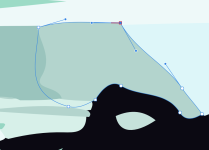
Vector isn’t really required. It’s just easier to say “vector only” than explain the intricacies of file prep for printing. I think they’re trying to avoid getting a bunch of 72dpi submissions.Also, why do we even have to vectorize anything to make Tayda happy? I find it hard to believe that if I send them a 2400dpi raster-based PDF with the correct dimensions and only a single layer needed, it won't print just about as nice and crisp as a vectorized file.
NOW you tell me, after I spent hours in Illustrator doing what would take minutes in MS-PaintVector isn’t really required. It’s just easier to say “vector only” than explain the intricacies of file prep for printing. I think they’re trying to avoid getting a bunch of 72dpi submissions.
 I'll really want those hours back when I'm on my death bed, gasping for just one more breath. Anyhoo, thanks for the raster encouragement.
You might try Spencer at @amplifyfun.NOW you tell me, after I spent hours in Illustrator doing what would take minutes in MS-Paint
*If* I ever use Tayda's drilling/printing again, I'll try high DPI raster artwork. I'm not happy with their production tolerances though. In the last batch of 10 I ordered, most enclosure walls are 2mm thick, as they should be, while the top can be closer to 3mm. 50% difference? Are you kidding me? Many holes are also off by easily 0.5mm or more. Not good enough when everything is PCB mounted - jacks, pots and all.
What else is out there? I'd happily pay more for better quality.
You don't. Most of my pedal designs are vectorized, but I have one that's just a jpeg dropped onto my coreldraw project with vectorized text over the top of it and exported as a pdf. Tayda has never complained and I've ordered it three times so far without issue.Also, why do we even have to vectorize anything to make Tayda happy?
3. I see several people go the route you did but I don't think you need to. If you're applying gloss to the entire face of the pedal, forget using the image or text in that layer. Just create a rectangle that spans the entire design, convert it to a curve, and apply your RDG_Gloss swatch to that rectangle. Much simpler than recreating the wheel when you're applying gloss to the entire face of the design.
Oh, Corel Draw! That takes me waaaay back. First time I used it, it was under Windows 3.1, running on a 386 CPU, with a whopping 100MB hard drive. Those were the days...I thought I was the only one!
Yeah I'm running CorelDraw 2018, got a lifetime license for free from my old job. I use it for UV print artwork (both Tayda and in-house) and for anything going to the CNC. I'm too comfortable with it now to use anything else.My “slow” computer has 2 256gb SSDs…

This is the one I do with non-vector artwork, the image I used is super high-resolution so I don't notice anything wrong with the print, but it's also (obviously) not a super detailed image.How is the print quality with your non-vector images, do you notice a difference between those and vector ones? I might be interested in not using vectors for the backgrounds, because they tend to be messy to turn into vectors and I lose image fidelity. So if I could use the original images instead, that would be helpful.
I recently started messing around with Stable Diffusion 2 installed locally on my PC, and it has a bunch of supersampling tools, so I should probably be fine with getting very high resolution images if necessary.
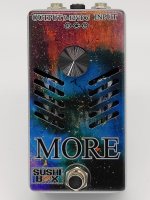
Do you remember what resolution? I can use the upscaling tools in Stable Diffusion so that part shouldn't be an issue. I think I'm at 4k x 4k at the moment, although obviously with a square image some of it is cut off, plus a bit is cut off from top and bottom anyway.This is the one I do with non-vector artwork, the image I used is super high-resolution so I don't notice anything wrong with the print, but it's also (obviously) not a super detailed image.
View attachment 52478
I don't remember the resolution, maybe around 2k-ish? I can check when I get home from work. The text was actually left vectorized, I didn't rasterize it. I convert the text to curves during pdf export to make sure there are no weird issues with embedding fonts, but Tayda has never complained on that one.Do you remember what resolution?
Is the text also rasterized?
So was the text overlapping the background, or did you carve space for it? I suspect I have submitted something where there was overlap before, but I'm not 100% sure. I think the guides suggest you make sure there's nothing overlapping on the same layer (White and Color can overlap of course, and probably should in a lot of cases).I don't remember the resolution, maybe around 2k-ish? I can check when I get home from work. The text was actually left vectorized, I didn't rasterize it. I convert the text to curves during pdf export to make sure there are no weird issues with embedding fonts, but Tayda has never complained on that one.
I used the outline tool in CorelDraw to put a white outline (still in the color layer though) around the text, but I still just left it slapped on top of the image, I didn't actually carve anything out of the graphic.So was the text overlapping the background, or did you carve space for it? I suspect I have submitted something where there was overlap before, but I'm not 100% sure. I think the guides suggest you make sure there's nothing overlapping on the same layer (White and Color can overlap of course, and probably should in a lot of cases).
