Guardians of the analog
Papi Fuego
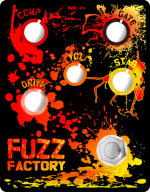
His guy Justin did the art, I just did the vectorizing and easy stuff. It is cool though.Wow that’s pretty.

His guy Justin did the art, I just did the vectorizing and easy stuff. It is cool though.Wow that’s pretty.

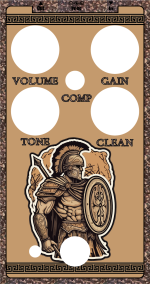

I’ve only used one, but I think that would have worked fine. There was one of those dreaded undefined white layer problems and what they sent me was a bit of a mess, but I’d love to try a do-over eventually, especially since I gave it to my brother as a casual tester and he’s been gigging with it for the best part of a year now.View attachment 47881
Anyone who has ordered a hammered copper enclosure, do you think the text would look ok if it was black outline with a hole in the middle so the hammered copper shows through? Or should I just go with brown on the inside or something like that. It's hard to tell when I just use a very hackjob of a background as a guide (cropped from their picture).


Thats how I always do it. Rather than dots, I do crosshairs with a .1mm line width.Quick question for the Tayda UV printing Gurus..... Is the following a good idea?
I was planning to get the pedal UV printed by Tayda and print dots at the center of my drill locations. Once I got the pedal, I would drill the holes, using my location dots, etc.
The only reasons for this method is to save money and make drilling adjustments (if my measurements were wrong).
Thoughts? Thanks as always.
That’s perfectly fine. Plenty of folks do that.I was planning to get the pedal UV printed by Tayda and print dots at the center of my drill locations. Once I got the pedal, I would drill the holes, using my location dots, etc.
Great idea!Thats how I always do it. Rather than dots, I do crosshairs with a .1mm line width.
Thanks.That’s perfectly fine. Plenty of folks do that.
I've done that a lot, but crosshairs. If the control graphics alignment is off a little it makes it simple to keep the knobs lined up with the tick marks and/or function labels. But I'm not keen on metalwork (have to do it outside in random crazy weather), and just having someone else do the drilling is often a huge bonus to me.Quick question for the Tayda UV printing Gurus..... Is the following a good idea?
I was planning to get the pedal UV printed by Tayda and print dots at the center of my drill locations. Once I got the pedal, I would drill the holes, using my location dots, etc.
The only reasons for this method is to save money and make drilling adjustments (if my measurements were wrong).
Thoughts? Thanks as always.

$200, plus the cost of whichever enclosures. An additional $100 if you’re doing a gloss layer tooSorry to hijack, but does anyone know off hand how much Tayda’s printing costs for 100x 125B enclosures? My art is just black and white over an enclosure that’s painted a solid color. Thank you!
Thank you!!!!!$200, plus the cost of whichever enclosures. An additional $100 if you’re doing a gloss layer too
I think you could just attach it to your post.I am about ready to try Tayda for my first UV print. I have used @Fingolfen wonderful instructions, so the process was made much easier. If able, I'd really like if someone would check my graphics and see if I have everything done correctly. I think I have it right, but a little confused about the gloss layer. It obscures viewing the underlying layers, even if I hide the gloss layer, so I am unsure if it is correct. The picture should be the phases of the moon. The pink dots are for my drilling pattern (that I'll do). I also want to make sure that the I will not have any of the printed area on the pedal's edges.
Here is a link to the Adobe file: https://drive.google.com/file/d/1npcqMbnavXh14hU_bheaLxvqUTk9kGMl/view?usp=sharing
If there is an easier way to share the necessary information, let me know.
Thanks for the help!
Thanks. I tried to attach the pdf and AI file, but it was too large. I have updated the permissions on the link.I think you could just attach it to your post.
Either that or set the Drive link to "anyone with a link", currently they have to ask for permission with their own email address.
 drive.google.com
The moons should have a gray gradient (like a normal picture of the moon), not white. I did put a white layer underneath the color image/layer. When I look at the moons in the color layer, the swatch is a “?.” I assumed that was due to the fact that the picture was not one color.Looks correct to me, if I hide the gloss layer, I don't see the gloss anymore. They seem to have the correct spot color, same for white. Everything is vectors.
Color for the moon(s), and the small drilling aids, and everything else is in white? And a gloss layer on everything? Is that correct?
The drilling aids won't show up like in the preview since they don't have white below them, but I would assume they still work for drilling.