Tayda UV Printing

View attachment 75799
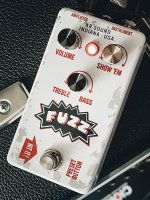
Oh man, I think I'm going to have to send Tayda an email. It has been a while since I last ordered from them and I forgot the prints come out too dark. The bottom row is fine, but Fuzzmaster General is pretty much ruined. It looks even darker IRL than in the picture. I attached the PDF file, would someone to be kind enough to take a look and see if it looks too dark to them? Is something really wonky with the calibration of my screen or something like that? It looks fine to me on my phone and PC, but the pot labels are pretty much unreadable except up close in the finished product.

Edit: I did send Hugo an email about the prints coming out too dark before but he basically replied "yeah it can be hard to know how it will come out" which obviously doesn't help me at all. Is it some setting on my end? Should I just run some brightening or desaturation filter as a last step?

I don't know of any other UV printing service that comes anywhere even near the same prices in EU, otherwise I might switch to them because this really sucks.

Edit2: I guess it might be the black enclosures because the cream one looks exactly like it looks on my screen? I didn't have a double white layer this time, but I have had it previously and it didn't really matter, they've been coming out too dark for a while.
I know this isn't helpful, but your artwork is freaking awesome.

I generally just take the safe route and go for lighter color enclosures, winked silver is my go-to. It shouldn't be the only way to get good color prints, but silver is what I wanted from the start anyway so I'm covered.
 
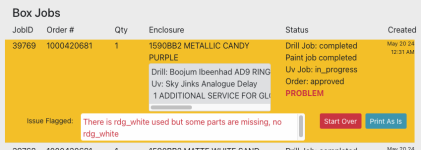
Here's a new (to me) error. "some parts are missing."
I have rdg_white selected in my WHITE layer as usual.
I wonder if this means it's finding RGB white in my color layer that's not reflected in my white layer?
Anyone seen this error before? Is it safe to select "Print As Is" if I have the correct swatch selected in my white layer?


1717002005277.png
 
I've not experienced this myself, but I'd probably start by double-checking to see if any objects in the white layer have strokes or outlines that aren't the rdg_white spot color.

Thanks Brett. I think they're protecting me from this abomination, a 37% opaque moon star thing in the background of the color layer. There's no white behind it on purpose because it's meant to be a dull background moon. I assumed it would just print as a grey-ish blob atop the purple powder coat. But I hadn't considered that there is white implied. Perhaps I should quickly redesign this.

1717023687973.png
 
@jessenator I redid the Fuzzmaster General following your advice, and it definitely came out lighter (I went 280% for the convert to profile for the raster image and 240% for the texts, if that makes a difference). I also added a tiny, even lighter border around the text to improve legibility. Of course it's impossible for me to judge whether it will come out as I expect or if it will still be too dark (or even possibly look horrible in a different way), but I'm thinking of giving this a try.

On some examples I looked at I went about ~9% lower in ink saturation, or from 193 to 176 total in that example (and black dropped from 7 to 0 - this was the text color).
 

Attachments

On some examples I looked at I went about ~9% lower in ink saturation, or from 193 to 176 total in that example (and black dropped from 7 to 0 - this was the text color).

Might be worth paying extra for the double white service. Or is it an option to print it on a white enclosure? That would probably look better.
 
I mean, take my suggestions with a grain of salt. It might work the way you want, it may not.

Going back to my strategy of increasing contrast and just cutting out all of the areas I deem (again, my opinion/preference) dark enough, and just letting the background do its thing. I can't say what would look the best, because I don't have a UV printer, so print at your own risk.
 
Might be worth paying extra for the double white service. Or is it an option to print it on a white enclosure? That would probably look better.
I did pay for double white before, but they still came out too dark a lot of the time. Plus the white that does show up looks fine to me - I don't think that's the issue, rather the non-white parts are too dark...
I mean, take my suggestions with a grain of salt. It might work the way you want, it may not.

Going back to my strategy of increasing contrast and just cutting out all of the areas I deem (again, my opinion/preference) dark enough, and just letting the background do its thing. I can't say what would look the best, because I don't have a UV printer, so print at your own risk.
...although the ones printed on non-black enclosures have tended to work better for me, so maybe there could be something to it. I just love black enclosures aesthetic wise. Also the non-black ones have all been a different style of design I think. But I'll consider that with upcoming enclosures for sure.

About cutting out the dark enough areas, I'm trying to phrase this in the most non-offensive way I can, because I mean no offense - but I literally don't understand why would I do that here? The black areas are not the issue - they're just as black as they should be. It's the areas that are not supposed to be black that are the issue, and I don't think cutting out the black parts help with that - or does it somehow help?

There's also the issue where I normally just have the picture that is cropped to a certain size and shape, and the white layer is the same but slightly bigger so I get black borders. Cutting out some areas of the image would mean I have to do more work with the white layer too. Which is doable, sure, but I just don't see the upside in my case (arguably there would be some ink saved and it would take less time, so Tayda would win, and that's something of course - but I don't think it would improve my outcome, just increase the work and risk of mistakes).
 
No offense taken.

With my own personal projects, the concern is about black in the powder coat and black (or other mixed CMY) the ink not being the same temperature. Like if I wore black jeans, I would have a devil of a time finding a black t shirt that didn't clash because one shifts blue (cold) and the other looks brown (warm). It just bugs me.

But that's how my eyes are trained. I don't mean to offend anyone, or sound superior, but some people just don't see it, or just don't care about it like I do. In some ways I envy people who don't care!

So it's just my design background coupled with my neuroses that does it.

It's not my intention to evangelize my preferences as the one true way. I think it's more just explaining my advice, and at times I don't do it well. Or it could be my fear that someone takes my advice, doesn't like the outcome, and then gets angry with me about it. Perhaps unfounded. It's how I do.
 
No offense taken.

With my own personal projects, the concern is about black in the powder coat and black (or other mixed CMY) the ink not being the same temperature. Like if I wore black jeans, I would have a devil of a time finding a black t shirt that didn't clash because one shifts blue (cold) and the other looks brown (warm). It just bugs me.

But that's how my eyes are trained. I don't mean to offend anyone, or sound superior, but some people just don't see it, or just don't care about it like I do. In some ways I envy people who don't care!

So it's just my design background coupled with my neuroses that does it.

It's not my intention to evangelize my preferences as the one true way. I think it's more just explaining my advice, and at times I don't do it well. Or it could be my fear that someone takes my advice, doesn't like the outcome, and then gets angry with me about it. Perhaps unfounded. It's how I do.
Ahh, black not matching up completely is a very good reason, and a good explanation overall. But thankfully I am one of those people who doesn't care (or at least not yet), and the added complexity plus possible issues with there being too big of a shift between the enclosure-black and the start of the UV paint black is another thing that I'm a little afraid of, but I'll keep it in mind.

Anyway, I decided I'll use the new "Convert to profile"-method with the images for the next set of boxes, but I think I'll do the Fuzzmaster general in the candy purple enclosure anyway to further improve my chances of getting it right. I'll consider other colors for the others too more heavily than before, but I might sneak in a black one just to see if there is a difference. I'll report back once I get them so maybe others can consider whether it's worthwhile (although I think not many people do full on big images), but it will be a few weeks probably due to how backed up their workshop is.
 
All my enclosures were completed yesterday, and it's now been roughly half a day after that, but they still haven't been shipped. Anyone ever had this happen before?

FWIW the drill/print order at least was made Jun 04 24 1:46 PM so that part actually went pretty fast (and I was prepared to wait longer), it's not an issue, I'm just impatient and curious.

Edit: Ahh, got the explanation on the drill site:
One or more boxes for this print job didn't pass our QC so we have to redo the boxes from scratch. You don't need to take any action. Especially prints with gloss layer prone to small air bubbles on gloss print ( this happens often ) and then we have to redo the box from scratch and this really takes time, usually at least 4 - 5 days more. We apologize for the inconvenience.
Understandable, and like I said it's really fine, I was just impatient.

Edit2: ...and they also shipped my order? Now I'm curious (and a little bit anxious) about what I will receive. Will it be a box with a glaring issue, some small issue that is unnoticeable, was it all a misclick on their end or will they send the last enclosure in a different package? Who knows! Place your bets! I wouldn't think they'd do a second shipment with how much shipping must cost for them too, so probably one of the other options.
 
Last edited:
All my enclosures were completed yesterday, and it's now been roughly half a day after that, but they still haven't been shipped. Anyone ever had this happen before?

FWIW the drill/print order at least was made Jun 04 24 1:46 PM so that part actually went pretty fast (and I was prepared to wait longer), it's not an issue, I'm just impatient and curious.

Edit: Ahh, got the explanation on the drill site:

Understandable, and like I said it's really fine, I was just impatient.

Edit2: ...and they also shipped my order? Now I'm curious (and a little bit anxious) about what I will receive. Will it be a box with a glaring issue, some small issue that is unnoticeable, was it all a misclick on their end or will they send the last enclosure in a different package? Who knows! Place your bets! I wouldn't think they'd do a second shipment with how much shipping must cost for them too, so probably one of the other options.
Sooooo.....?
 
Sooooo.....?
Sorry, I didn't want to post three times in a row in this thread so I posted on the mailbox thread instead https://forum.pedalpcb.com/threads/whats-in-the-mailbox-📬-📦.12436/page-326#post-285561

Tl;dr: The enclosure that had the error was fine, but another one had a small blemish I don't really mind too much (but I'll mention it in their review). The colors were better than before, but not perfect yet. I'll have to tweak the "convert to CMYK" values a bit to make them even lighter so they work even better on the darker enclosures.
 
Here’s a visual aid for why it’s so important to use a white underlay for certain applications:

View attachment 76970

Here is the graphic rendering for reference:
View attachment 76971

I’ve already corrected the file and made some improvements while I was at it but it just goes to show that even people used to the process can still forget things from time to time.

I dig your new branding, especially the "HIT IT!" arrow. (y)
 
I think it looks fun and playful. I was just complimenting your art style. Sorry if I'm misunderstanding something.
 
I'm not that snarky. I assumed it was an original design.
In fact, in pondering how I caused offense, I thought you thought I was dissing your missing white layer and thought, "Obviously, I was talking about your graphic rendering, not the botched pedal, which can be fixed."

Honestly, I'm just a dopey dude who tries to make friends by being optimistic and complimenting good work.
 
Last edited:
Nicely done homage. It's a surprisingly whimsical design for the era; I always think of the late 60s / early 70s pedals as being drab, and in grey, utilitarian, folded steel enclosures with bare aesthetics.
 
Back
Top