Tayda UV Printing

Anyone had an UV print job sit at “In Progress” for 5 days? I ordered 2 different enclosure jobs, they both got started faster than usual with the first one getting Drilled/Painted/Printed and the second getting Drilled/Painted but the Print status has been In Progress for the past 5 days after the other enclosure was completed… not sure why it’s stalled there usually the print step happens fast once everything else is completed.
 
  • Like
Reactions: Nic
I don't think I have for UV print, but I had some drill/paint/uv jobs done last time, I ordered two and a week later two others. My second order was completed before the first one.
 
Only five days?

You obviously never ordered when the workshop was overloaded…😂
I have waited much longer but I’m saying they completed the first one rapidly, and even went through the first two steps of this one then it just stalled out… usually it takes a while for them to even start the drilling process but then each step happens rapidly.
 
All bets are off if they are as overloaded as they say they are right now.

I’ve definitely had wonky stuff occur on the order of what you describe.
Alright good to know. I was surprised how fast they started mine, like 3 days after placing the order which is definitely abnormal… but was just weird 1 enclosure was completed and the other was so close and stalled out. Will wait the standard few weeks I guess lol
 
Just wanted to give a shoutout to Hugo at Tayda. Did my second order of UV printed enclosures mid-last week, I realized yesterday that while I managed to triple check almost everything, I'd completely forgotten to "merge" all of my graphics. I sent a message through customer service and Hugo got back to me within 24 hours, told me he could delete the UV print jobs and I was able to upload and attach the fixed files easy peasy. I was worried with all of their "all orders are final!" warnings that I'd be screwed so it's nice to breathe a sigh of relief.
 
Just wanted to give a shoutout to Hugo at Tayda. Did my second order of UV printed enclosures mid-last week, I realized yesterday that while I managed to triple check almost everything, I'd completely forgotten to "merge" all of my graphics. I sent a message through customer service and Hugo got back to me within 24 hours, told me he could delete the UV print jobs and I was able to upload and attach the fixed files easy peasy. I was worried with all of their "all orders are final!" warnings that I'd be screwed so it's nice to breathe a sigh of relief.
It's pretty obvious that they can fix wonky orders and graphics stuff, but the warnings are there so they hopefully don't have to (and of course, they could refuse to fix it at any point if they wish).

I triple checked everything multiple times last time, got all the correct drill, enclosure and print jobs and such. But paying with Paypal just hangs for me for whatever reason, so I had to re-do the order multiple times. And on the last try I realized I had forgotten to order more mono jacks for the builds. Thankfully I didn't have to contact them or anything (plus since the print stuff would have been fine maybe I would have just put in a different order there or elsewhere). But it's an easy mistake to make, but verifying you have everything multiple times is still a good idea.

Edit: Oh and FYI for anyone wondering about current queues, order placed on May 8th late at night and I think it started drilling yesterday on the 14th so five days (since they work on Saturdays at least?), now it has started being painted on the 15th. Or the black enclosures have started painting, cream one still waiting.
 
Last edited:
Edit: Oh and FYI for anyone wondering about current queues, order placed on May 8th late at night and I think it started drilling yesterday on the 14th so five days (since they work on Saturdays at least?), now it has started being painted on the 15th. Or the black enclosures have started painting, cream one still waiting
Mine’s exactly the same order date and their painting right now.
 
…I'd completely forgotten to "merge" all of my graphics.

I wonder if merging my layers in Illustrator would prevent some unexpected problems where hidden elements under white blocks show up on the enclosure. (Even though they don't show up on screen. I've never merged layers but I'll try it next time. Thanks for that tip!
 
I wonder if merging my layers in Illustrator would prevent some unexpected problems where hidden elements under white blocks show up on the enclosure. (Even though they don't show up on screen. I've never merged layers but I'll try it next time. Thanks for that tip!
“Ideally” each color is merged and knocked out from each other so that there aren’t overlapping shapes and colors. That way you know for sure there won’t be any wonkiness.
 
for anyone wondering about current queues, order placed on May 8th late at night and I think it started drilling yesterday on the 14th so five days (since they work on Saturdays at least?), now it has started being painted on the 15th. Or the black enclosures have started painting, cream one still waiting.
I placed an order May 6 and it shipped May 13, but it was just qty 10 of the same enclosure design so all the same color/drills/prints.
 
I placed an order May 6 and it shipped May 13, but it was just qty 10 of the same enclosure design so all the same color/drills/prints.
Yeah if all of mine would have been black, I think they might ship tomorrow or on Friday, but the cream colored one delays them a bit. But it's fine, I knew it was going to take a while when I ordered. I have plenty to do with fixing up some other pedals in the meantime.
 
Yeah if all of mine would have been black, I think they might ship tomorrow or on Friday, but the cream colored one delays them a bit. But it's fine, I knew it was going to take a while when I ordered. I have plenty to do with fixing up some other pedals in the meantime.
Yeah it seems like they're busy, but it sounds like the 15+ days they mention at checkout is a worst case scenario and not a guarantee. If you have 12 different colors on one order it will slow things down, but I'm too boring for that and all my enclosures are the same color.
 
“Ideally” each color is merged and knocked out from each other so that there aren’t overlapping shapes and colors. That way you know for sure there won’t be any wonkiness.

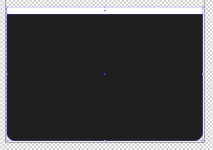
Here's where I ran into an issue. I had a white rectangle, on top of a larger black rectangle.
The black box had a stroke of 0.25pt, which showed up in the white area.

Is turning off the stroke enough to fix it so that I have white on top of black like I see on screen?

1715825442112.png
 
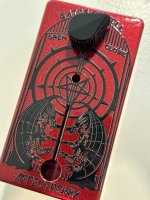
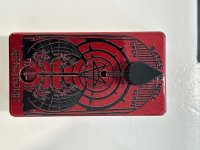
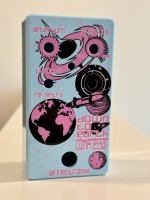
New Enclosure Day!
-Gates of Hell - Fortin Zuul (Muzzle). Going to have red and orange LED illuminating the opening gate when engaged along with the standard multicolor LED
-Down to Earth Compressor - Thorpy Fat General (General Tso). Space theme - Pressure (0atm to 1atm) is Sustain, Afterburn is Treble, Switch for Throttle (volume) or Re-entry (blend).

Can’t wait to build these out!
 

Attachments

  • IMG_9749.jpeg
    IMG_9749.jpeg
    564.1 KB · Views: 43
  • IMG_9748.jpeg
    IMG_9748.jpeg
    482.7 KB · Views: 41
  • IMG_9757.jpeg
    IMG_9757.jpeg
    370.9 KB · Views: 42
Is turning off the stroke enough to fix it so that I have white on top of black like I see on screen?
It’s best to follow @KR Sound’s advice above. Do not overlap white or any other color on top of the other if you want to be sure it prints correctly.
 
Back
Top