Tayda UV Printing

It just occured to me that I may be giving myself more work than I need to... The Tayda UV printing site makes no mention of having to convert strokes to paths, but every print I've done in the past, I went throught the file converting everything and carefully correcting each misshapen one, etc...

Anyone able to confirm that I've been wasting my time, and that its totally fine to have strokes instead of paths for any linework and outlines?
 
Anyone able to confirm that I've been wasting my time, and that its totally fine to have strokes instead of paths for any linework and outlines?
Better safe than sorry. Coming from a print design background, it never hurts to prep your files for the lowest common denominator. When I've sent work over, I make sure everything is expanded/converted from strokes and completely trapped/flattened on the artboard before I consider it "ready."

I'm using a pre-cloud version of Illustrator (which I paid for, full disclosure) and have the Roland Versaworks swatches for anyone who needs them in that version (or older). Like I said, I've been in the print world for a long time, and only even recently got into Affinity's products. I work much faster in the Big Red A's Devil Music programs, so that's where I'll be for the foreseeable future. A first gen Mac Pro sure does lumber along compared to my newer stuff, but such is life.


Also, hello, I haven't posted on this forum, just recently joined to lurk and read some excellent reviews and breakdowns :) thanks to pedalpcb for setting it up with XenForo (y)


Recent experience with Tayda time: everything about that experience is lacking in the UX dept. It's good to see so many folks here overcoming the odds 🤣 I might repeat some experiences from the last 40 or so pages, so bear with me.

All of the pieces one needs to add (a la carte) are not easily searchable, so it's worth taking one's time to completely do it—something a modern eComm experience has trained us to not do. I wasted a month of back and forth, because of one missing item, which was less than the minimum purchase order for Tayda. Also doesn't help that you're dealing with two separate domains (and in some ways two separate accounts). Heck, if Tayda paid me, I'd audit the whole eComm experience just to get it comprehensible.

FWIW, they aren't lying when they say they're overloaded. Their support ticket system is… well never once did their side answer anything. It was just me posting updates, and only when I added an additional 3 (because $5 min) UV Gloss cart items did they finally process the last bit of the pedal. The rest of it—drill, cut, base coat, and art—was already done by the time it was flagged as missing the gloss item in my order. Anyhow, TAKE YOUR TIME. The end result, though, was fantastic, and I'll definitely do it again when I've ticked all of the boxes.

Here's my recent job. Also made use of the "lines" option, which is killer for something like this with horizontal slide toggles.

b1KN2Tw.jpg


I've done it twice and it's worked good for me.
This is also good to know! I'm planning something along the lines of a bare surface.

 
Apologies if it's been asked already, I'll admit I haven't searched too thoroughly...

Anyone have any experience with their UV prints on the "Sand" enclosures? I've been wanting to try having some UV prints done but also really was feeling some sand enclosures for some upcoming builds... didn't know if they get along nicely or not.
 
Apologies if it's been asked already, I'll admit I haven't searched too thoroughly...

Anyone have any experience with their UV prints on the "Sand" enclosures? I've been wanting to try having some UV prints done but also really was feeling some sand enclosures for some upcoming builds... didn't know if they get along nicely or not.
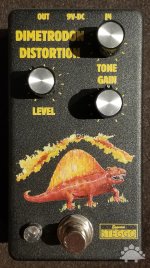
Yes - I've done UV prints on the black sand - it comes out great:

Dimetrodon Distortion 1A - SN 02 - 05.jpg

Robert was also kind enough to compile my three part "how to" guide into one part: https://forum.pedalpcb.com/resources/steggo-studios-tayda-uv-printing-tutorial.16/
 
Apologies if it's been asked already, I'll admit I haven't searched too thoroughly...

Anyone have any experience with their UV prints on the "Sand" enclosures? I've been wanting to try having some UV prints done but also really was feeling some sand enclosures for some upcoming builds... didn't know if they get along nicely or not.
My Oops! Wrong-808 buikd was a UV print on sand black. I’ve also seen quite a few stealth black pedals done with black printing and gloss on a sand black enclosure, and I have orders in for a few prints on sand black and sand white which I’ll post about when I get them. I haven’t tried printing on the sand grey, nor have I seen anyone else do so, but I have a pedal that I’ll be doing with that in the near future.
 
Better safe than sorry.
Sorta what I figured, but I figured that if someone had luck without taking the extra steps, maybe I could risk being lazy for once 😂
Coming from a print design background, it never hurts to prep your files for the lowest common denominator. When I've sent work over, I make sure everything is expanded/converted from strokes and completely trapped/flattened on the artboard before I consider it "ready."
That’s how I usually do it. I’m not super involved in digital art and print outside of guitar pedal building, but still, I come from the art world, so the “proper” ways are in my blood.
Here's my recent job. Also made use of the "lines" option, which is killer for something like this with horizontal slide toggles.

b1KN2Tw.jpg
This looks great! The line cutting service is definitely a godsend for those of us who like to use slide switches ;)
 
@giovanni @steviejr92 @Fingolfen
I find that the matte works well with fine lines, where the gloss would catch too much light on the fine details.
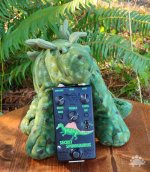
Also works well to give image a vintage look (like this, this was already an image from an old naturalist book, and the matte serves it well)
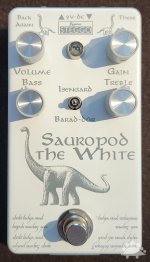
Like on @Fingolfen sauropod the white, it would have work well (kind of what I did here, photos don't show it much, but it looked great with the matte).

*It does look a bit more grainy though, so I wouldn't recommend it on a mix of brighter colors where the gloss mitigates the graininess of the uv print.
 
*It does look a bit more grainy though, so I wouldn't recommend it on a mix of brighter colors where the gloss mitigates the graininess of the uv print.
that’s perfect then I went with the regular green enclosure which I’m hoping will be dark enough for the matte gloss. I also put a an image in the design using only matte gloss no color so I’m hoping it’ll come out good!
 
Hi all! I'm about to submit my first UV print project to Tayda and was hoping to get feedback from someone who has been through this. The pedal will be a PedalPCB Pauper in a winked silver enclosure. I'm planning to use the pre-drilled 3-knob Type 1 enclosure, which seems to align with the drilling template for this project (minus the clipping toggle, which I'm planning to keep internal anyway).

My thought was to keep it really simple for this first attempt to make sure I get the basics down. The "visual" attachment reflects what I'm aiming for, and the "Tayda" attachment is what I'm planning to submit. Thoughts?
 

Attachments

I opened the Tayda file in illustrator and it's all showing up in one layer, not the 3 layers (Gloss, Color, White) needed by their printers. What program did you use to generate the art, and did you use one of their templates?
 
I don't use Illustrator, but looking at it in a Acrobat I see 3 layers. The are out of order though (not sure if that matters). In your file it goes WHITE, COLOR, GLOSS-V, I've always put them in the opposite order like the example. The WHITE layer only contains the underline, which may be intentional. There's no harm with putting white under black. COLOR and GLOSS-V look okay. When looking at the file with Scribus it doesn't look like you properly used spot color for the WHITE and GLOSS-V layers, but that could be Scribus incorrectly importing the file. Not sure if I can check that in Acrobat. Sorry I'm not super helpful, but I have a cobbled together system for doing my prints which doesn't make checking someone else's files particularly easy.
 
Hi all! I'm about to submit my first UV print project to Tayda and was hoping to get feedback from someone who has been through this. The pedal will be a PedalPCB Pauper in a winked silver enclosure. I'm planning to use the pre-drilled 3-knob Type 1 enclosure, which seems to align with the drilling template for this project (minus the clipping toggle, which I'm planning to keep internal anyway).

My thought was to keep it really simple for this first attempt to make sure I get the basics down. The "visual" attachment reflects what I'm aiming for, and the "Tayda" attachment is what I'm planning to submit. Thoughts?
A few thoughts:

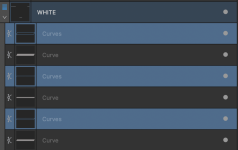
1. In your WHITE layer, you have a few layers that should not be there. You're going to either want to delete those layers or move them to your COLOR layer instead.
1673640870342.png

2. I would strongly suggest that you increase the character tracking (spacing between letters) on your words. Some of the letters are close together and they may run together when printed.

3. I cannot confirm for certain that the Roland spot colors are present because I don't have Adobe Illustrator or Acrobat Pro, but you need to be absolutely certain that you have RDG_GLOSS applied to all objects in the GLOSS-V layer and RDG_WHITE applied to all objects in the WHITE layer.

Although not absolutely necessary, you may consider getting a little more value for your money by adding a little more to your design (even if it's your first print). Tayda has done well on most of the enclosures I've ordered with UV printing so far and I hope that your experience is the same!
 
Thanks all for your feedback! Some follow-up...

I don't use Illustrator, but looking at it in a Acrobat I see 3 layers. The are out of order though (not sure if that matters). In your file it goes WHITE, COLOR, GLOSS-V, I've always put them in the opposite order like the example.
I'm using Affinity Designer and have the layers ordered as:

GLOSS-V
COLOR
WHITE

And when toggling visibility, they function as expected (COLOR covers up WHITE, GLOSS-V covers up color). This is the same order they import in from the Tayda template, so I'm not sure how they're getting jumbled up. When I open the exported PDF in Affinity Designer, the layers still seem like they're in the correct order, but I haven't been able to check with another program (and it's possible there's some oddness specific to Designer).

In your WHITE layer, you have a few layers that should not be there.
Ah, good catch! I'll get rid of those.

I would strongly suggest that you increase the character tracking (spacing between letters) on your words. Some of the letters are close together and they may run together when printed.
Will do. (y)

I cannot confirm for certain that the Roland spot colors are present because I don't have Adobe Illustrator or Acrobat Pro
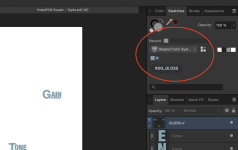
Thanks for mentioning this. I can confirm that I imported the Roland swatch and used those colors for the RDG_WHITE and RDG_GLOSS for the white and gloss layer objects, respectively.

1673644261188.png
 
Thanks all for your feedback! Some follow-up...


I'm using Affinity Designer and have the layers ordered as:

GLOSS-V
COLOR
WHITE

And when toggling visibility, they function as expected (COLOR covers up WHITE, GLOSS-V covers up color). This is the same order they import in from the Tayda template, so I'm not sure how they're getting jumbled up. When I open the exported PDF in Affinity Designer, the layers still seem like they're in the correct order, but I haven't been able to check with another program (and it's possible there's some oddness specific to Designer).


Ah, good catch! I'll get rid of those.


Will do. (y)


Thanks for mentioning this. I can confirm that I imported the Roland swatch and used those colors for the RDG_WHITE and RDG_GLOSS for the white and gloss layer objects, respectively.

View attachment 40199
I just did my first UV job and although I haven’t received the enclosure yet, the job succeeded. I used AD to create (and double check) the pdf. As soon as I have a minute I’ll grab my laptop and open your file in AD to verify.
 
Back
Top